Cashfree Payments for Magento 2 - User Guide
Extension Installation
Prerequisites
- Magento 2.3.x – 2.4.x installed and functioning.
- Active Cashfree Payments Merchant Account (App ID & Secret Key).
Magento Marketplace Customers Method
- Access your server CLI via SSH and navigate to your Magento root directory.
- Run the Composer command to fetch the extension:
composer require meetanshi/magento2-cashfree-payment-gateway - Enable the extension module:
php bin/magento module:enable Meetanshi_Cashfree - Run the upgrade command:
php bin/magento setup:upgrade - Deploy static content based on your Magento version:
- For Magento 2.0.x – 2.1.x:
php bin/magento setup:static-content:deploy - For Magento 2.2.x & above:
php bin/magento setup:static-content:deploy -f
- For Magento 2.0.x – 2.1.x:
- Flush the Magento cache:
php bin/magento cache:flush
Direct ZIP / Meetanshi Customers Method
- Download the extension ZIP file from your Meetanshi account area.
- Extract the archive contents and upload them to your server under
<Magento_Root>/app/code/Meetanshi/Cashfree/. - Connect to your Magento server via SSH and execute the following commands:
php bin/magento setup:upgrade- For Magento 2.0.x – 2.1.x:
php bin/magento setup:static-content:deploy - For Magento 2.2.x & above:
php bin/magento setup:static-content:deploy -f
php bin/magento cache:flush - For Magento 2.0.x – 2.1.x:
Cashfree Payments for Magento 2 enables seamless online payment processing via Credit/Debit Cards, Net Banking, UPI, Wallets, and Pay Later options powered by Cashfree Payment Gateway.
How to Obtain Cashfree API Credentials
To process payments using Cashfree, you must retrieve your App ID and Secret Key from the Cashfree Merchant Dashboard:
- Log in to your Cashfree Merchant Dashboard.
- For testing, select Test Environment (Sandbox), or select Production Environment for live transactions.
- In the left navigation menu, navigate to Developers > API Keys.
- Click Generate API Keys (or view existing credentials).
- Copy your App ID and Secret Key.
- Paste these credentials into the corresponding Live App ID / Test App ID and Live Secret Key / Test Secret Key fields in the extension configuration in Magento Admin.
Payment Gateway Configuration
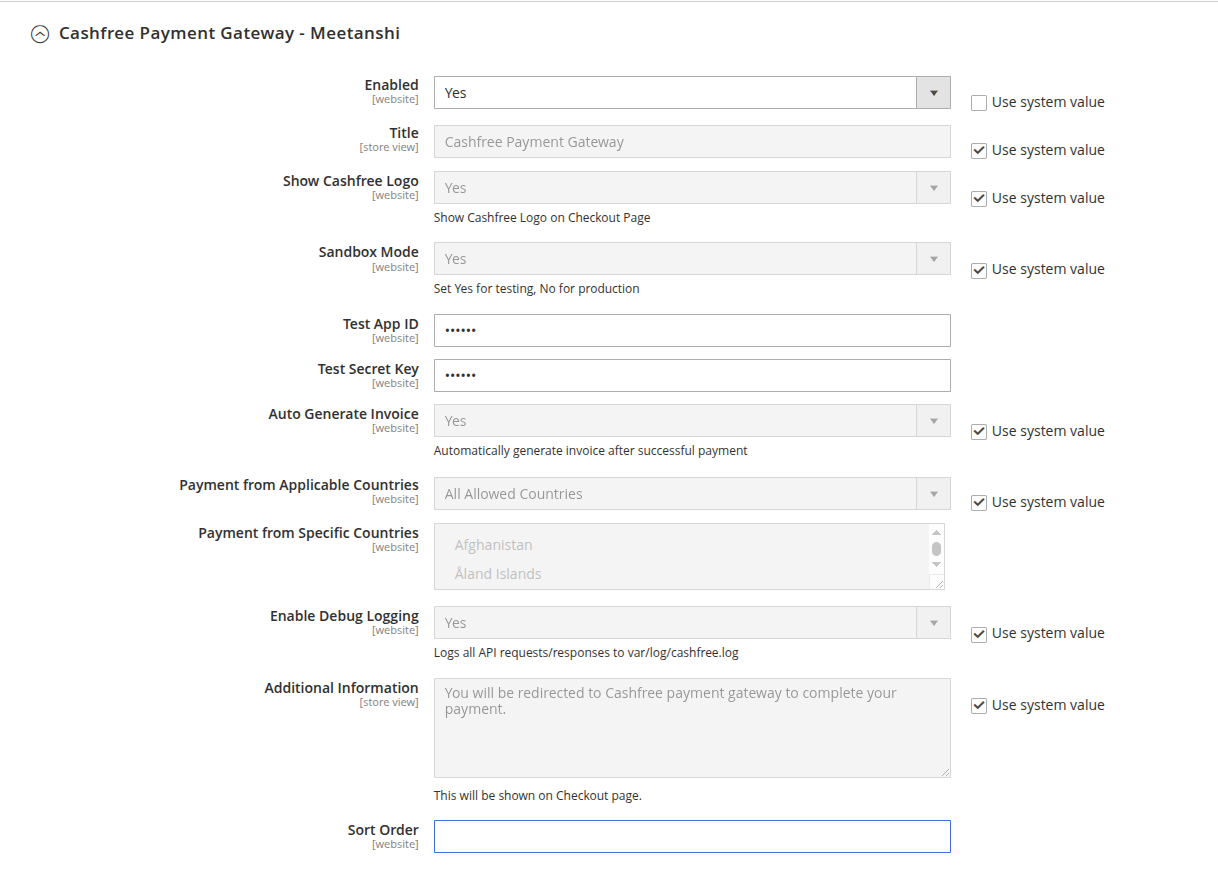
Navigate to Stores > Configuration > Sales > Payment Methods > Cashfree Payment Gateway - Meetanshi to configure gateway settings.
- Enabled: Select Yes to enable Cashfree Payment Gateway on store checkout.
- Title: Enter the payment method title displayed to customers on the checkout page (Default:
Cashfree Payment Gateway). - Show Cashfree Logo: Select Yes to display Cashfree brand logo next to payment method title.
- Sandbox Mode: Select Yes for testing with Cashfree sandbox credentials, or No for live production payments.
- Live App ID: Enter your live production App ID obtained from Cashfree Merchant Dashboard.
- Test App ID: Enter your test/sandbox App ID.
- Live Secret Key: Enter your live production Secret Key.
- Test Secret Key: Enter your test/sandbox Secret Key.
- Auto Generate Invoice: Select Yes to generate invoices automatically upon successful payment.
- Payment from Applicable Countries: Select All Allowed Countries or Specific Countries.
- Payment from Specific Countries: Select target countries when specific countries restriction is enabled.
- Enable Debug Logging: Select Yes to write detailed API requests and responses to
var/log/cashfree.log. - Additional Information: Enter custom payment instructions shown on checkout.
- Sort Order: Enter a number to set payment method display order on checkout.
Zero Subtotal Checkout
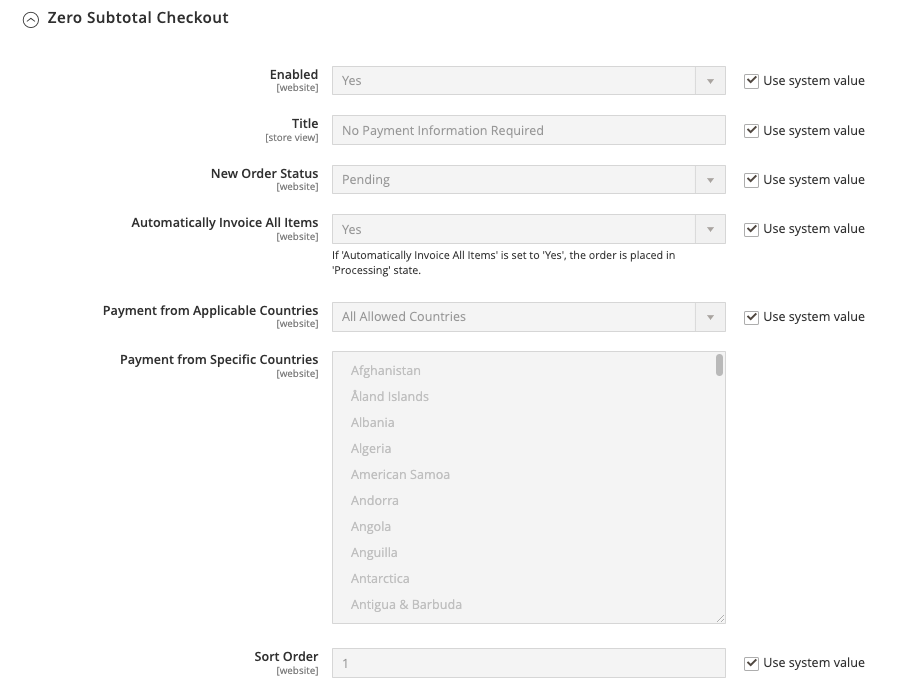
Enabled: Select Yes to allow customers to place orders when the subtotal or grand total is zero.
Title: Enter the payment method title displayed to customers on checkout.
New Order Status: Choose the initial order status assigned when an order is completed with a zero total (Default: Pending).
Automatically Invoice All Items: Select Yes to generate an order invoice automatically upon placement. When set to Yes, the order state automatically moves to Processing.
Payment from Applicable Countries: Select All Allowed Countries or restrict availability to Specific Countries.
Payment from Specific Countries: Choose target countries from the multi-select list if specific country restrictions are applied.
Sort Order: Enter a number (e.g.,
1) to determine its position relative to other available payment methods during checkout.
Check / Money Order
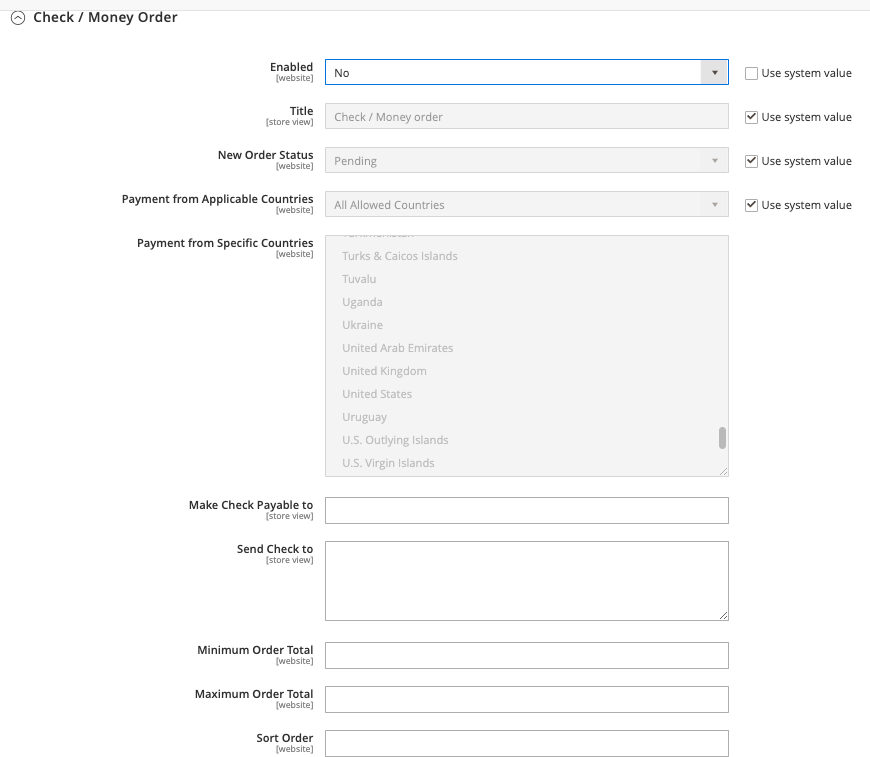
Enabled: Enable or disable check payments.
Title: Display title on checkout.
New Order Status: Order status upon order placement (Default: Pending).
Payment from Applicable Countries: Restrict by country if needed.
Make Check Payable to: Enter the payee organization/person name.
Send Check to: Enter physical mailing address where checks must be sent.
Minimum & Maximum Order Total: Set total thresholds.
Sort Order: Set display position.
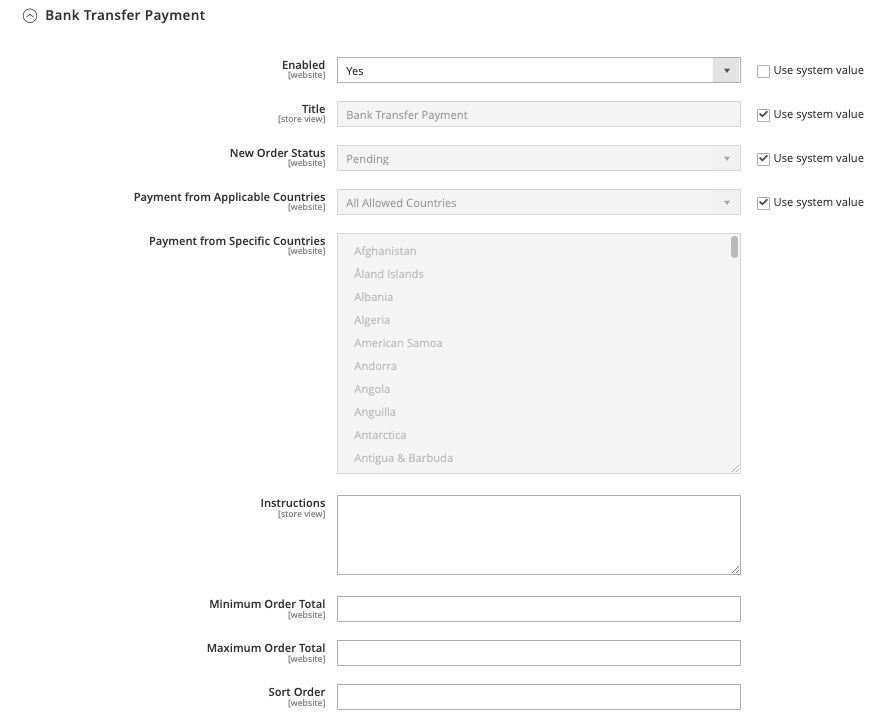
Bank Transfer Payment
Enabled: Select Yes or No.
Title: Custom label for bank transfer payments.
New Order Status: Choose initial order status (e.g., Pending).
Payment from Applicable Countries: Restrict or allow all countries.
Instructions: Enter bank account details (Bank Name, Account Number, IFSC/IBAN, SWIFT code) for customers to transfer funds manually.
Minimum & Maximum Order Total: Set allowable order amount limits.
Sort Order: Set checkout listing order.
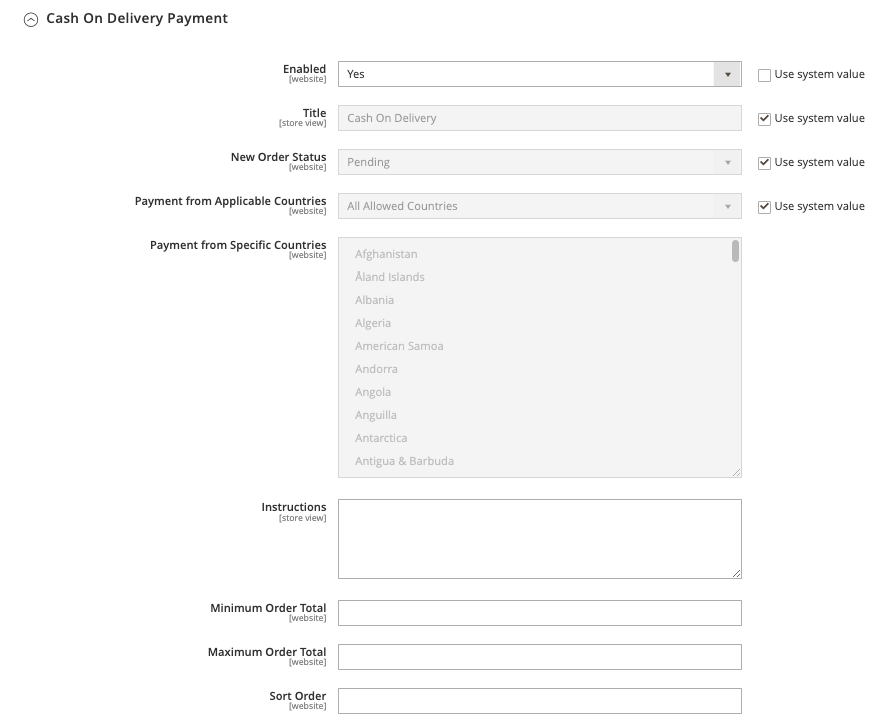
Cash on Delivery Payment
Enabled: Select Yes to allow customers to pay upon package delivery.
Title: Label for Cash on Delivery.
New Order Status: Assign order status (e.g., Pending).
Payment from Applicable Countries: Limit to domestic or specific regions.
Instructions: Instructions displayed regarding cash collection upon arrival.
Minimum & Maximum Order Total: Set qualifying cart values.
Sort Order: Set list position.
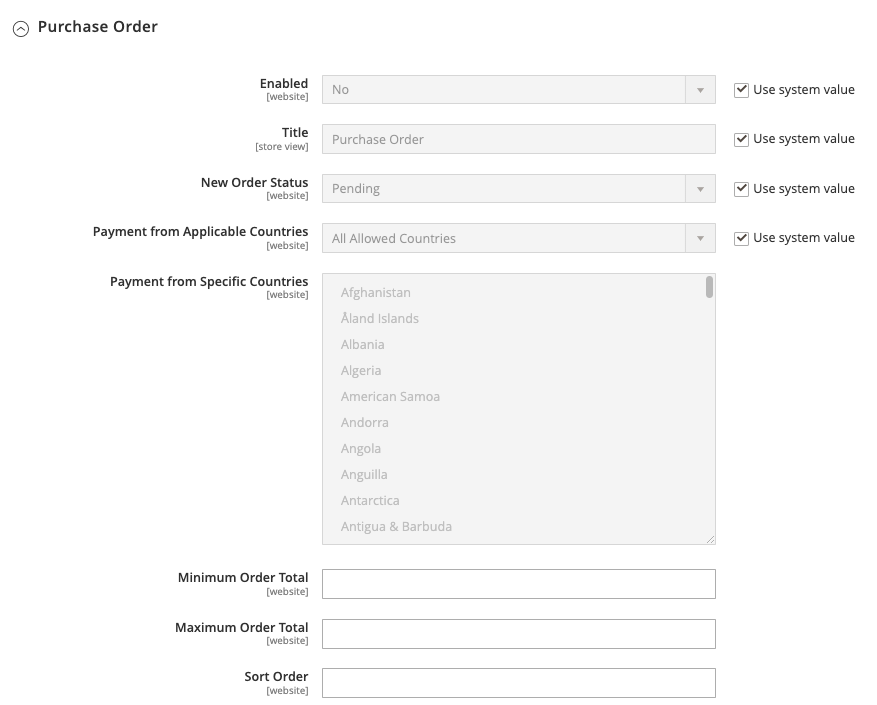
Purchase Order
Enabled: Enable for B2B or wholesale purchase orders.
Title: Set display title on checkout.
New Order Status: Default status (e.g., Pending).
Payment from Applicable Countries: Restrict access by country.
Minimum & Maximum Order Total: Define cart range allowed for PO.
Sort Order: Set display position.
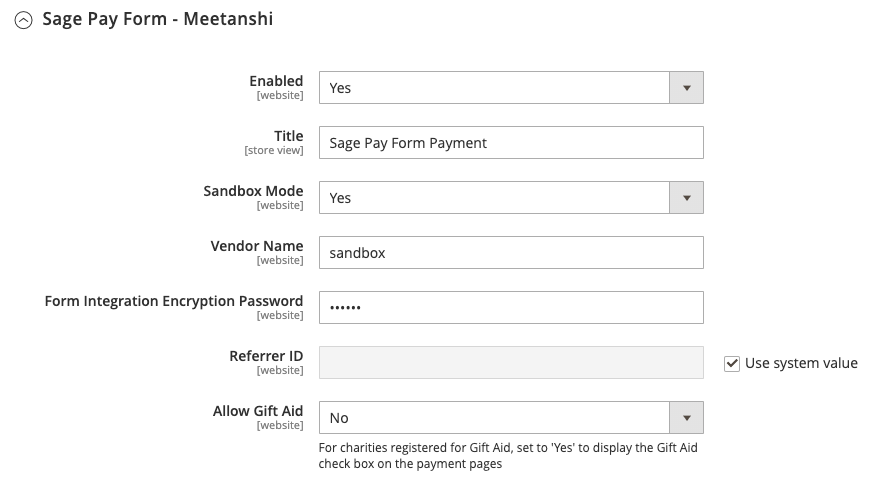
Sage Pay Form - Meetanshi
- Enabled: Select Yes to enable Sage Pay Form on checkout.
- Title: Payment method title displayed on checkout (Default: Sage Pay Form Payment).
- Sandbox Mode: Select Yes for testing, or No for live production payments.
- Vendor Name: Enter your Vendor Name.
- Form Integration Encryption Password: Enter your Form Integration Encryption Password from the Opayo dashboard.
- Referrer ID: Enter your Referrer ID, or leave set to Use system value.
- Allow Gift Aid: For charities registered for Gift Aid, set to Yes to display the Gift Aid check box on the payment pages.
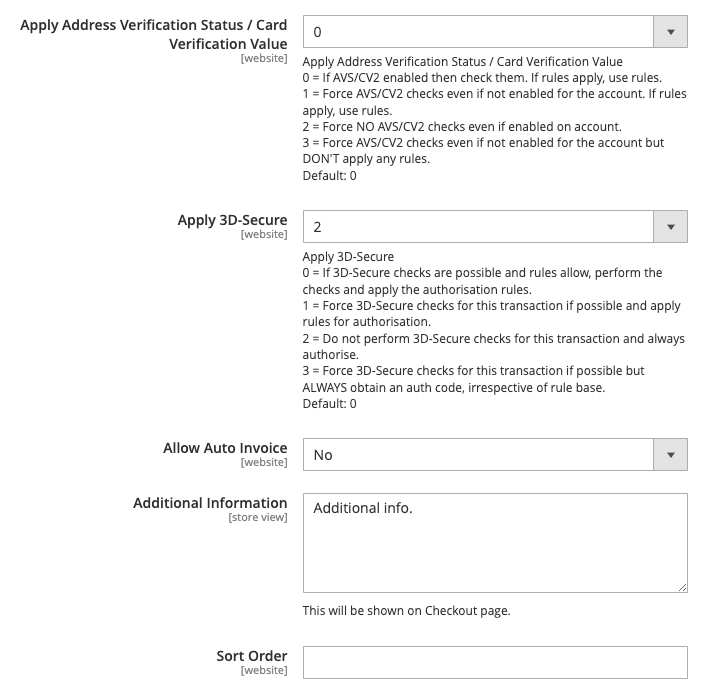
Apply Address Verification (AVS/CV2): Set rules (0 = Check if enabled on account; 1 = Force checks; 2 = Force no checks; 3 = Force checks without rule actions).
Apply 3D-Secure: Choose 3D-Secure authentication policy (0 = Standard rules; 1 = Force check; 2 = Do not perform check; 3 = Force check and obtain auth code).
Allow Auto Invoice: Automatically generate an invoice on success.
Additional Information & Sort Order: Set customer notes and display position.
Opayo Direct - Meetanshi
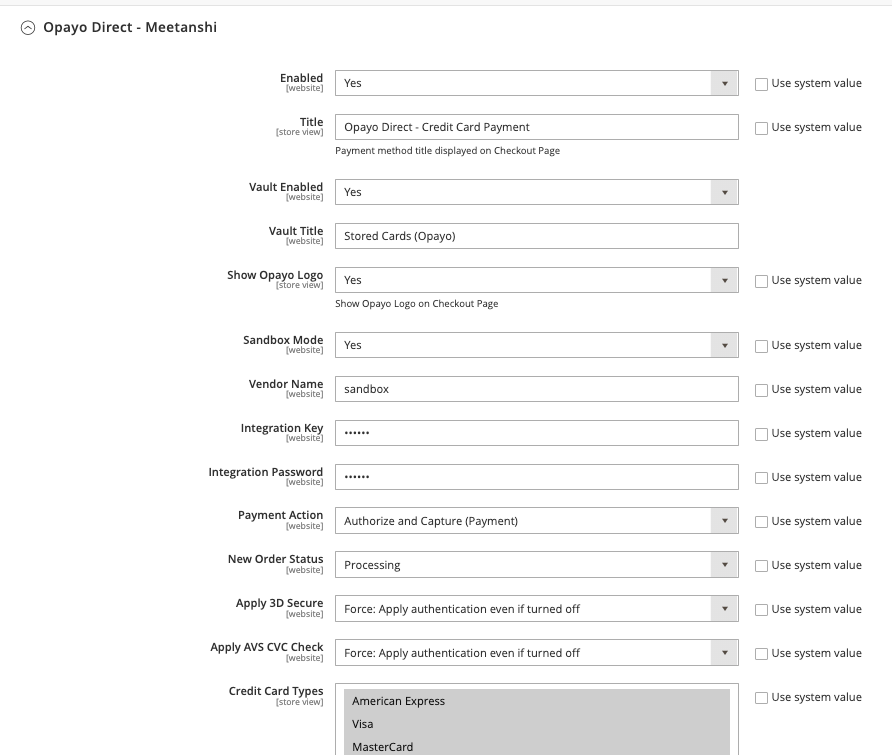
Enabled & Title: Enable the gateway and set the customer-facing label.
Vault Enabled & Vault Title: Enable tokenization allowing shoppers to safely store card details for future checkouts.
Show Opayo Logo: Toggle logo visibility on checkout.
Sandbox Mode: Choose between test and live environments.
Vendor Name, Integration Key, & Integration Password: Enter your Opayo API credentials.
Payment Action: Choose Authorize and Capture or Authorize Only.
New Order Status: Set status to Processing or Pending.
Apply 3D Secure & AVS CVC Check: Enforce security checks.
Credit Card Types: Select accepted card brands (Visa, MasterCard, American Express, Discover, and others).
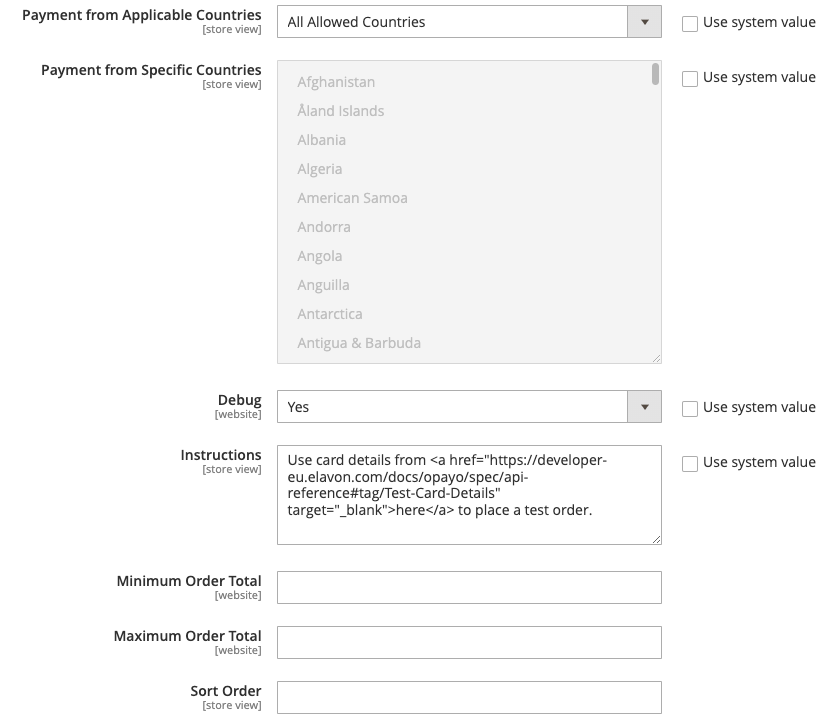
Payment from Applicable Countries: Select All Allowed Countries or Specific Countries.
Payment from Specific Countries: Select target countries when the specific restriction is enabled.
Debug: Select Yes to log detailed API requests and responses.
Instructions: Custom instructions shown on checkout. Customers can use Opayo test card details to place a test order.
Minimum Order Total / Maximum Order Total: Cart total range for which this method is available.
Sort Order: Payment method display order on checkout.
Checkout Flow & Customer Experience
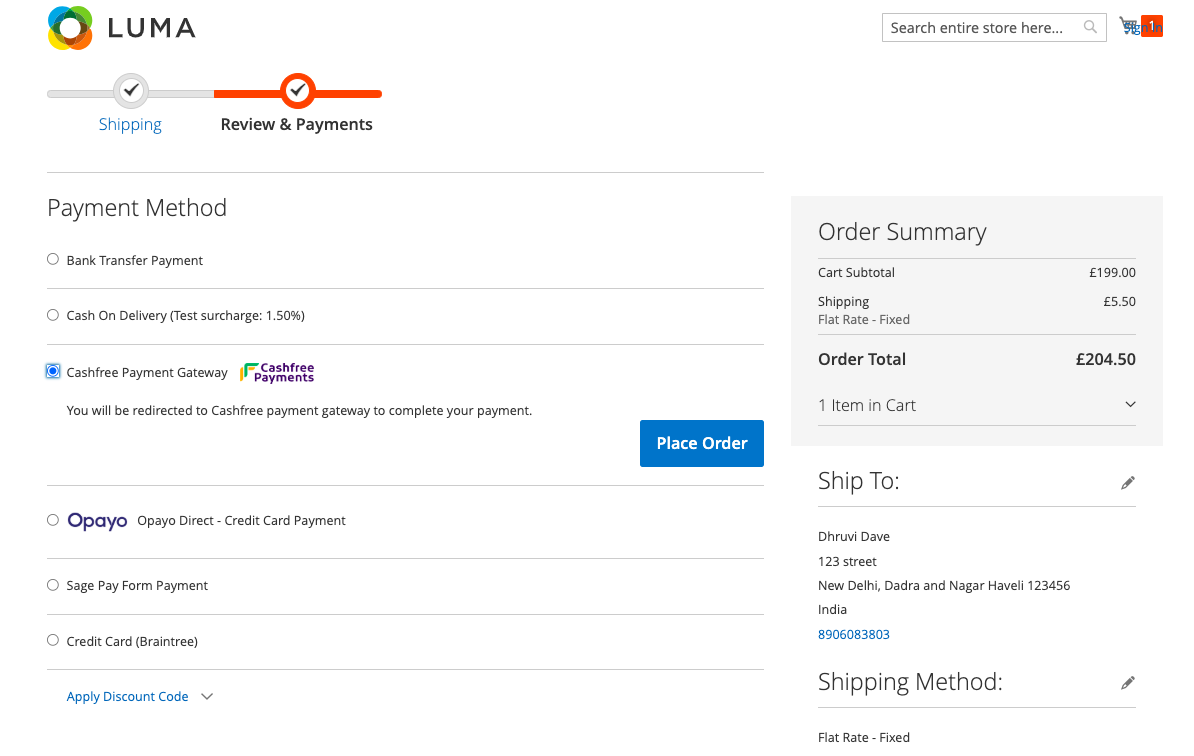
- Customers select Cashfree Payment Gateway during checkout and click Place Order.
- The customer is redirected to Cashfree hosted checkout page to complete payment via UPI, Card, Net Banking, or Wallet.
- Upon successful payment verification, the customer is redirected to Magento order success page with auto-generated order invoice.