Auto Invoice & Shipment for Magento 2 - User Guide
Extension Installation
For Magento Marketplace Customers
- Login to your SSH and run:
composer require meetanshi/magento2-auto-invoice-shipment
- Enter your authentication keys. Your public key is your username; your private key is your password.
- Wait for Composer to finish updating your project dependencies and make sure there aren't any errors.
- To verify that the extension is installed properly, run the command:
php bin/magento module:status Meetanshi_AutoInvShip
- By default, the extension is probably disabled. Enable the extension and clear static view files:
php bin/magento module:enable Meetanshi_AutoInvShip --clear-static-content
php bin/magento setup:upgrade
- For Magento version 2.0.x to 2.1.x -
php bin/magento setup:static-content:deploy
- For Magento version 2.2.x & above -
php bin/magento setup:static-content:deploy --f
php bin/magento cache:flush
For Meetanshi Customers
- Extract the zip folder and upload our extension to the root of your Magento 2 directory via FTP.
- Login to your SSH and run below commands step by step:
php bin/magento setup:upgrade
- For Magento version 2.0.x to 2.1.x -
php bin/magento setup:static-content:deploy
- For Magento version 2.2.x & above -
php bin/magento setup:static-content:deploy --f
php bin/magento cache:flush
Configuration
For configuring the Auto Invoice & Shipment for Magento 2 extension, log in to Magento 2, move to Stores > Configuration where you can find various settings to configure the extension.
- Auto Invoice & Shipment: Enable or disable the extension from here.
- Payment Methods: Here, all the enabled payment methods of your Magento 2 store have been listed. Select some or all the payment methods to enable auto invoice and shipment for.
- Automatic Invoice Generation: Enable auto Invoice generation from here.
- Automatic Shipment Generation: Enable auto shipment generation from here.
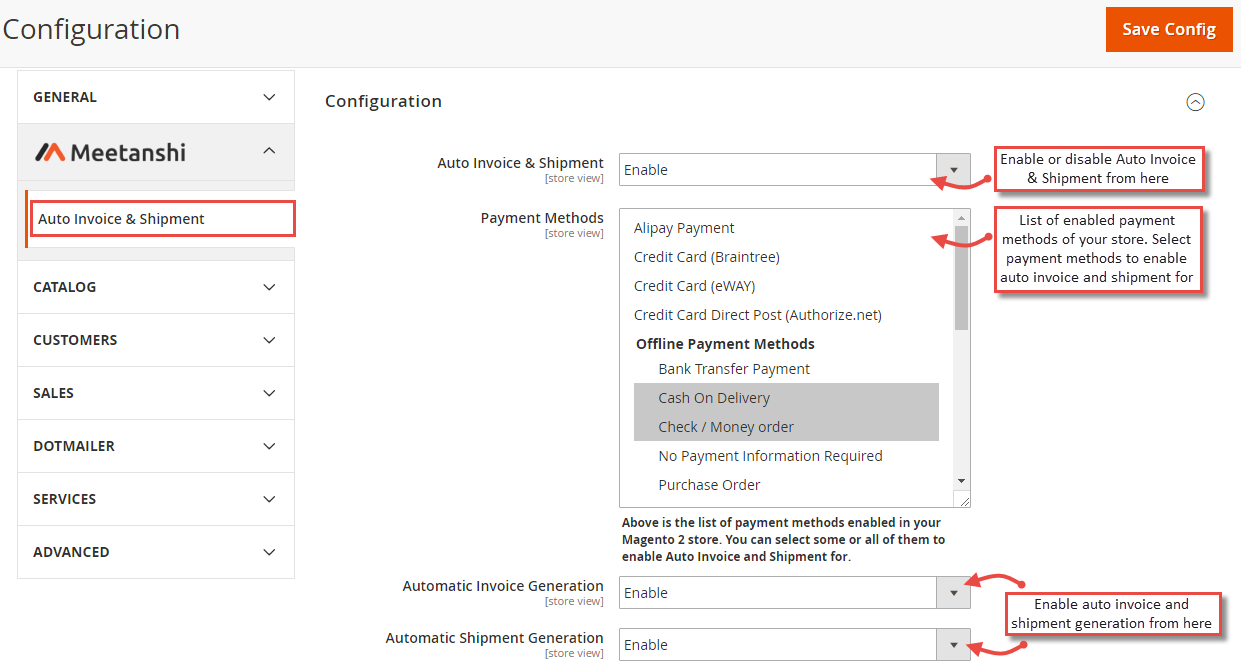
Once the extension is configured from the Auto Invoice & Shipment tab under Meetanshi menu, Invoice and shipment will be generated automatically when the order is placed by the customer.