

Make your store search engine friendly using quality SEO features.
Explore Here
Magento Search Engine Optimization can improve your online store’s organic visibility. It can help your website appear in Google search’s top results when customers search for your products.
For example:
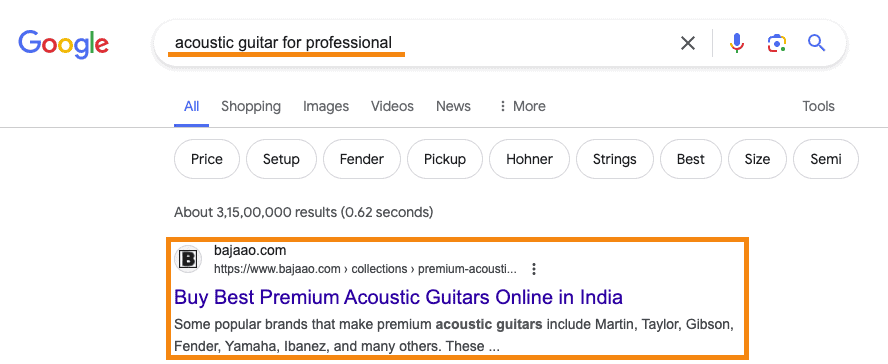
Think about the organic traffic (totally FREE) that you can get by appearing in the top position.
Do you feel you are missing out on this opportunity?
Follow this Magento 2 SEO guide till the end to know the best settings, tips, and practices for your store to rank high on Google.
Magento 2 SEO Settings You Must Know
Meta Robots
To have your store visible on search engines, they must be able to access it. The meta robot is an HTML tag that tells search engines whether they can crawl a certain page and follow the links on it.
In Magento 2, you can control the default robots tag for all pages on your website. Here’s how you can modify the default robots tag:
Log into your admin panel and go to Content > Design > Configuration.
In the Global store, click the Edit option and expand the Search Engine Robots section.
Set the Default Robots to “INDEX, FOLLOW” to allow the search engines to crawl your Magento 2 store and follow all links on it.

Click the “Save Config” button on the top-right.
Robots.txt
Robots.txt is a set of rules that tell search engine crawlers (bots) which pages to crawl for indexing. And also, which not to crawl. It’s useful to prevent the crawling and indexing of pages you don’t want to show on search engine results. For e.g., the /vendor/ directory in Magento 2.
Follow the route Content > Design > Configure > Edit (on global store)
In the same Search Engine Robots section, you can add the custom instructions for the robots.txt file.
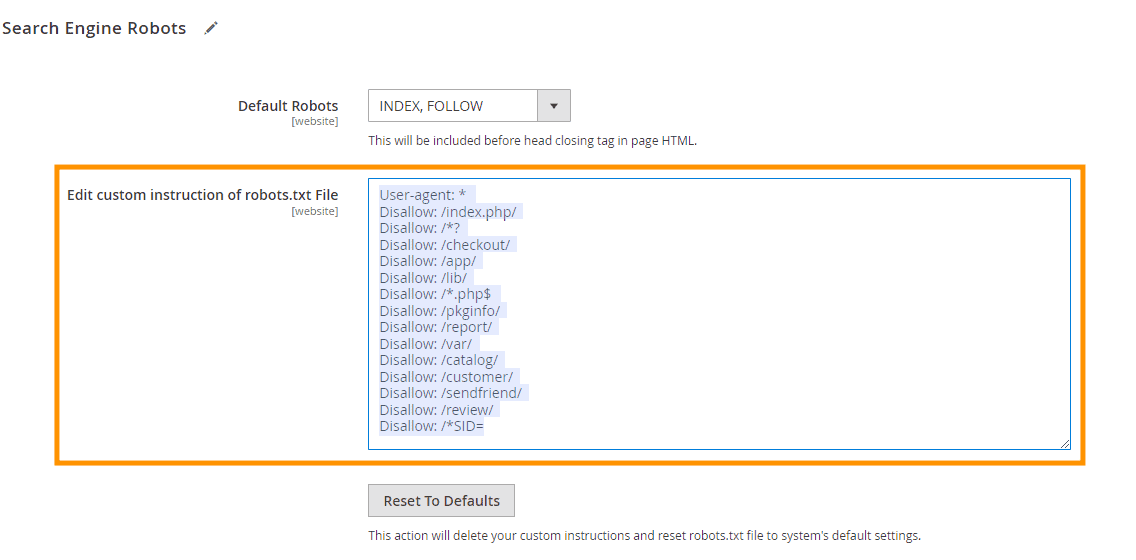
Check out the examples of common Magento 2 Robots.txt instructions.
Sitemap.xml
An XML sitemap is a file containing a list of all pages and media elements on your website. It helps search engines find essential pages and media on your website.
In the store admin panel, navigate to Stores> Configuration > Catalog > XML Sitemap.
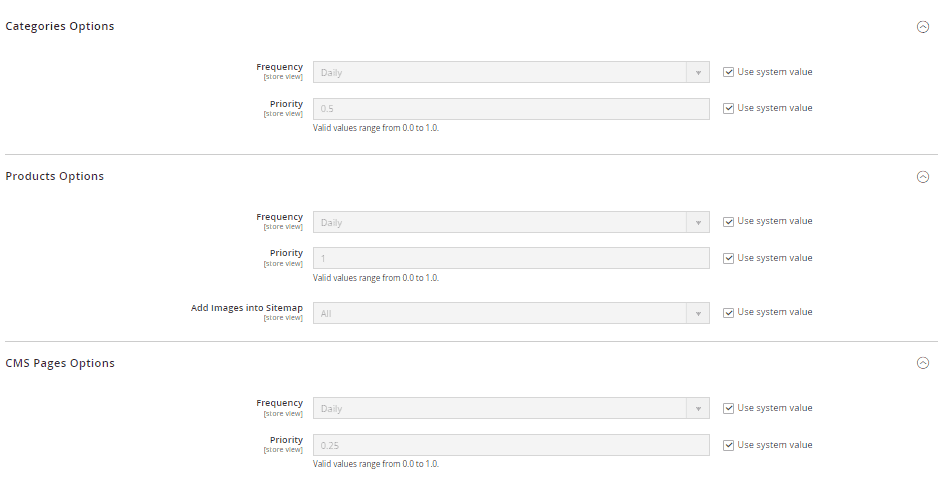
Here, you can find options to configure the XML sitemap and set preferences for various entities like products, categories, and CMS pages. You can set the frequency and priority of these entities for the XML sitemap. (It’s best to stick to the default settings.)
Now, expand the Generation Settings to enable the XML sitemap in Magento 2 and set its refresh frequency.
Here are the recommended settings:
- Enabled: Yes
- Start Time: 00:00:00 (you can literally set any time here!)
- Frequency: Daily
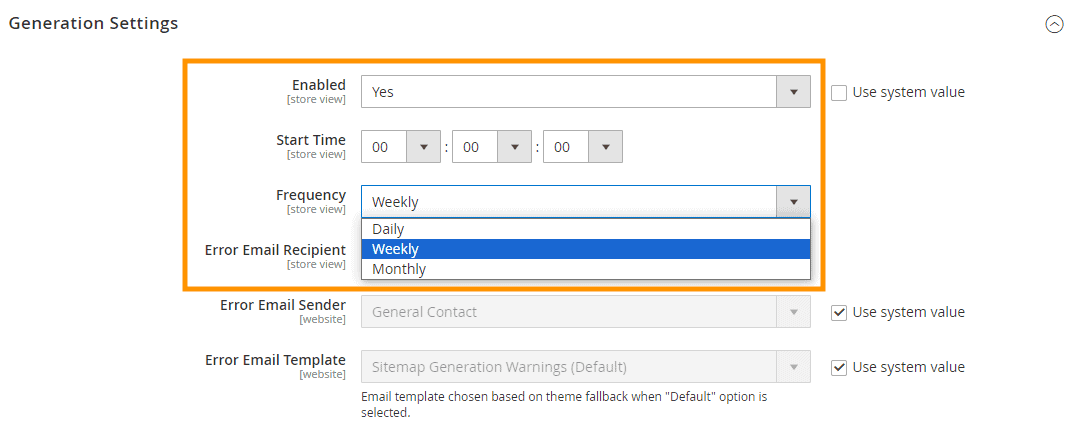
You can also add your email to receive any failure notifications.
In the next section, keep the Sitemap File Limits settings to default.
Expand the Search Engine Submission Settings and set the option to “Yes” to include your sitemap.xml URL in the robots.txt file.

This way, search engines can easily locate your sitemap.xml file.
Once you’re done with the XML sitemap settings, you can generate the sitemap.xml file from Marketing > SEO & Search > Sitemap and submit it to search engines.
Implement Canonical URLs
Content duplication is a major SEO concern for Magento 2 stores. Because the same product/category can be accessed using multiple URLs. And search engines like Google treat them as two distinct pages, even though they’re the same.
For e.g., consider the following two URLs:
https://craftcart.in/jewellery/handmade-jewellery/choker-style-flower-necklace-set.htmlhttps://craftcart.in/jewellery/choker-style-flower-necklace-set.html
To avoid content duplication issues, you can add a canonical tag that points to the original URL.
In SEO for Magento, it’s a recommended practice to add self-referencing canonical tags to the product and category pages. This means, the URL will always point to the original page no matter from where it’s accessed from.
To add canonicals for Magento 2 SEO, go to Stores > Settings > Configuration.
In the Catalog, navigate to Catalog > Search Engine Optimization, where you can enable the canonical tag for the product and category pages.
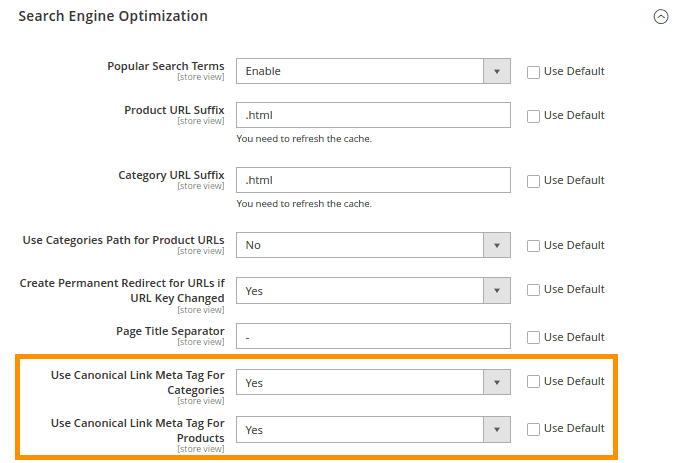
Once done, click the “Save Config” button at the top-right.
Title & Meta Description
Google uses title and meta description to show your webpage as a result on the result page. Meaning they’re the free ad copy promoting your products. Therefore, updating the titles and meta descriptions is an important part of Magento 2 on-page SEO.
Important: Magento 2 also supports auto-generated titles and meta descriptions. They’re a good option for large inventory stores. But, it’s recommended to manually add the SEO stats and facts wherever feasible for better Magento 2 SEO.
In Magento 2, you can change titles and meta descriptions of various entities (like products, categories, CMS pages) under the Search Engine Optimization settings.
Here’s the navigation to modify titles and meta descriptions in Magento 2:
- Products: Catalog > Product > Select the product listing > Search Engine Optimization
- Categories: Catalog > Categories > Select the category listing > Search Engine Optimization
- CMS pages: Content > Elements: Pages > Select the page > Search Engine Optimization
In all the cases, you’ll get the options like the ones shown below.
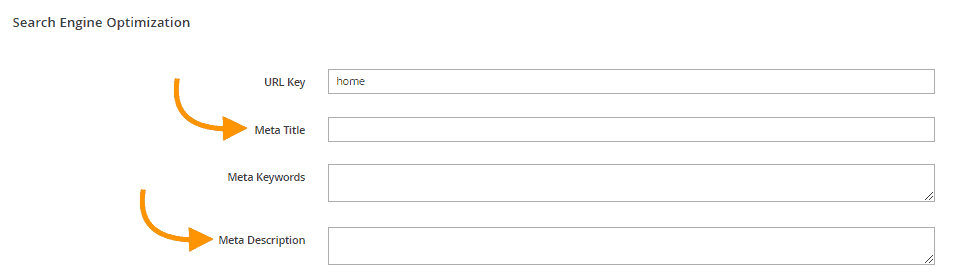
Here are some Magento 2 SEO best practices for titles and meta descriptions:
- Keep titles under 55 characters and meta descriptions under 155 characters.
- Try to include the targeted keyword in the title and meta descriptions.
- Include product attributes in the title to drive attention. For e.g., Keyword + Shape + Dimension/Capacity + Color.
- Cover the main benefit/differentiating feature of your product in the meta description.
- Add CTA or action words like “Buy now” in the meta descriptions
Note: You can leave out the Meta Keywords empty since it’s no longer used by Google.
Image Optimization
Too much high-quality media content can negatively affect your website’s speed and ultimately the rankings. That’s why image optimization is of utmost priority for online stores.
In Magento 2, you can modify image and media gallery settings to optimize all the product images. Here’s how you can do it:
Go to Stores > Settings > Configuration > Advanced > System.
In the Image Upload Configuration, reduce the image quality to 80% to minimize the file size. If you want to resize images on the front end, enable the option else disable it.
Also, you can set the maximum width and height of images. Your uploaded images will be automatically adjusted to that configuration.
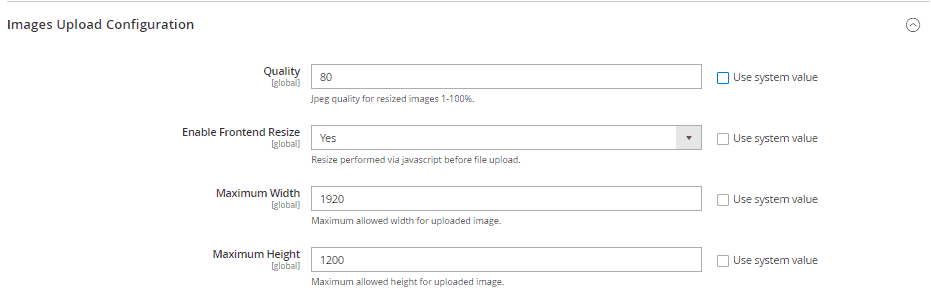
On the same page, below Images Upload Configuration, you will find an option to manage and organize your media files.

Once you enable Enhanced Media Gallery, go to Content on the left panel. You will see a new section of Media > Media Gallery.
In this section, you can upload all the media files directly and organize them in folders. Also, you can delete unnecessary media files from here to reduce the load on the server.
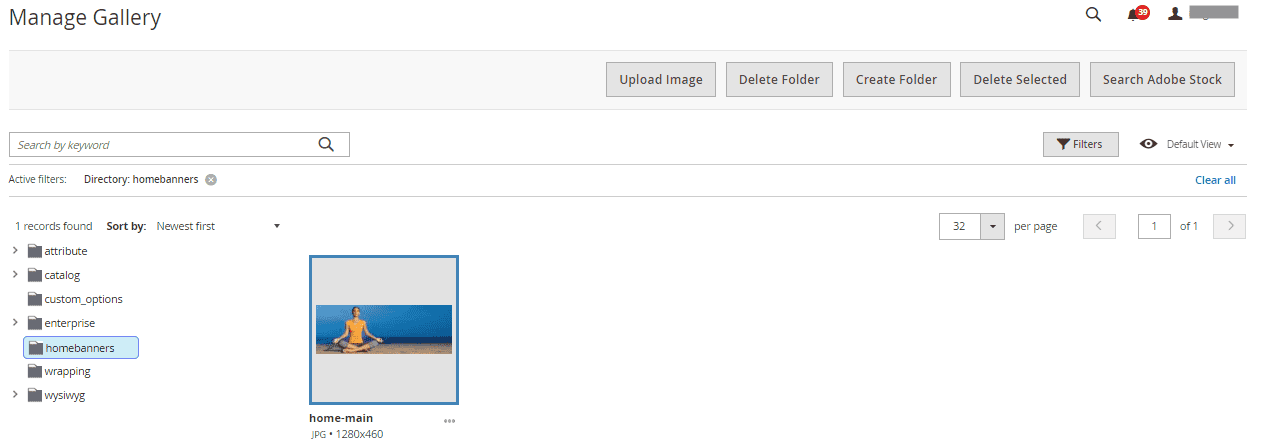
Optimize CSS & JS Resources
The JavaScript and CSS resources can eat up resources – and affect the site loading speed.
You can merge and minify JS and CSS resources to minimize this impact. It helps with SEO in Magento 2 by reducing the number of requests to the server by reducing the browser load. You can enable JS and CSS from the developer mode in your store.
Go to Stores > Settings > Configuration. Expand Advanced in the left panel and go to the Developer option.
In the JavaScript Settings, enable the following three options:
- Merge JavaScript Files
- Enable JavaScript Bundling
- Minify JavaScript Files

Now, scroll down and expand the CSS Settings. And enable the following options:
- Merge CSS Files
- Minify CSS Files

Click the “Save Config” button at the top-right.
Magento 2 SEO Extensions
Make your online store search engine-friendly with additional features using the best Magento 2 SEO extensions.
Magento 2 SEO Tips & Best Practices
Here are a few Magento 2 SEO best practices that I suggest to our clients:
User-friendly URLs
Magento 2 auto-generates URLs for pages based on attributes like page titles and category names. In most cases, these URLs do not fit into what we consider “SEO-optimized.”
Because, mostly they’re:
- Too long (I mean literally!)
- Do not always contain the target keyword
- Contain numbers that are not required
It’s recommended to modify the default URLs. And make them user-friendly, optimized for SEO in Magento 2. You can modify the URLs of various entities in Magento 2 Search Engine Optimization settings.
For e.g., to change product URLs, go to Catalog > Products > Select product > Search Engine Optimization. And modify the “URL key” field.
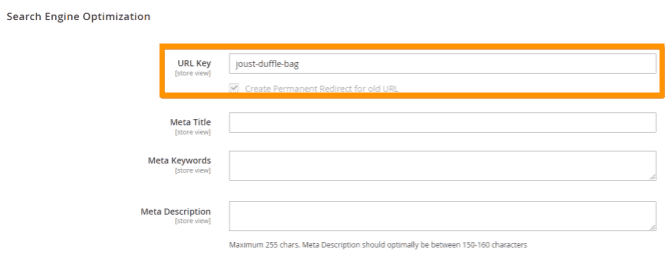
Important: Don’t forget to check the permanent redirect field. Or else it may lead to a broken link on your site.
Here’s are some bonus tips to write SEO-friendly URLs:
- Include your target keyword that best describes your product
- Separate words using hyphens (for e.g., joust-duffle-bag)
- Avoid adding numbers, special characters and stop words like a, the, but, for, etc.
- Maintain a consistent URL format on the entire site
- Keep the URLs short and readable
Image Size, Name & ALT Text
You can make your images SEO-friendly in Magento 2 by focusing on three points:
- Size optimization: Use free image compression tools like ShortPixel to compress the images to optimum size before uploading.
- Image name: Keep the image names short, descriptive and keyword-rich.
- ALT text: The ALT text (or alternative text) is an HTML attribute that provides more context about the image to screen readers. Search engines also use it to understand what the image is about – and, therefore, it’s a good SEO opportunity to include the keywords.
Implement Schema Markup for Rich Snippets
Schema markup (structured data) helps search engines with additional information to show them on SERPs. It includes average ratings, in-stock status, product price, breadcrumbs, and product image.
They make the pages eligible for the Google Rich Snippets.
For example, here’s what a normal and rich snippet looks like on Google:
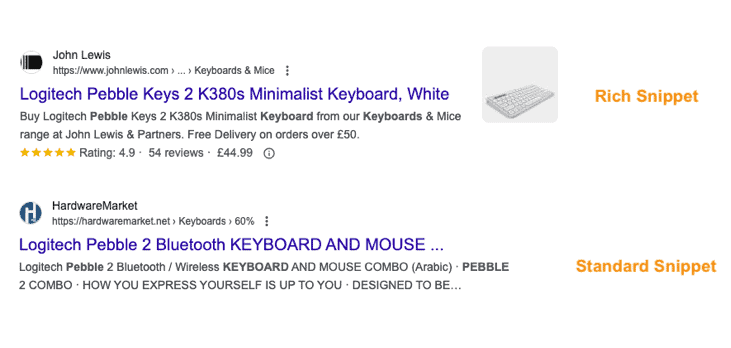
Though rich snippets don’t promise any instant or direct impact on SEO ranking, they can help improve click-thru rates. You can test pages for rich snippets using Google Rich Results Test and also find issues within the structure data.
By default, Magento 2 adds basic product schema markup to product pages. However, for rich results, you’ll have to depend on third-party extensions or custom development for additional schema markups in Magento 2.
Improve Website Loading Speed
Both customers and Google hate slow-loading websites. Therefore, improving store speed should be part of your Magento 2 SEO optimization.Here are some recommendations to improve your site speed:
- Defer parsing of JS: You can delay parsing of unwanted JavaScript files and improve your site’s loading speed – and also vital metrics like LCP. You can use the free Defer Parsing of JS extension for that.
- Choose the right hosting provider: The right choice of Magento 2 hosting service provider keeps you from manually managing a lot of services. Analyze the system requirements and services like elastic search to run your Magento 2 store efficiently.
- Use Content Delivery Network (CDN): Leverage the benefits of improved security, scalability, and faster loading times by implementing CDNs. They are known to reduce the latency of fetching data from servers by delivering content from nearby servers. The execution of CDN is crucial for online stores serving global audiences.
Prioritize Mobile Shoppers
Known fact – mobile optimization is a must! Though the latest Magento 2 version runs smoothly across devices, here are a few tips to improve:
- Choose a simple and mobile-friendly theme for your store.
- Use a hamburger menu for ease of navigation on mobile devices.
- Keep an approach to mobile-first design when performing design customizations.
- Launch a Progressive Web App (PWA) for your e-store to improve experiences on slow network connections.
Connect Magento 2 with GA4
You have updated all necessary Magento 2 SEO settings, and now traffic has started flowing in. How will you know what’s working well and what should be fixed?
Google Analytics (GA4) can help you get a bird view of the customer journey on your Magento store. You can get to know where the users are coming from, what actions they’re performing, and also the bottlenecks in their journey.
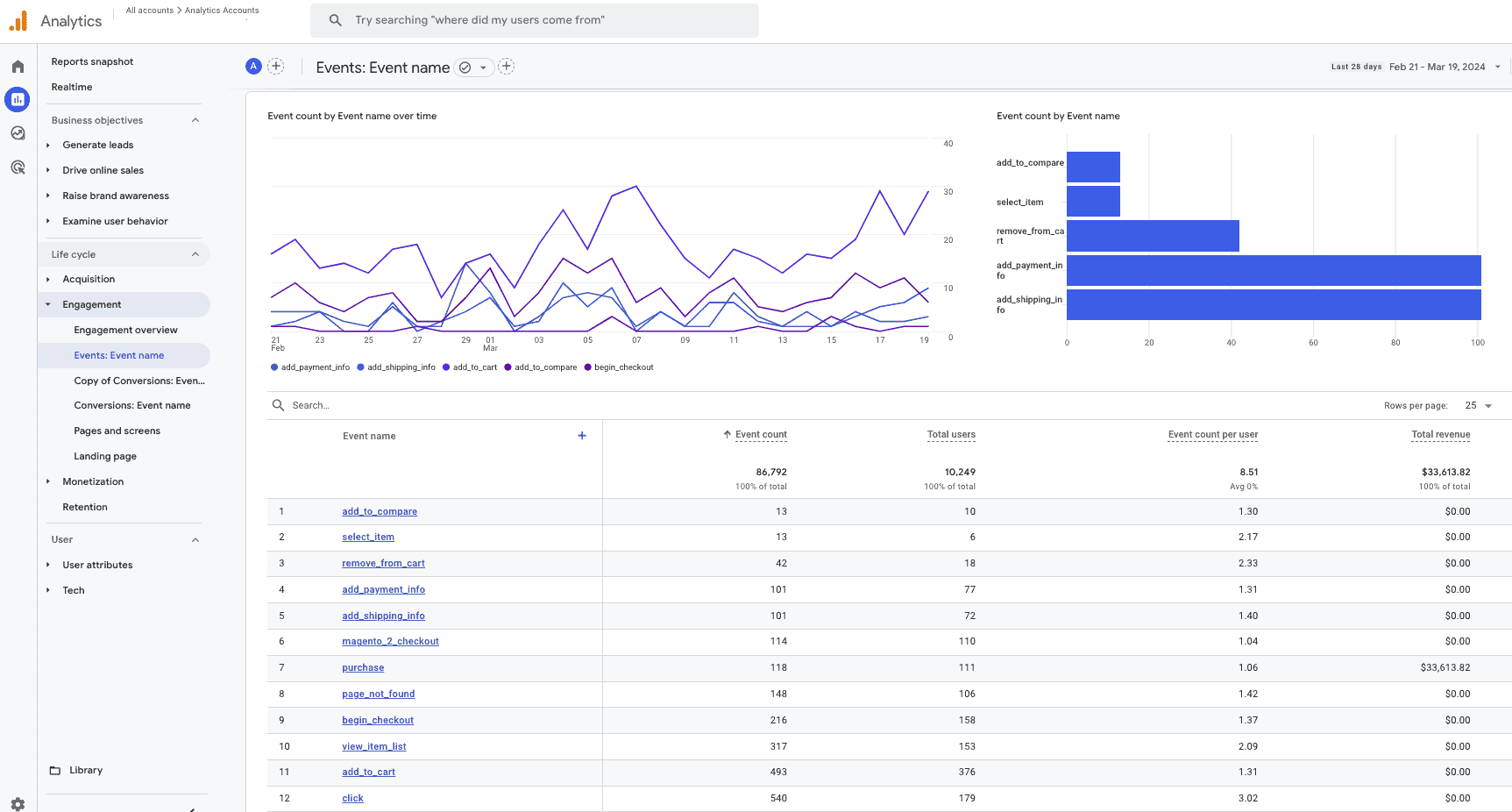
To integrate GA4 into your Magento 2 store, you can use Meetanshi’s Magento 2 Google Analytics 4 extension.
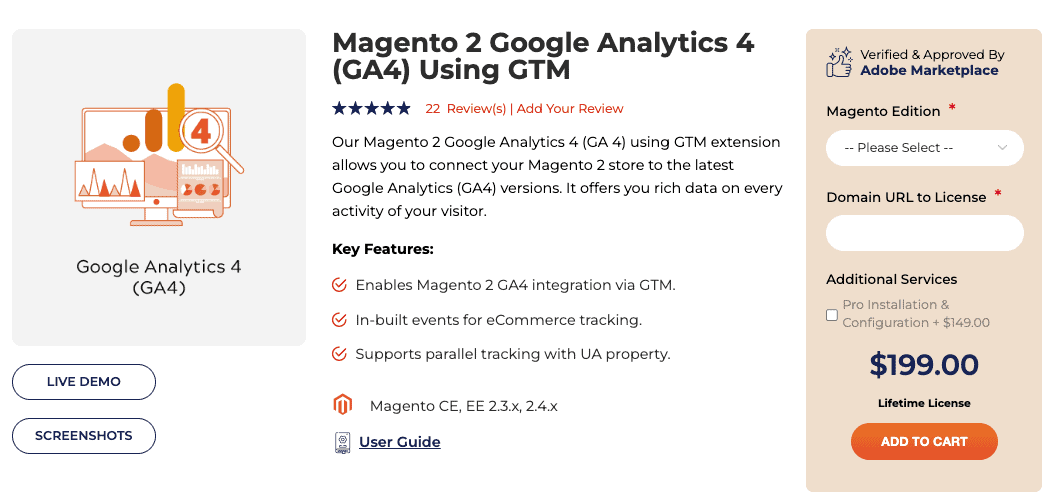
Our extension integrates GA4 to your store via Google Tag Manager. It will simplify ecommerce event tracking with pre-built templates and facilitate an overview of traffic tracking history on the Magento dashboard.
Next Steps for Magento 2 Search Engine Optimization (SEO)
Avoid every Magento 2 SEO mistakes for an smooth flow.Magento 2 Search Engine Optimization is an ongoing journey. Following the steps mentioned above will help you get started with a firm foundation.
Here are the next steps:
- Monitor your Google Search Console for any crawling or indexing-related issues
- Regularly audit your Magento 2 store for SEO issues using tools like Screaming Frog
- Improve your store’s design and content to match the way users navigate and search
- Earn quality and relevant backlinks from other websites through partnerships and collaboration
- Promote user-generated content like customer reviews to build trust factor
I’m sure this Magento 2 SEO tutorial curated by our experts will be helpful to you. If you want to know about the technical hiccups your online store is experiencing, book an SEO audit with our experts.
Make your store search engine friendly using quality SEO features.
Explore Here
