

Magento 2, as a platform, tries hard to make your online store visible on the search engines, but inevitable SEO mistakes can drive your site down in terms of search results.
Understanding these mistakes and addressing them in a timely manner is crucial to improving your site’s search engine rankings and attracting more qualified traffic.
Where can you find these common Magento 2 SEO mistakes, and, more importantly, how can you address them? In this blog post, we are discussing precisely that.
10 Common Magento 2 SEO Problems and How to Solve Them?
Each of the common Magento 2 SEO issues we discuss below has the potential to compromise your entire SEO efforts. Hence, go through the problems below to understand where your site may need to catch up when it comes to SEO.
Mistake #1: Poor auto-generated URL
A Magento 2 store may often undergo changes, such as a significant rebuild, category removal, or new category addition. These changes lead to auto-generated URLs that are hard to read, and have unnecessary characters.
Here is an example of such URLs: https://ema-models.co.uk/catalog/product/view/_ignore_category/1/id/3645/s/lime-dowel-8mm
They are neither user-friendly nor search engine-friendly. They can negatively affect your search engine rankings and user experience.
These types of URLs also increase search engines’ crawl budgets, as the same pages may have different URLs. This is one of the most common Magento 2 crawling issues that can affect your site’s SEO, as Search Console might notify you about the original Canonicals.
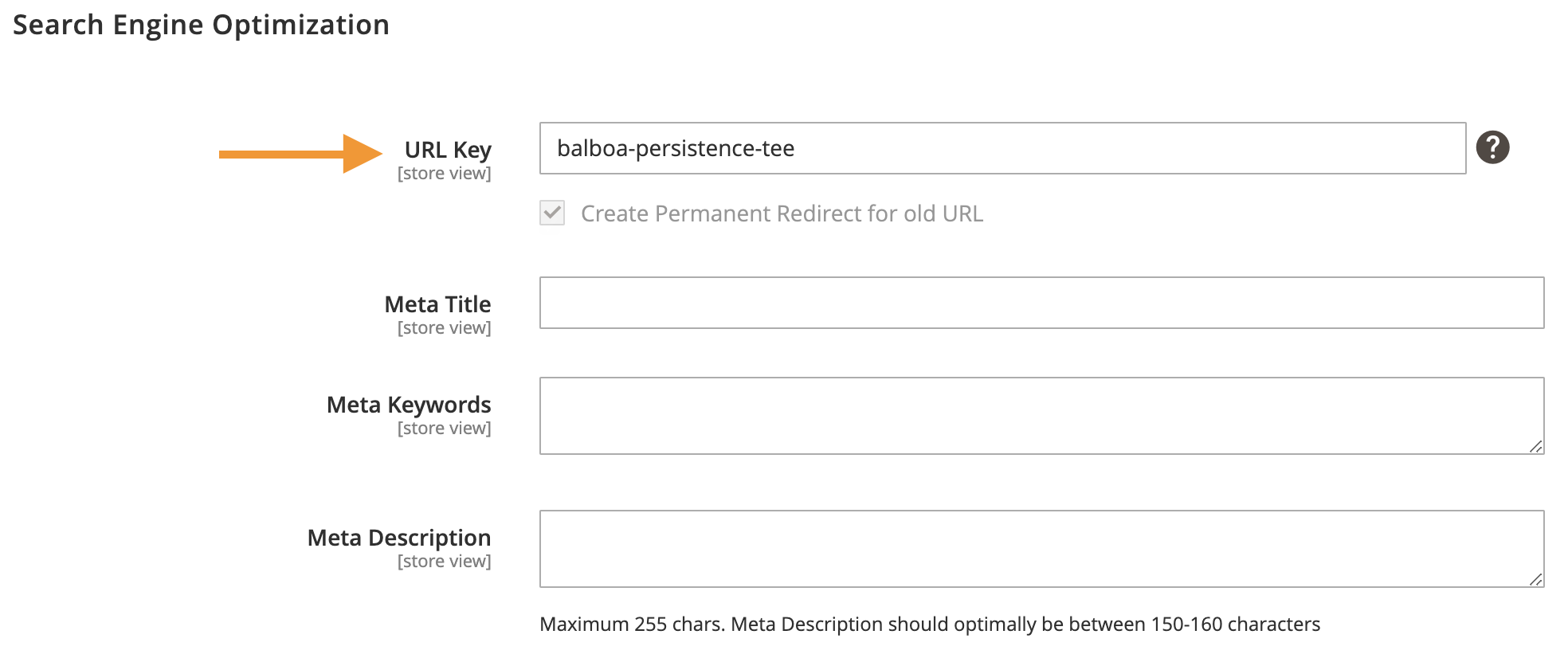
You can quickly address this issue by adding URL keys to your Magento store and rewriting these complex URLs. This will help you display a user-friendly URL that search engines love as given below.
https://ema-models.co.uk/lime-dowel-8mm.html
Here is how you can do it.
- Go to Stores > Catalog.
- Select the product and scroll down to the Search Engine Optimization section.
- Change Create Permanent Redirect for URLs if URL Key Changed to Yes.
- Click Save Config to save the setting.
Mistake #2: Missing Canonical Links
Your Magento 2 store may have multiple URLs pointing to the same page or categories. There are several reasons for this. One of them could be the same products appearing under different categories, collections, etc.
Here is an example:
- www.example.com/eagle-leather-shoes
- www.example.com/men/eagle-leather-shoes
Both these links lead to the same page. The only difference is that the second URL includes the category (men) in the URL. For a search engine, both are unique links, although they display the same product and content.
The best solution is to tell the search engine your preferred URL version using the canonical tag. When you add the canonical tag, no matter how many URLs point to the same page, search engines will only consider the page with the canonical tag.
Mistake #3: Duplicate Products
You may often sell different versions of the same product, such as colour variations of clothes, shoes, etc.
This will confuse search engines, as the page may have very similar content, leading to compromised search ranks. Another issue is the increased crawl budget. Every search engine allocates a specific budget—resources and computational power—to crawl and index your site, and duplicate pages are a waste of resources for search engines.
Duplicate pages also dilute the link equity, which may further affect your search engine ranking. The best way to address this is to create a configurable product on your Magento 2 store.
Here is how you can do it.
- Log into your Magento 2 store and go to the Admin Panel.
- Navigate to Catalog > Products. And, Click Add Product.
- Choose Configurable Product from the dropdown.
- Scroll down to Configurations.
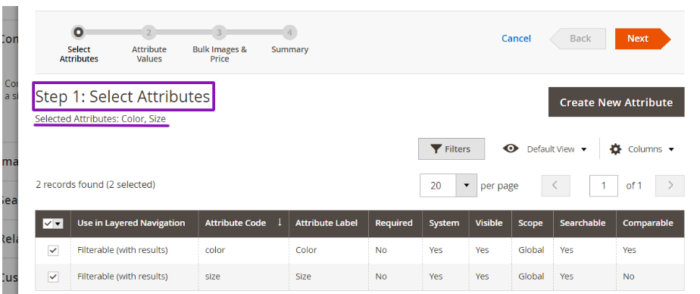
- Now, add attributes, such as colour, size, etc., to the configurable products.
Mistake #4: Improper Robot.txt Configuration
Improper configuration of the robots.txt file in Magento 2 can lead to significant SEO issues. It can prevent search engines from indexing important pages, inadvertently allowing them to crawl sensitive content and index duplicate pages, leading to ranking issues.
Here is how you can check and configure your Magento 2 store robots.txt.
Proper use of the robot.txt file helps ensure that search engines can crawl and index your site correctly and does not block agents from crawling and indexing essential pages.
Mistake #5: Default Layered Navigation
Layered navigation allows visitors to browse products faster and more seamlessly.
It helps users find products they want, check product variations, and navigate through the category or collection. All these improve user experience and lead to higher conversion rates. However, the default layered navigation in Magento limits the potential of layered navigation.
The default layered navigation in Magento has various limitations, such as:
- Site owners cannot custom attribute to the product filters.
- Users can only select one filter per attribute to sort the products.
- Full-page reload with default navigation makes pages load slower.
- The absence of a custom price range filter reduces user experience.
- No rating-based filter, which is a standard filter in the ecommerce sector.
These limitations will negatively affect your store’s user experience, leading to higher bounce rates and low conversion rates.
The best way to address this issue is to set up layered navigation in Magento 2 and customize layered navigation filter attributes.
Mistake #6: Improper Heading Structure
The heading structure of your Magento 2 store needs to be logical and hierarchical.
From H1 to H6, there needs to be a structure that makes it easy for users and search engines to understand the content on the page better. A well-structured heading hierarchy helps you convey the importance of content and its relationship to other sections to everyone accessing the page.
Here are some of the common Magento 2 product page issues that improper heading structure can cause.
- Using more than one H1 tag on a page can confuse search engines about the page’s primary topic.
- Jumping from an H1 directly to an H3 without using H2 tags can disrupt the logical flow of content and make it harder for users to navigate.
- Using generic headings can fail to inform users about the content that follows and lead to higher bounce rates.
- Failing to include relevant keywords in headings can limit the page’s visibility in search engine results.
There are several ways to check where your site has a clear heading structure. Here are some of the ways.
- Inspect the source code of the product page and look for H1 – H6 tags.
- Use SEO tools like ScremingFrog, Google Search Console, etc.
- Read through the content on your pages to assess the heading structure.
You can address this issue by developing a content style guide that clearly mentions the use of heading structure, style, etc., for content developers, designers, and developers to follow.
Mistake #7: Missing Important Structured Data
Structured data allows you to display more information to users on search engine result pages than otherwise possible. It helps you display details, such as pricing, rating, availability, and more.
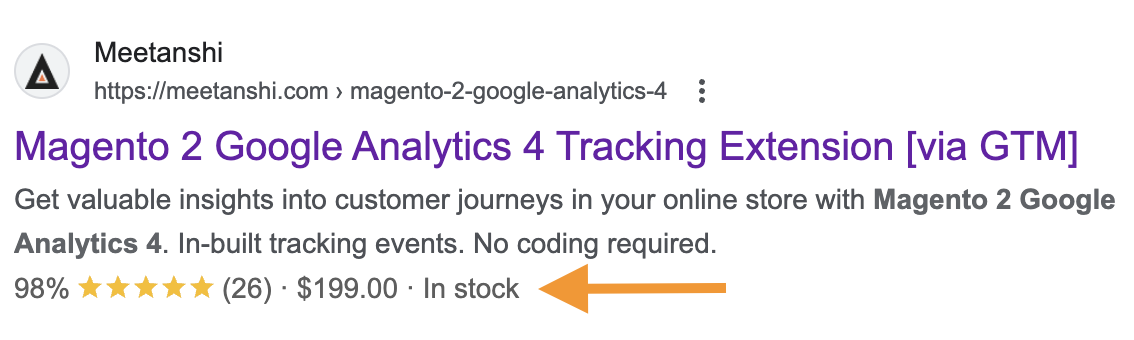
This is important to increase the CTR and reduce bounce rates on your site. However, many Magento stores fail to use this highly effective feature.
You need to modify the theme files to add the structured data code and enable this feature in your Magento store. As this requires coding proficiency, you need to work with an expert Magento 2 developer to make this happen.
You can also do this with the help of extensions, like Meetanshi’s Magento 2 Rich Snippets.
Mistake #8: Indexing Search Pages
When your users search for products in your Magento 2 store, a new URL is created depending on the search. Search engines like Google tend to treat these URLs as unique and may index them. This leads to duplicate pages and indexation bloat, which limits website crawlability.
Your store will face a variety of SEO challenges if you fail to address this concern. A few of the most vital issues are given below:
- The search pages with keywords will compete with other product/category pages.
- Keyword cannibalization can lead to the same pages with different URLs competing for ranking, making them both fail.
There are several ways to address this.
- Use the noindex meta tag: Add a noindex meta tag to your internal search result pages to prevent them from being indexed.
- Update the robots.txt file: Disabling indexing of internal search pages through your robots.txt file allows you to make this change take effect across the search pages populated in your store.
- Redirect internal search URLs: Another way to address this issue is to redirect traffic to the search pages, if they receive traffic, to relevant category or product pages.
Mistake #9: Missing Title & Meta Descriptions
Meta titles and descriptions are essential parts of SEO. In addition to helping you optimize the page with primary keywords and close keyword variations, they also help improve the click-through rates (CTR) on search engine result pages.
Often, searchers want to know what they are getting into and whether the page they are going to visit has the information they are looking for.
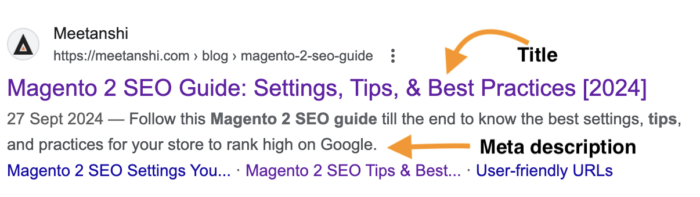
While you must update the information when publishing a product page, landing page, or blog, you can also update it later. Here is how to update the meta title and description on the Magento 2 store.
Mistake #10: Indexing HTTP Version
When you have an SSL certificate for your store, the URL usually has the prefix ‘https’. However, sometimes, the URL with just the ‘http’ prefix may get indexed, which can lead to crawling and SEO performance issues.
Here is what a site looks like with the ‘https’ prefix.
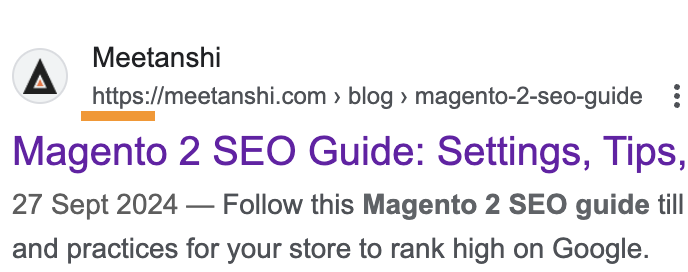
At the same time, your site is also accessible with just ‘http,’ which can confuse the search engines because it treats both URLs as unique.
Here‘s how:
- https//meetanshi.com
- http//meetanshi.com
This can lead to crawlability issues and negatively affect SEO ranking. The best way to address this is to configure your settings to display the preferred version, which is the URL with the ‘https’ prefix.
Here is how you can do this.
- Log in to your store’s Admin panel.
- Navigate to the Configuration Catalog section.
- Go to the Search Engine Optimization tab.
- Enter the URL for your website in the Base field.
- Add ‘https’ with the URL.
- Remove all prefixes or suffixes from the URL.
- Save changes and clear the Magento cache for the effect to take place.
Fix SEO Mistakes & Improve Organic Traffic
Fixing these Magento 2 SEO mistakes is crucial for your site to rank higher, bring in qualified leads, and improve sales. While these issues may seem small in the larger context of SEO, they form the foundation upon which other elements work.
Hence, identifying these issues and resolving them yourself or work with a Magento SEO company that will the help handles it better.
