

Why is my conversion rate so low on Shopify? A popular question among Shopify store owners.
The solution isn’t about the store traffic but about fixing the shopping experience for the visitors to actually become customers.
This optimization is critical to achieve a healthy conversion rate that usually sits between 2% to 3%. If your rate is lower than 1%, it is the right time to start optimizing.
Find here actionable tips on how to improve conversion rate on Shopify without wasting any time on unnecessary aspects.
Top Reasons Your Shopify Conversion Rate Is Low
Before you can improve conversions, it’s important to understand why shoppers aren’t completing their purchases.
Most Shopify stores lose sales due to a few common issues that create disruption in the buying journey. Here’s what might be holding your store back:
- Your pages take longer to load (3 seconds is the ideal time), and most visitors will leave before they even see your products
- The store is not optimized for mobile. Small buttons, a cluttered layout, or multiple pop-ups can lead to instant exit
- Basic product information and images are missing for shoppers to make a confident decision.
- Long forms or forcing account creation often leads to lost sales
- No social proof, like reviews or trust badges, to build trust among shoppers that your business is genuine
- Unexpected shipping fees at checkout hurt sales the most. If your pricing isn’t clear from the start, shoppers feel misled and abandon their carts right away
Actionable Ways to Improve Shopify Conversion Rate
Conversion rate optimization is not a one-time task since there are multiple strategies involved in the process. The core of your optimization is always your product pages, checkouts, store layouts, and marketing touchpoints.
But the most important POV is of your target audience.
It is important to first understand the relevant traffic your store is getting and create touchpoints for them that lead to actual sales.
This will bring better clarity when you apply the following strategies in your store.
1. Improve User Experience
This must be your top priority while starting your CRO.
Start by using Shopify’s built-in speed reports to identify heavy apps or unoptimized images that might be impacting your page speed. Follow a strict Shopify image optimization process and remove/replace heavy script-loaded apps with lighter alternatives.
Additionally, enable lazy loading to ensure your store loads faster.
Then, focus on optimizing the user experience on mobile devices. Test your store on multiple devices to ensure buttons are thumb-friendly and pop-ups don’t block the entire screen.
The faster shoppers find your product, the better the user experience.
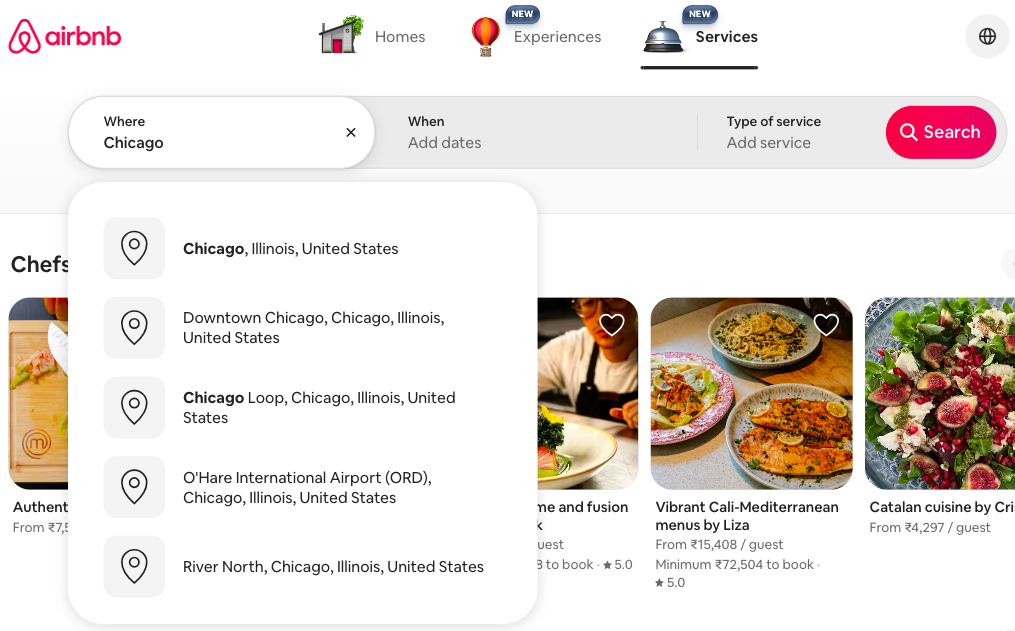
A clean menu is your navigation point to direct the shoppers to the product they came searching for. Shopify makes it easy to edit your menu without any external help.
Just navigate to Content > Menus and add the important sections like best sellers, new arrivals, about us, and more in your store header and footer.
Here is how clearly Airbnb has directed a menu, directly leading the travelers to take the main action (book rooms).
2. Boost Product Page Performance
Your product pages are your digital salesperson, add maximum product information for shoppers to make a sound decision.
Use high-quality images, add videos, and write detailed product descriptions.
Write benefit-driven descriptions and include relevant keywords to help both shoppers and search engines understand the value. For example, instead of “100% Cotton,” say “Breathable, soft cotton that keeps you cool all day.”
If you have multiple products, avoid using the same description for them. Instead, use the Meetanshi AI content generator to create SEO-friendly descriptions in bulk.
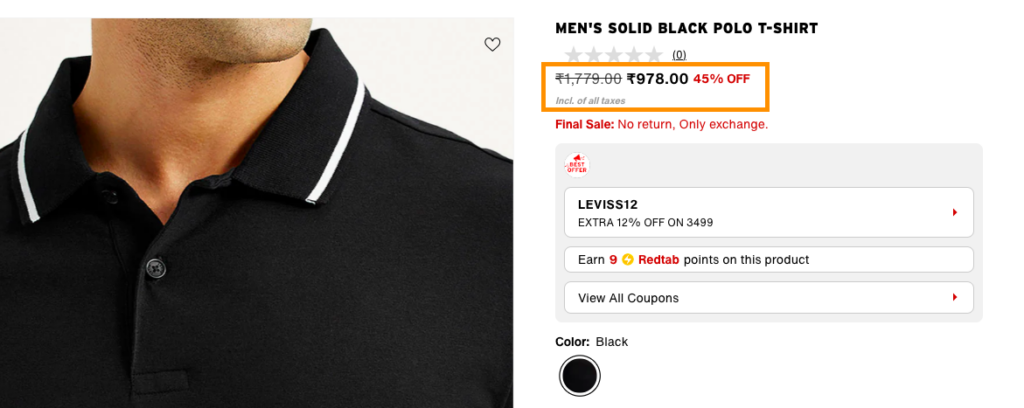
Then, display the price neatly, and if a discount is available, show the original price crossed out to highlight the offer. Use trust badges and communicate order details using Shopify SMS notifications app to reduce hesitation.
Here is an example of a well-managed product page.
3. Increase Trust & Credibility
Social proof is the biggest trust building factor. Use any one of these to boost your store’s credibility :
- UGC videos
- Product reviews (text or video)
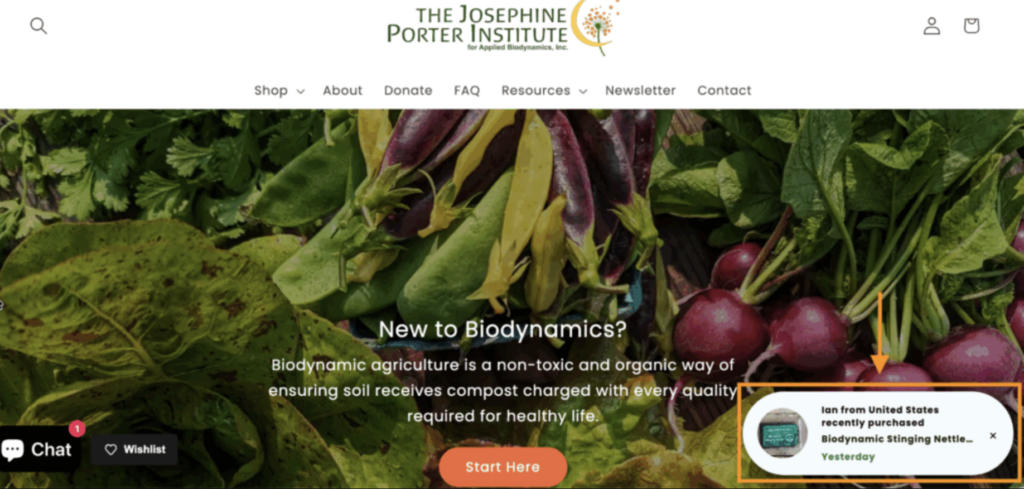
- Recently purchased pop-ups
Some store owners opt to show a fake sales notification pop-up, but it comes with a risk of damaging your brand reputation.
We recommend showing a real sales notification in your store that pulls out accurate data and displays information accordingly.
Here is an example of one.
Additionally, highlight shipping, return policies, money-back promises, and more to remove hesitation. These small elements instantly reassure shoppers that your store is safe and reliable.
4. Improve Checkout Flow
Checkout is where many interested shoppers drop off, so your goal is to maintain momentum.
Before they even hit the checkout button, seeing recent sales notifications creates a sense of assurance. Prioritize and hide payment methods based on location to ensure your checkout page has the payment options that matter.
If your focus is on COD orders, apply a shortcut and show a form directly on the product page so that shoppers don’t have to go through the full checkout process.
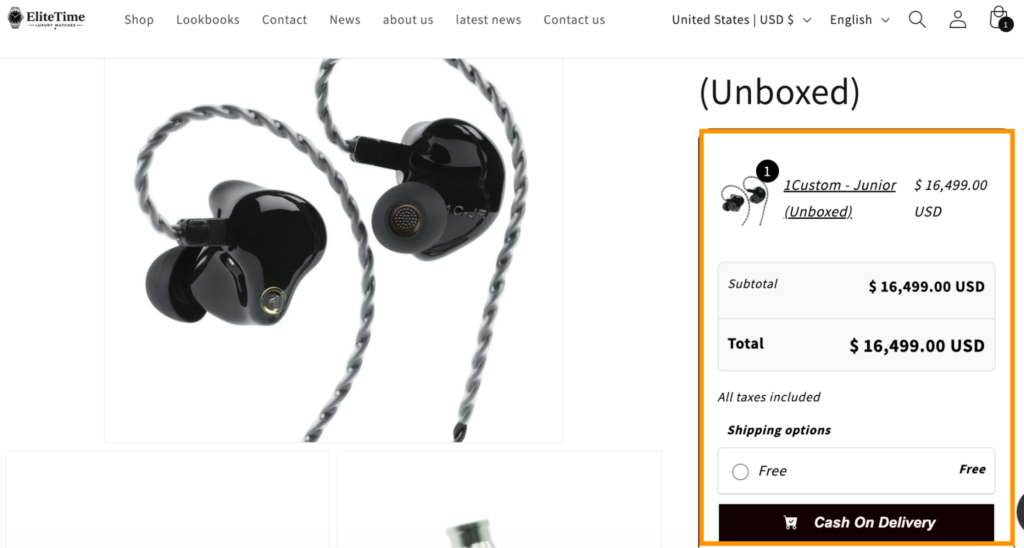
The COD form in Shopify saves shoppers time, and they leave your store faster, which is a win.
While payments are not the only reason a shopper will leave their cart, you need to make an effort to win them back with a cart abandonment email campaign to understand what went wrong and how you can make the experience better.
5. Use Persuasion Techniques
Taking persuasion a step further, tools like Text go beyond static timers and stock counters. Text monitors visitor behavior from the moment they land on your store. The tool detects intent in real time and triggers a relevant offer or message before the shopper even considers leaving. The entire interaction is handled within a single window by an AI agent, with a human agent able to step in seamlessly if needed. It’s the digital equivalent of an attentive in-store sales associate who knows exactly when and how to approach a customer.
Alternatively, showing “Only 3 left in stock” signals that the product is popular and may not be available later.

Use such notification bars, timers, and Shopify popups to activate the trigger and move the shopper to make the final purchase.
Using these techniques can quickly boost your store’s conversion rate and show results in a short period of time.
Best Shopify Apps to Boost Conversion Rate
Here is the list of apps that positively impact your Shopify conversion rate. While each app works on different aspects of your store, the goal is the same for all.
| Recommended App | Primary Role | Why it Boosts Conversion |
| MIT Quick Order Form COD | One-Page Checkout | Skips the standard 3-step checkout; essential for high COD markets. |
| Meetanshi Recent Sales Popup | Live Notifications | Shows real-time “Someone just bought” alerts to build instant trust. |
| Meetanshi Countdown Timer Bar | Scarcity/FOMO | Adds a ticking clock to sales, pushing browsers to decide now. |
| Loox or Judge.me | Visual Reviews | Displays photo reviews from real customers to reduce buyer hesitation. |
| ReConvert | Post-Purchase Upsell | Offers one-click deals on the Thank You page when trust is highest. |
| Shop Pay (Native) | Express Checkout | Saves payment info globally for a seamless, 1-tap mobile purchase. |
How to Practically Audit Your Shopify Store for CRO?
When you audit your Shopify store, stop seeing it like the owner and look at it like a first-time shopper. A nice design isn’t enough; you need to find the issues that quietly affect sales.
Here’s an easy 4-step audit framework.
Step 1: The Data Audit
Start with your data.
Check the Online Store Conversion funnel to see where shoppers drop off. Low add-to-cart means weak product pages, and low reached-checkout means your cart is causing friction.
You can find this funnel in your Shopify admin under Analytics > Reports > Online store conversion. This shows exactly where customers stop, so you know what to fix next.
However, if you see a high drop-off at the final payment step, it usually points to surprise fees or irrelevant payment options.
Step 2: The Visual & UX Audit
Your homepage and product pages must pass the instant-clarity test: a visitor should immediately understand what you sell and why it matters, or they’ll bounce.
Use heatmaps and session recordings to see how real users behave, look for rage clicks on elements that don’t work and dead clicks on items that appear clickable but aren’t.
Also, ensure your navigation is clear and your search bar is easy to find, since shoppers who use search typically convert at a much higher rate than those who only browse.
Step 3: The Technical Performance Audit
Technical debt is a hidden conversion killer.
If your pages take too long to load, a big portion of visitors will leave before they even see your products. Regularly audit your installed Shopify apps and remove any unused ones that still load background scripts. Also fix layout shifts when a page jumps during loading, shoppers may accidentally tap the wrong element instead of clicking Buy, which instantly creates frustration and drives them away.
Step 4: The Qualitative Audit
Numbers tell you what happened, but customers tell you why.
Use exit-intent surveys to ask leaving visitors a single question like “What stopped you from checking out today?” and use post-purchase surveys to ask customers what almost made them abandon the purchase. These quick insights reveal the hidden objections and fears you need to fix to improve future conversions.
Reclaim your spot on search results with our proven SEO strategies.
Get a Free SEO Audit
Frequently Asked Questions
What is a good Shopify conversion rate?
A good Shopify conversion rate is typically around 2% to 3% percent, though top stores achieve much higher.
Why is my Shopify conversion rate low?
Your conversion rate is low because visitors are facing friction, slow pages, weak product pages, hidden costs, or a confusing checkout.
What apps increase Shopify conversion rates?
Meetanshi’s Shopify apps are designed to boost conversion rates by improving trust, site speed, checkout flow, and upselling, essential factors for enhancing overall store performance.
Get a Free Shopify CRO Audit
If you’re serious about scaling your store, now is the perfect time to fix the hidden issues holding back your sales.
A structured audit shows you exactly how to improve conversion rate on Shopify without guesswork, by removing friction, improving trust, and streamlining the buyer journey.
And if you want expert eyes on your store, we offer a Free Shopify Audit and receive a clear, action-focused report on what’s stopping your visitors from converting and how to fix it fast.
