Custom reports allow you to get deeper insights into the overall functioning of your store, bypassing the default Magento 2 reporting options (sales, customer, marketing, and more). You can personalize the custom report based on the data you need to make quality business decisions.
In this blog, I will show you how to create Magento 2 custom reports that offer maximum flexibility with up-to-date data all the time.
Why Build Custom Reports?
Magento custom reports are key in building a scalable store.
If you are running a large store, you don’t want to be stuck with the limited filter options in the default Magento 2 admin reports. Advanced filtering and flexibility makes custom reports stand out.
You can get detailed data regarding a specific area of your store, which you can easily create and manage without needing anyone’s help.
For instance, after a holiday sale, you can generate a custom report to analyze sales from a specific country, including the total limit. This level of customization is not available with the default reporting, as it typically offers only a basic level of filtering options.
Using the custom reports in Magento 2, you can:
- Overcome the limitation of the default reporting
- Extract key data to understand specific business aspects
- Make better business decisions
- Connect it with other business tools like Google Sheets
- Use different elements to visualize the data
Popular Types of Magento 2 Custom Reports
Using custom reports, you can create reports similar to the default ones; the difference lies in the filters. This changes the data that you get for the same report.
Let’s look at the filter options closely.
| Report types | Custom Report Filters | Custom Report Example | Default Report Example |
| Customers | – Country/region/city – Total order spend – Customer group – New vs. returning | New orders from New Jersey with spending over $100 | Simple new order range from a specific data range |
| Product | – SKU – Category Brand & color – Price range – Stock status | Blue jeans product with less than 100 SKUs | Products will SKU less than 5 quantity |
| Order | – Order Status – Payment method – Shipping carrier – Order total | Credit card payments in the last 90 days | Order created in last month |
The custom reporting filter offers deeper customization options. Moreover, you can add filters based on customer behavior and segmentation, such as purchase frequency, last login, and more.
Methods to Get Data for Custom Reports in Magento 2
You have three options to create custom reports in Magento 2:
- Export from Magento admin – Use the Magento admin panel to create your report, but there will be limitations in terms of filters. The filters available are decent, but not good enough for advanced analysis.
- Magento 2 SQL Report Builder – Use the Meetanshi Magento 2 SQL Builder to create reports using SQL queries. You can save the created SQL query to create different reports of your choice.
- Magento 2 API – Fetch your data using REST or GraphQL APIs. Only use this method if you have technical expertise or are working with a Magento 2 developer.
The recommended method is to use the Magento 2 SQL Report Builder extension, as it saves you time by eliminating the need to create multiple reports repeatedly. Plus, you don’t need any technical expertise here.
How to Create Magento 2 Custom Reports Using an Extension?
You can use the Meetanshi Magento 2 SQL Report Builder extension here.
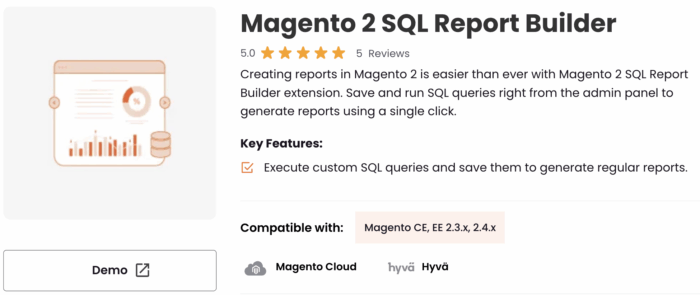
Our SQL report builder is a single solution to build custom reports anywhere outside Magento — you can get almost any data in JSON / CSV format and enjoy its auto-update feature.
You don’t need to keep creating new reports; the extension’s Refresh Frequency setting allows you to set daily, weekly, or monthly frequency to generate a report. Additionally, you can use business tools like Google Sheets, Power BI, and more to create your report.
Here are the steps for Magento 2 custom reports generation using an extension.
Step 1: Create a New Report
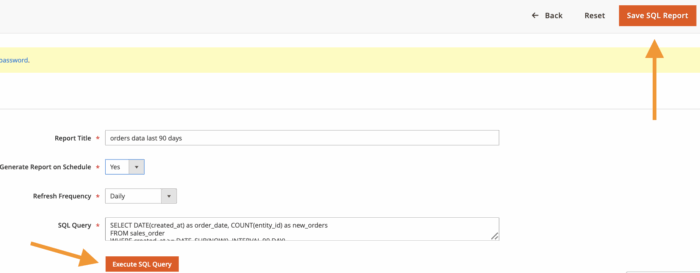
Install and configure the extension, and then move ahead with creating a SQL report. Click on Add New SQL Report and then add the following details.
- Report Title: Add the title for the SQL Report
- Generate Report on Schedule: Select yes to manage custom SQL reports at regular intervals
- Refresh Frequency: Set the frequency at which you want to regenerate the report
- SQL Query: Add the custom SQL query you want to execute
Finish this up by clicking on Execute SQL Query.
After this, our Magento 2 custom report module will start fetching the data. If you need this report regularly, click on Save SQL Report.
Step 2: Get Integration URL for CSV
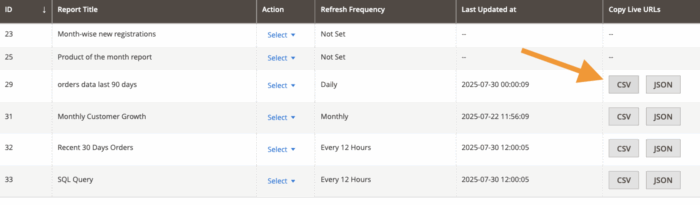
Now, you will find your generated report in the SQL Report Grid.
Here, you will find CSV and JSON URL buttons that will help you integrate your report into other business tools outside of Magento 2. Copy the CSV URL and head to Google Sheets.
Step 3: Use CSV URL in Google Sheets
From Google Sheets, use the =IMPORTDATA() function in this format
=IMPORTDATA(“https://your-magento-site.com/path/to/data.csv”)
This will replace the URL with the actual link, and the results will be exported.
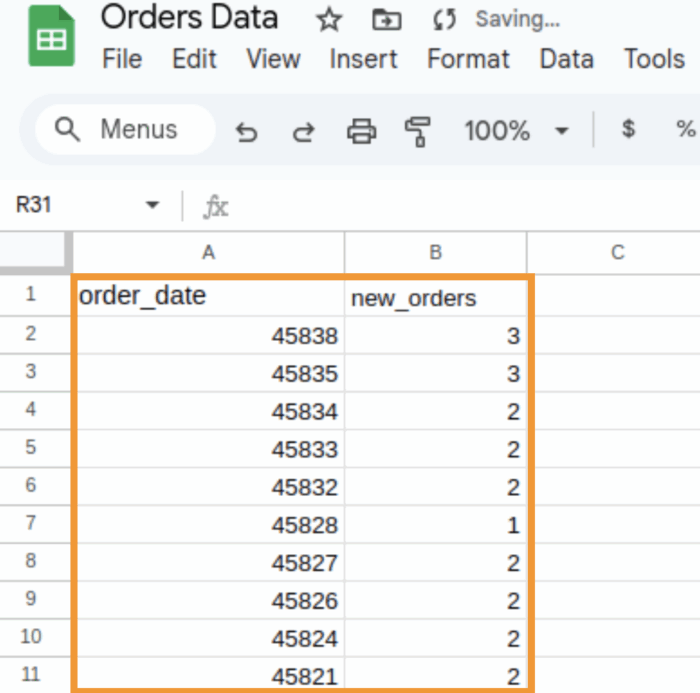
Just like Google Sheets, you can integrate the data into Power BI for your regular reporting.
Now, you know how to create custom reports in Magento 2 and take the report outside the Magento realm for better data management. This is a simple and reliable method since:
- There is no coding involved
- No monthly or recurring expenses
- Complete data control & security
- Fastest way to get regular reports
Create Advanced Reporting Like Never Before
Basic reporting will limit the capacity to make business decisions to drive sales. With the Meetanshi Magento 2 custom report builder, building advanced reports is much faster, and no need to keep creating the same reports thanks to its auto update feature.
Goodbye manual reporting forever; get our no-code solution to auto-update your data.
Get Now