This blog walks you through the entire process to set up your Shopify store in the United Kingdom.
Here, you will learn:
- Legal requirements to operate within the laws
- Exact steps to build your Shopify store
- Cost to set up a Shopify store in the UK
- Answers to commonly asked questions
Requirements to Set Up a Shopify Store in the UK
Setting up a Shopify store in the UK involves technical, legal, and financial requirements to operate your business.
Technical & legal requirements:
- Decide your business type and structure.
- Register your business with HMRC and Companies House.
- Mandatory legal documents on your website (privacy policy, terms & conditions, returns, refunds, exchange policy, and cookies notice)
- Register for VAT with HMRC if your taxable turnover exceeds £85,000 in 12 months.
Store requirements:
- Your brand assets (name, logo fonts)
- A clear domain name including your brand name
- Product details like quality product images and name
While Shopify offers you different templates to create the essential pages like cookie notices, privacy policies, and more, you must customize them based on your business model.
Failing to stay within the laws and mandatory registration can lead to penalties. Here is a table to understand the priority for each before you start building the store.
| Requirement | Priority |
| Business type and register with HMRC (optional Companies House) | Mandatory |
| Legal documents like privacy policy, terms & conditions, returns, and more | Mandatory |
| Register for VAT if turnover exceeds £85,000 | Mandatory |
| Brand domain and product images | Medium |
| Brand assets | Medium |
Steps: How to Start Your Shopify Store in the UK
Follow these steps to build your Shopify store and start selling.
Step 1: Create a Shopify Store
Start your online journey with a free trial to explore the platform without any commitment.
- Go to Shopify.co.uk and click on “Start free trial.”
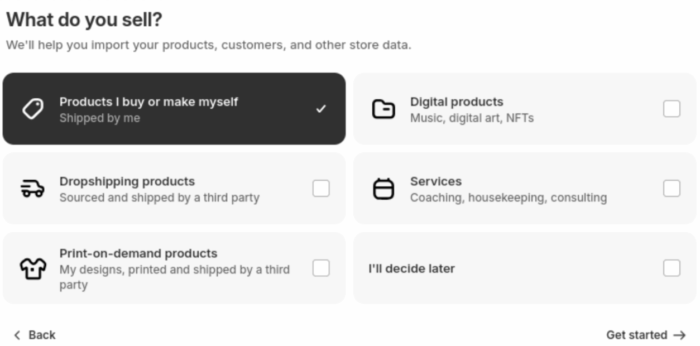
- Answer a few simple questions related to your business. This helps Shopify learn more about your brand.
- Add your email address and password to create your account and get access to the main Shopify admin panel.
Step 2: Install & Customize a Theme
Pick a design theme based on the vision you have for your store. The default Shopify theme is Dawn, but you can select a new one from the range of free themes.
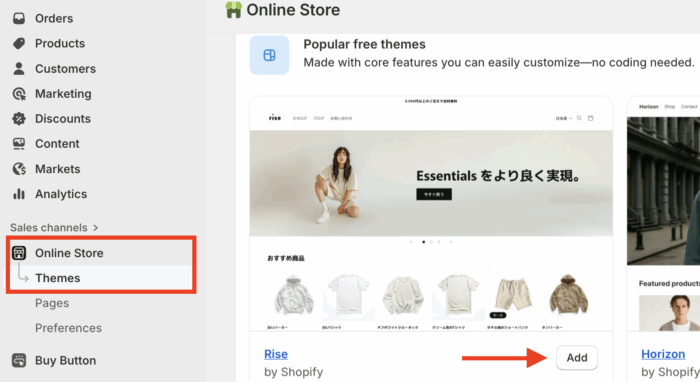
- From your Shopify admin, navigate to Online Store > Themes.
- Choose a theme from the Shopify Theme Store and click Add.
After your theme is added, click on the Customize button from the Theme dashboard to access the theme editor to edit/add logo, colors, fonts, page layouts,
Step 3: Create Products & Collections
This is where you start creating your product pages.
- Head to Products > All products. Click Add product.
- Enter all the product details carefully:
- Product title and a compelling description.
- High-quality images and video to showcase your items.
- Pricing, including any comparisons.
- Inventory information and SKU.
After a product is added, follow the same process. Then, you can move on to them in the Collections and add featured collection to capture shoppers’ interest (e.g., “Men’s T-Shirts,” “Summer Collection”).
Step 4: Create Privacy Policy & Other Pages
You will need to create mandatory pages in your Shopify store privacy policy, terms & conditions, returns, and more.
- Head to Online store > Pages
- Click on the Add page, enter all your details, and save.
In the same way, add the rest of the mandatory pages and place them in your footer. You can add a specific About Us section to make your brand story attractive.
Step 5: Integrate a Payment Method
Shopify comes with multiple payment methods for you to integrate. Whichever method you consider, take note of their transaction charges.
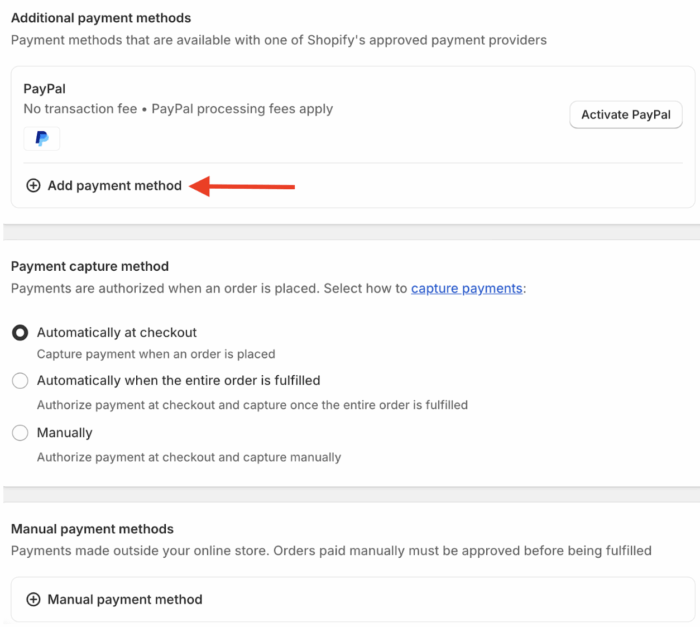
- Go to Settings > Payments.
- Using the search bar, add the needed payment option. You can also accept payments via digital wallets like Apple Pay, Google Pay, and Shop Pay.
- Then add other payment collection details like payment capture method and manual payments.
Step 6: Configure Shipping & Taxes
Using the navigation here, you can add specific shipping zones from your UK store and also create different zones based on your target audience.
- Go to Settings > Shipping and delivery.
- Create Shipping Zones. Start adding specific zones and add shipping rates.
Then for taxes, Shopify will automatically handle VAT calculations based on your store’s location. If you like, you can add a specific product’s tax rate.
Step 7: Connect a (.com/.uk) Domain
When you create your store in Shopify, the default domain name is yourstorename.myshopify.com domain (for example, happyplants.myshopify.com). You can buy a new domain name. If your audience is in the UK, a .uk domain is recommended.
- Head to Settings > Domains and connect your custom domain.
Step 8: Launch Your Store
With everything set up, it’s time to make your store live.
- Head to Online Store > Preferences and remove the password in your store; this will make your site live.
After this, you must start with promotions and marketing to tell the store to get the needed traffic. Social media, targeted ads, implement Shopify AI chatbot and announcements among friends & family are a good starting point.
Go Beyond DIY: Launch Your Store with a Shopify Agent
A Shopify professional helps to create a future-ready store.
In the DIY approach, there are chances of falling into unseen pitfalls that can slow your site down, break your theme, or result in not having elements that make your store rank (SEO).
When you partner with a Shopify professional, you can expect:
✅Technical Excellence: Your store will be built on a robust and technically sound foundation.
✅ Enhanced User Experience: Appropriate customizations and integrations will be added to improve site navigation and customer engagement.
✅ Improved Visibility: Comprehensive SEO strategies will be applied to maximize your store’s search engine performance and organic traffic.
Learning everything by yourself and applying the changes in your store will delay your launch time while you will need to focus on other aspects of your business.
A Shopify professional makes everything manageable.
Common Questions About Starting a Shopify Store in the UK
Is Shopify Profitable in the UK?
Yes, absolutely. Many successful UK brands, from startups to household names, use Shopify, like Gymshark, The Body Shop, and Vogue.
How Much Does it Cost to Open a Shopify Store in the UK?
The cost can vary, but here is a breakdown of the typical expenses:
- Shopify Plan: Basic plans start around £25 per month.
- Domain Name: A custom domain costs approximately £10-£20 per year.
- Apps & Tools: Many apps are free, while others can be a monthly subscription (e.g., £5-£50+).
- Theme: While there are many excellent free themes, a premium theme can cost a one-time fee of £150-£300.
Does Shopify Need VAT in the UK?
You are required to register for VAT with HMRC if your taxable turnover in any 12-month period exceeds the current VAT threshold (£90,000 as of 2025).
Ready to Go Live?
This is our wrap to our guide on how to start a Shopify store in the UK. Over to you now, bookmark and use this guide as your go-to resource to build your store and start selling in the UK.
Let our Shopify experts create a custom theme to boost and elevate your customer experience.
Learn More