

Hello, Magento peeps!
My previous blog post on the Magento 2 API series was all about using Magento 2 API to set shipping and billing information. I will show how to create order using Magento 2 REST API in today’s post.
The Magento 2 Create an Order API is useful for placing the order after successful payment by the customer. It plays a vital role in the order placement after the customer has entered the shipping & billing information and completed the payment. The create order API in Magento 2 returns an order id, marking the successful order creation.
Let’s begin with the Magento 2 API – Create an Order!
Create Order Using REST API in Magento 2
In order to create an order in Magento 2 using REST API, the client needs to submit the payment information through a POST request to Magento 2 along with the customer token. It returns the order id in response, which marks the order creation. An example of the same is provided below:
Method: POST
URL: store_url/rest/V1/carts/mine/payment-information
Header:
- Bearer Token: <customer_token>
Body:
{
    "paymentMethod": {
                "method": "checkmo"
     },
    "billing_address": {
                "email": "[email protected]",
                "region": "Gujarat",
                "region_id": 580,
                "region_code": "GJ",
                "country_id": "IN",
                "street": ["Shiv Elite"],
                "postcode": "364001",
                "city": "Bhavnagar",
                "telephone": "8141102201",
                "firstname": "Jignesh",
                "lastname": "Parmar"
     }
}
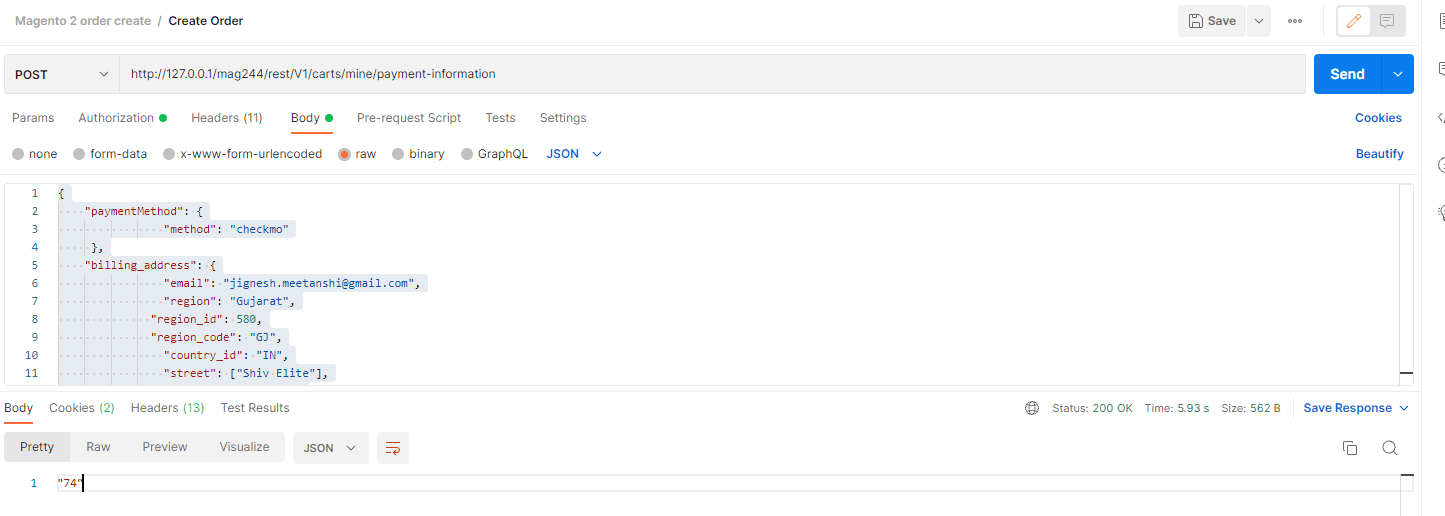
Response:
On successful authorization of the request and verification of the payment, Magento 2 returns the id of the created id.
74Conclusion
Magento 2 provides API endpoints for all the vital events required for the eCommerce stores. In case you are developing a new website or working on a mobile app based on Magento 2, you can use the APIs to connect the new storefront with Magento 2. The Magento 2 API to create order is useful for placing the order by submitting the payment information. I hope you will find this guide helpful to create an order using Magento 2 API. Likewise you can create order in admin panel Magento 2 to assist your customers in order placement when they require. In case, you still have any doubts or queries, feel free to comment. I will be happy to help you.
Also, do not forget to share this useful blog post with your developer friends via social media.
Thanks for reading.
