“How to start a Shopify store with almost no money”—an honest question for merchants starting their online journey, deserves an honest answer.
The truth is you will need to invest a small amount, $3 exact, and then through various no-cost tactics, you can start your Shopify store.
This blog will teach you how to plan a business and create your Shopify store within a tight budget.
Steps to Start a Shopify Store with No Money
Step 1: Pick a Business Model
Start with deciding on the business model.
The best business models for a zero-dollar budget store are dropshipping, print-on-demand (POD), digital products, and service-based businesses. These require no upfront investment in inventory, which is crucial for starting out.
| Business Model | Initial investment | Inventory & Shipping | Description |
| Dropshipping | Low | Third-party | Partner with a supplier who stores, packs, and ships products directly to your customers. |
| Print-on-Demand (POD) | Low | Third-party | Design T-shirts, mugs, and posters. The POD company handles the printing & shipping. |
| Digital Products | Zero | Not needed | Sell ebooks, online courses, or templates with no per-unit cost. |
| Services | Zero | Not needed | Sell professional skills/services using your expertise, which requires no inventory whatsoever. |
Dropshipping and selling digital products are the most famous options among new store owners. The best part is that there are no inventory management headaches; your main role is to communicate and market the product in a way that brings sales.
But remember, you will have to pay dropshipping and print-on-demand suppliers when the customer’s order is delivered.
Step 2: Build a Brand
Based on a suitable business model, it is time to start creating your brand and its assets, without spending a dime.
- Brand Name & Tagline: Use ChatGPT for your Shopify store to brainstorm ideas and ask it to create taglines based on your target audience.
- Logo Design: You don’t need a designer. Shopify’s Logo Maker is a free tool that lets you quickly create a simple, professional logo for your store.
- Domain: Use the free domain that Shopify gives you (e.g., yourstorename.myshopify.com) when you sign up. You can always switch to a custom one once you start seeing profit.
Spent here: $0
Step 3: Take Advantage of Shopify Free Trial
Shopify offers a low-cost way to get your business off the ground.
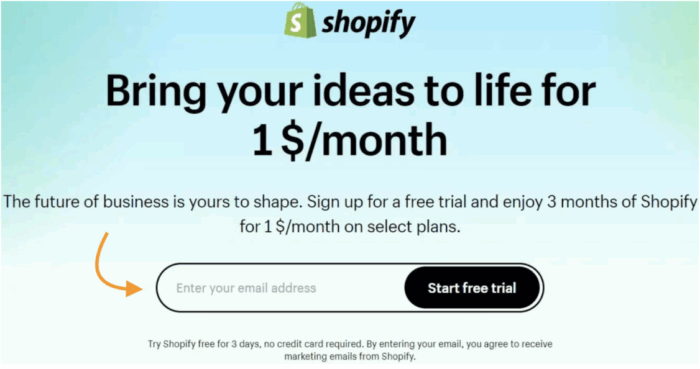
First, you can sign up and take a 3-day free trial to explore the platform. After your free trial, you can claim a promotional offer to get the Basic plan for just $1 per month for the next three months (otherwise, $29).
With this free access:
- Create & add unlimited products
- Use 100+ Shopify themes
- Add sales channels like social media, marketplaces, and more
- & more
With these three months, you can take full advantage of the platform before they start charging you the regular subscriptions plans.
Spent here: $3 (for 3 months)
Step 4: Setup Your Shopify Store
Now, head to the Shopify admin panel, and navigate to the left-side navigation to start building your store.
Start with picking a store theme. You can choose from a range of free Shopify themes, which you can then customize using the theme editor (Online store > Theme > Customize).
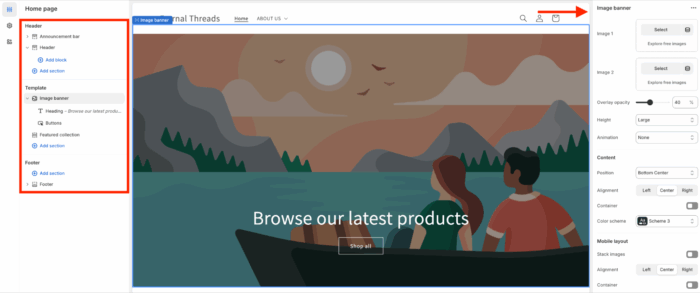
Then, navigate to Products and start adding the sellable items. Add the complete product images, information, pricing, variants, and more. After this, add collection slider section that goes beyond the static design.
Like products, you also need many other pages in your store. Head to Online Store > Pages, and click Add Page to start creating an about us, contact us, FAQ, and other pages.
Lastly, set your payment method. You can use the built-in Shopify Payment to accept online payments. It’s completely free to set up and allows you to securely accept payments from your customers without needing a third-party provider.
Once you have everything in place, you’re ready to launch your store!
Spent here: $0
Step 5: Market Your Store
When you have finished your Shopify setup, it’s time to spread the word. The best way is to leverage your SEO, social media, and WhatsApp.
Boost Your Store’s SEO
Good Shopify SEO will help you automatically rank on Google/other search engines to directly bring interested shoppers to your store. It is free and highly effective.
- Keywords: Write a keyword-filled title and meta description for every product and page.
- URLs: Make your product page URLs simple and descriptive, like yourstore.com/products/blue-t-shirt.
- Unique Content: Avoid using the same content across different pages to avoid duplicate content issues.
- Images: Compress your product images to make them load faster. You can use a free online tool to do this. Also, add alt text on all images to describe what the image is for better visibility.
Leverage Social Media
After this, promote your store without investing in any ads.
Share your newly created Shopify store link with your friends and family on WhatsApp, and promote your products on social media platforms like Facebook, Instagram, and more.
Spent here: $0
This is your entire plan to start a Shopify store with just an investment of $1 per month.
Free Resources to Start Your Shopify Store
Starting your online store on a budget is completely possible when you know which free tools to use. Here’s your essential toolkit for building your business without a big investment.
| Tools | Helpful to |
| Shopify free trial & $1 plan | Start your Shopify journey only for $1 for 3 months |
| Canva | Design your brand assets using pre-build templates |
| Shopify Theme Store | Get a range of free Shopify themes |
| Shopify Payments | Build-in payment process to collection payments at checkout |
| Shopify App Store | Get free apps like AI content generator to create SEO-friendly content |
Most of the tools mentioned here come with a free plan and monthly limitations, but if you work it better, you can stay within the monthly limit and save yourself from spending a few dollars.
Frequently Asked Questions
Can I start a Shopify store for free?
You can take a free trial of the Shopify store, but when this trial ends, you will need to purchase a Shopify plan to continue.
Is Shopify dropshipping profitable?
Yes, Shopify dropshipping is a profitable business but it heavily depends on the actions you take and the type of dropshipping business you are into.
What are some business ideas to sell on Shopify with low/no investment?
You can sell print-on-demand items (custom-designed t-shirts, mugs, etc), ebooks, dropshipping, memberships, and online services.
Ready to Build?
Starting a Shopify store with no money is just a catchphrase; there is a need for minimum investments. Take advantage of all the free access while investing a little to access the Shopify platform completely.
Take a free trial of Shopify and continue using the platform for only $1 for 3 months.
Grab Now