Learn here how to start a Shopify store in Germany while staying within the legal laws and regulations to run a successful online business.
Legal Requirement for a Shopify Store in Germany
Here are the non-negotiables you must follow to build your online presence using the Shopify platform.
If you fail to follow them, it can lead to strict actions that can even shut down your business.
Business Registration
You must register your business with the local Gewerbeamt (trade office). You might have to pay a fee of about €20–€60, which varies depending on the city. Successful registration grants you a Gewerbeschein (trade license), proving your legal status as a merchant.
VAT & Tax Registration
If your annual revenue is expected to be above €22,000, you are required to charge VAT. If your business is based outside the EU or is selling internationally, you must register for and charge VAT from the very first sale. This registration is mandatory for all businesses selling to consumers in Germany or the EU.
Legal Pages
German law mandates adding a legal notice (Impressum), privacy, terms and conditions (Allgemeine Geschäftsbedingungen), and cancellation pages along with the GDPR-compliant cookie banner to comply with the General Data Protection Regulation (GDPR) law.
Pricing & Checkout Information
The German law requires you to show complete pricing transparency on product pages. Displaying the total price, including VAT (MwSt.) and the shipping costs (zzgl. Versandkosten) near the price.
Additionally, you must have an order button that needs to be labeled as “zahlungspflichtig bestellen” (order subject to payment). It is also mandatory to include a checkbox at the checkout to confirm the acceptance of the AGB and Widerrufsrecht.
Steps to Set up Your Shopify Store in Germany
Start with taking a free trial on Shopify to know the platform better before making any final commitments and explore its features fully. Shopify will ask you a few questions to understand your store, so make sure to answer them carefully.
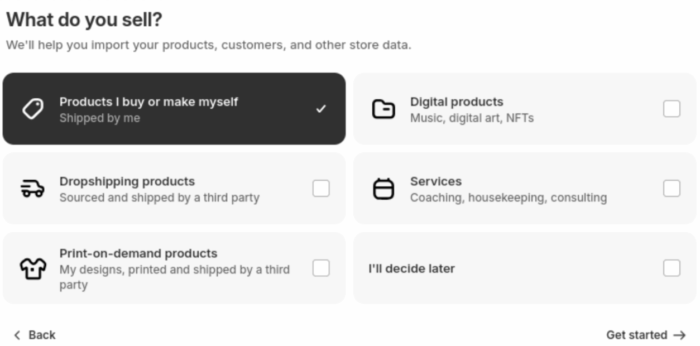
After signing up, you will reach the Shopify admin panel. A central point to control and easily navigate to any pages, settings, or other features within your store.
Step 1: Add Themes, Products, & Collections
Here, we will start with adding the foundation elements of the store: theme, products, and collections.
Theme
Navigate to Sales channels > Online Store > Themes. Explore free Shopify themes and add one to your store. Shopify by default uses the Dawn theme, which you can continue to use if it matches your vibe.
Products
From the left-hand sidebar, go to Products > Add Products. Fill in all the product details carefully and provide complete information to meet the transparency law. In the same way, add as many products as you wish.
Collections
Navigate to Products > Collections from the admin panel to add either a manual collection or an automated one. The former needs you to add products to the collection manually, and the latter works on a condition basis.
After this, head to the theme editor (Online Store > Theme > Customize) and add the created products/collection to your homepage.
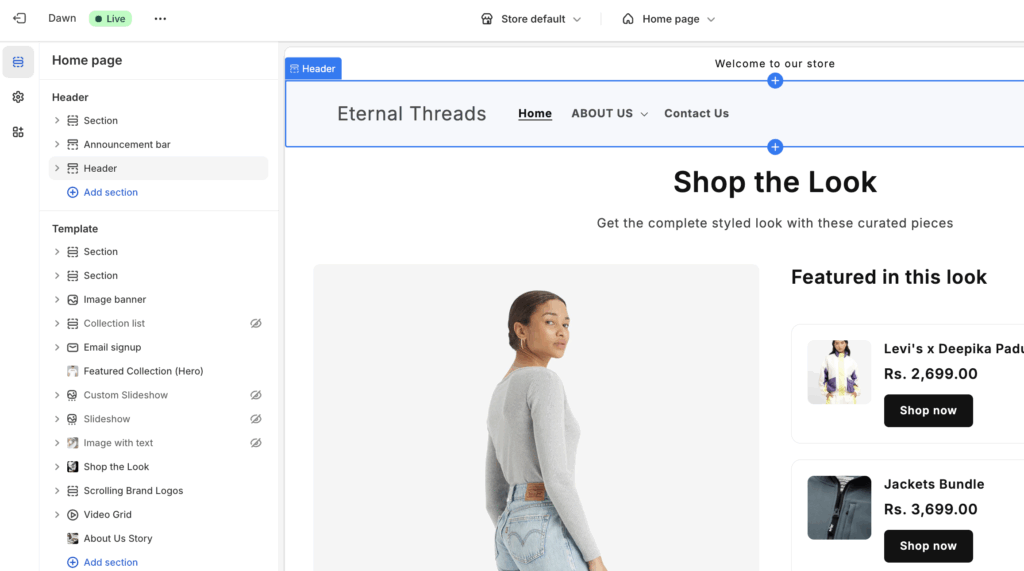
The theme editor is also a great place to add sections like Shopify Instafeed or video grids to capture shoppers’ attention as they scroll through your site.
Step 2: Add Important Legal Pages
As it is mandatory to create and show some pages while building an online presence in Germany, here are the steps to easily create them on Shopify.
Terms and Conditions page
- Head to Online Store > Pages > Add Page
- Enter the title (Terms and Conditions) and in the Content box, add the content
- Click Save.
Privacy Page
- Go to Online Store > Pages > Add page button.
- Add page title (Privacy) and fill in the content box.
- Click Save.
Follow the same process to create other pages and add them to your navigation menu for the shoppers to easily access them.
- Go Content > Menu.
- Select the Add menu item and enter the page name
- In the Link field, select the pages.
- Finally, add and save.
Specifically, when creating these pages, ensure they are titled clearly with the legal name: Impressum, Datenschutzerklärung (for Privacy), and Widerrufsbelehrung (for Cancellation/Withdrawal).
While writing any of your legal pages, it is good to have a professional on board to avoid any errors or liberties.
Step 3: Integrate Local Payment Methods
Head to Settings > Payments > Add payment method.
Use the search bar to find and add the payment provider of your choice. Here are some popular payment options in Germany.
| Payment Method | Popularity in Germany | How to Offer |
| Klarna (Buy Now, Pay Later) | Extremely Popular (Especially “Pay Later” or Kauf auf Rechnung) | Available through Shopify Payments or a third-party gateway. |
| Sofort/Giropay (Instant Bank Transfer) | Very Popular | Available through Shopify Payments or providers like Stripe. |
| PayPal | Very Popular (Second most used after purchase on invoice) | Essential. Easy to integrate via Shopify. |
Besides this, set options to collect payments offline, like COD, money order, etc.
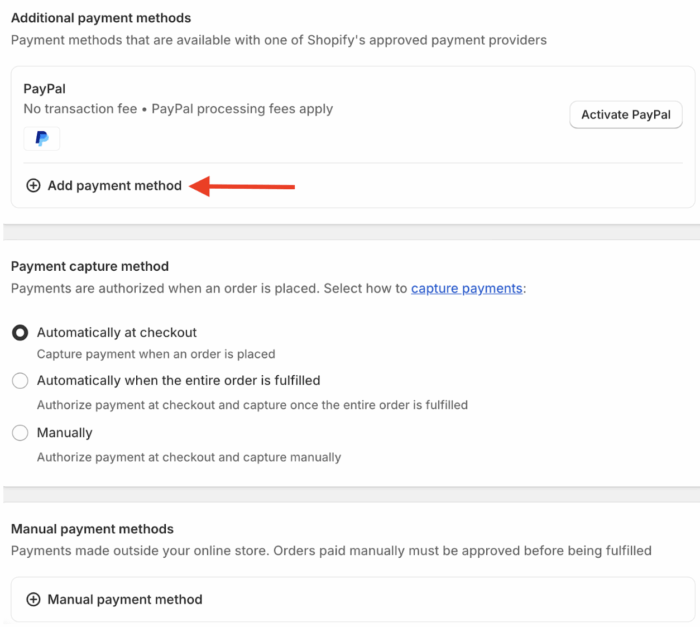
Here, you must also add needed customizations like add maximum & minimum order quantity limit rule, set different payment methods based on cart total and more so you don’t loose your profit margin from the very beginning.
Step 4: Shipping & Tax Integration
Go to Settings > Taxes and duties. Set your home country as Germany and ensure your products are correctly set up to charge the 19% (or 7%) German VAT.
Shopify’s tax engine can handle this, especially when utilizing OSS for cross-border sales. Here, it is extremely important to mention the correct expected delivery date for legal reasons.
Then, define clear shipping zones and rates for Germany and the EU. German customers expect realistic shipping times to be displayed.
Step 5: Connect Domain & Launch
Shopify offers a default domain name like this: your-store-name.myshopify.com. You can use this domain or buy a new one specific to Germany without any Shopify branding.
Then, take a preview of your newly created store to see your store as a shopper and fix issues that they might face. Use the eye icon next to the Online Store for preview.
If everything looks good, head to the Preferences tab, remove the password protection, and make your store live.
This covers the steps to start a Shopify store in Germany.
After your store is live, start with its marketing and spread the word to attract quality traffic.
Here are some of the ideas to market your new store:
- Leverage Shopify SEO to earn organic traffic.
- Add a product share button to improve visibility.
- Use social media platforms to interact with interested followers.
Get Help From a Shopify Agent
Your Shopify store is the powerhouse to attract and sell, making it essential to build your store on solid grounds that run effectively for a long time and withstand the competition online.
Our Shopify experts build a store that is:
✅ Free of technical issues to avoid any store breakdown.
✅ Optimize with a good page speed that enhances user experience.
✅ Filled with quality SEO practices for a higher organic reach.
✅ Loaded with strategies to improve conversions.
Single-handedly managing everything is overwhelming; in case of a mistake, it can majorly affect your site’s functionalities. And fixing it can cost more than spending it on an expert now.
Frequently Asked Questions
Is Shopify available in Germany?
Yes, Shopify is widely used and available in Germany.
Is Shopify dropshipping legal in Germany?
Yes. Dropshipping is legal in Germany, provided you comply with all German and EU laws.
How much does Shopify cost in Germany?
Shopify Basic: Around €33 – €36 per month. Shopify (Growth Plan): Around €88 – €105 per month.* Shopify Advanced: Starting at around €384 per month.* Shopify Plus: Starts from approximately $2,300 USD per month (or a variable platform fee).
Wrapping Up
Starting a Shopify store in Germany requires diligence on the legal front, but the platform provides all the technical tools you need. Focus on compliance, cater to local payment preferences, and start seeing quality traffic in your store.
Let our Shopify experts create a custom theme to boost and elevate your customer experience.
Learn More