Setting order limits helps you protect your inventory and ensure every sale is profitable. Here is the easiest way to add a maximum & minimum order quantity limit rule in Shopify using a dedicated app.
What Is the Order Limit on Shopify?
An order limit on Shopify is a rule that controls the minimum or maximum amount of a product a customer can buy in a single purchase cycle.
By default, Shopify provides a native Add-to-cart limit feature that allows you to set a maximum quantity for items to be added to the cart.
Here is its navigation Settings > Checkout > Advanced preferences.
Shopify often provides a recommended limit based on your sales history (typically defaulting to 50 units for newer stores).
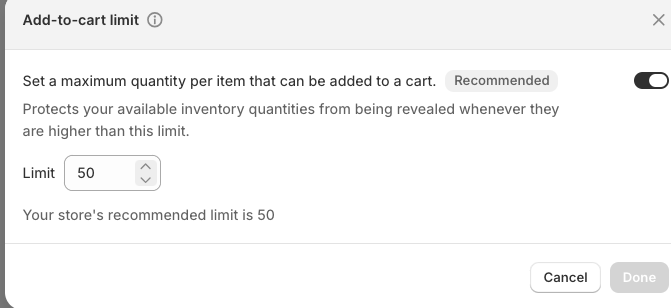
However, this setting is applied globally. If you want to set quantity rules at the product and variable level, you will have to opt for the Shopify Plus plan or use a third-party Shopify app.
Such customization like product-based order limits or shipping charges per product help you save your margin.
How to Add Maximum & Minimum Order Quantity Limit Rule in Shopify (Using App)
Here we will use the MIT Cart & Order Limits app to add a minimum & maximum order quantity. Follow these three simple steps:
Step 1: Navigate to Quantity per Products
Install and open the MIT Cart & Order Limits in your Shopify admin. Go to Quantity per Products > Create a new rule to start setting up the order quantity limit.
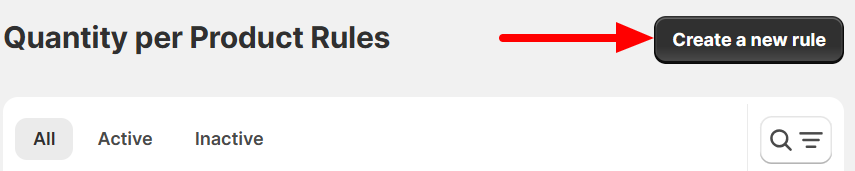
Step 2: Define Product Quantity Limits & Conditions
Add a title for the rule and set the required limits, such as:
- Minimum quantity in cart – Enter the minimum product quantity
- Maximum quantity in cart – Enter the maximum product quantity allowed
- Multiple quantity in cart – The product quantity should be a multiple of this number
You can also add custom error messages that will appear if customers do not meet the quantity requirement.
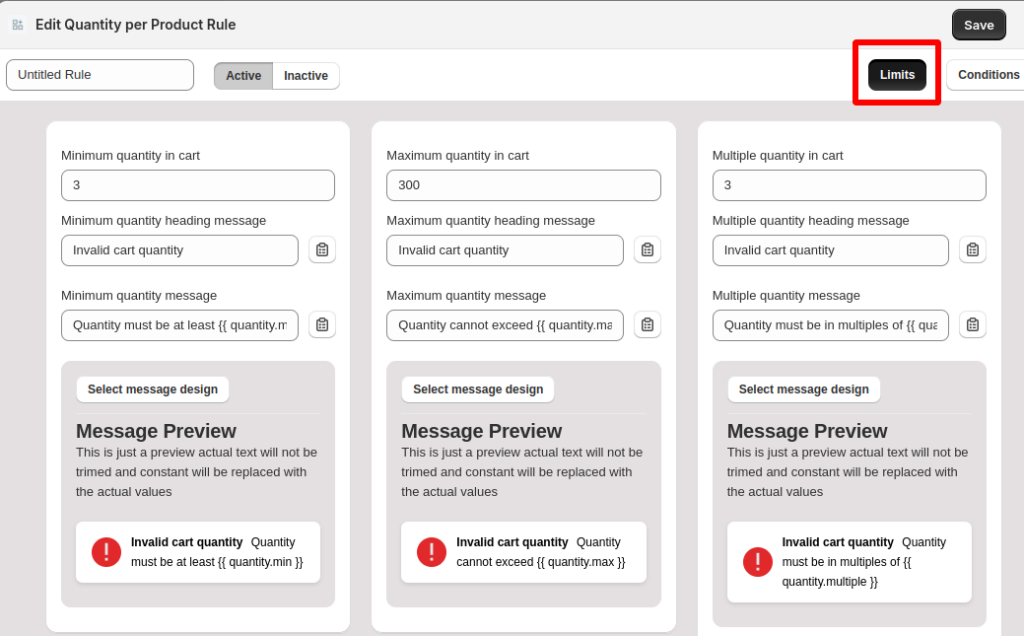
Then click Conditions to decide when the rule should apply and configure the logic using AND/OR conditions if needed.

Step 3: Save & Test on the Frontend
Once the limits and conditions are set, click Save.
And test the rule on the cart page to ensure the quantity limits work correctly and display the warning messages when the requirements are not met.
This is how it looks on the checkout page:

And that’s how it is easy to set up minimum and maximum order quantities in Shopify.
Benefits of Using the MIT Cart & Order Limits Shopify App
The MIT Cart & Order Limits app helps to optimize your checkout process without upgrading to the Shopify Plus plan.
Create unlimited conditions for a single plan at $7 only.
Here are some additional benefits of using our app to add maximum & minimum order quantity limit rules in Shopify:
- Manage all rules directly from a user-friendly dashboard with no liquid coding required.
- Use smart “AND/OR” logic to combine conditions effortlessly.
- Restrict the number of different products a customer can add to their cart.
- Fully customize the branding of your error messages (colors, fonts, and icons) so they feel like a native part of your theme rather than a clunky pop-up.
- Set minimum or maximum total cart weight to ensure your orders stay within the limits of your preferred shipping carriers.
Frequently Asked Question
How to set the minimum order quantity on Shopify?
You can set a minimum order quantity on Shopify by using an app like MIT Cart & Order Limits to create rules that restrict checkout until customers meet the required quantity.
Can you limit the number of items a customer can buy on Shopify?
Yes, you can limit the number of items a customer can buy on Shopify using built-in settings or use the MIT Cart & Order Limits Shopify app for advanced control.
Does Shopify have a built-in feature for quantity limits?
Shopify has an add-to-cart limit feature, which is applicable globally. For advanced customization, you will need a Shopify Plus store or a third-party Shopify app.
Conclusion
Don’t let a few bulk orders derail your inventory strategy or eat your profits. With MIT Cart & Order Limits, you can deploy advanced quantities and spend rules in just a few clicks.
It’s the simplest way to bulletproof your checkout, optimize your fulfillment, and scale your Shopify store with total confidence
Custom limits for every cart. Configure your rules in seconds to protect your margin.
Configure Now