

Shopify uses one shipping rate for your whole store by default, which can cause problems when different products have different shipping costs.
In this guide, learn how to set up product-wise shipping rates in Shopify using two easy ways: Shipping Profiles and product-based shipping apps.
These methods help you set accurate rates and protect your profit margins.
Why Do You Need Different Shipping Rates per Product?
Not all products cost the same to ship; some are lightweight and inexpensive to deliver, while others are bulky or heavy. For example, a seed packet might cost only $3 to ship, while a heavy soil bag could cost $15.
Using Shopify flat rate shipping per product across your entire store can cause you to overcharge customers for small items or lose money on large ones.
When you set up custom shipping rates on Shopify to match your actual fulfillment costs, you ensure fair pricing, prevent revenue loss, and maintain healthy profit margins across your entire catalog.
Here are the two methods to add custom shipping rates by product in Shopify.
Method 1 – Using Shopify Shipping Profiles (Native Option)
Shopify Shipping Profiles let you assign different products to their own shipping rates.
Instead of using one global rule for everything, you can group specific items, like heavy soil bags, and give them separate shipping prices without affecting the rest of your catalog.
Follow these steps to give specific products their own shipping rules.
Step-by-Step: Set Up a Custom Shipping Profile for a Product
Step 1: Create Your Custom Profile
From your Shopify admin, go to Settings > Shipping and Delivery in your Shopify admin.
Under the Shipping section, select Create custom profile option to start a separate shipping setup.
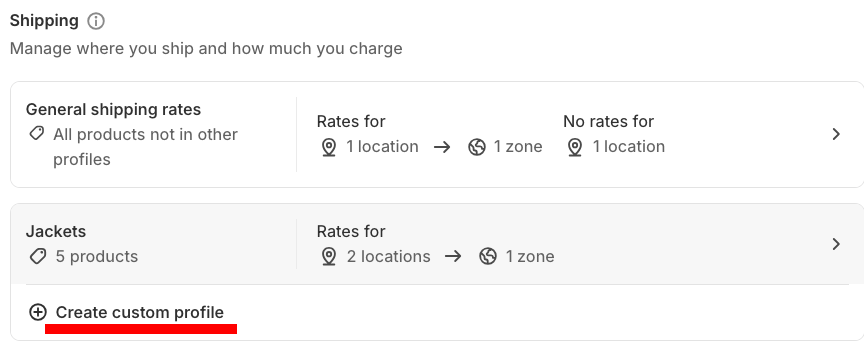
Step 2: Add Details in Your Profile
Enter a name for the profile (for example, Oversized items) and in the Products section, click Add products, then select the products you want to use these special rates for.
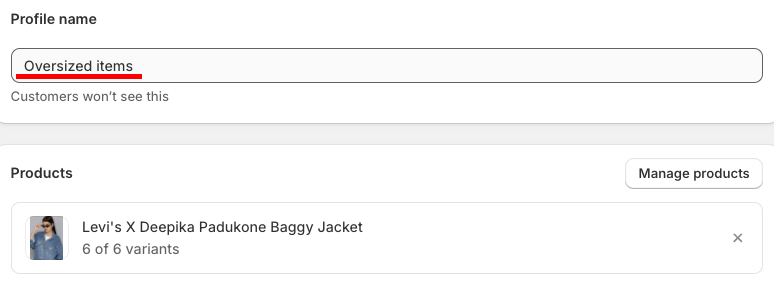
Define where you ship to (Zones) and then click Add rate to specify the exact cost for those products in those regions.
Step 3: Save & View Pricing
Click Save in the top right, then go to your storefront to ensure the new rate appears correctly when those specific items are in the cart.
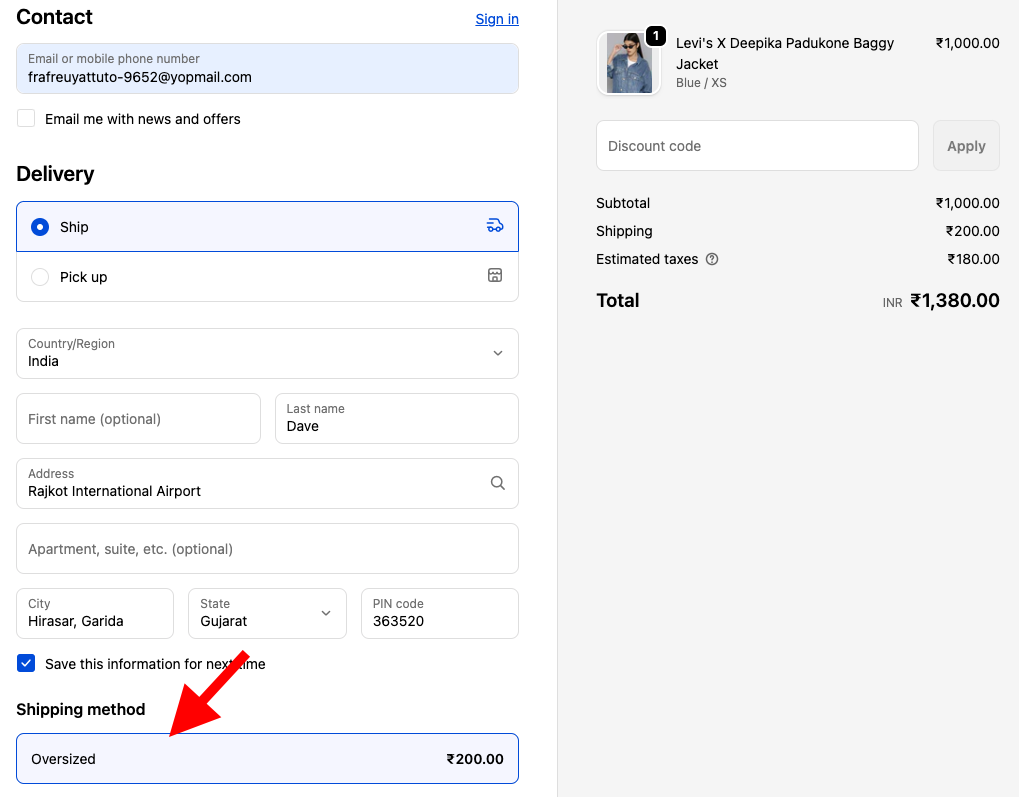
While these Shopify shipping profiles are free and built in, they do have a few limitations that can become limiting as your Shopify store grows:
- Buying a standard item and a heavy item together makes Shopify add both rates, leading to high checkout totals.
- Each product can only be assigned to one shipping profile
- You can’t set advanced logic like “charge only for the heaviest item”
- You can create only up to 99 custom shipping profiles
Method 2 – Set Shipping Rates Per Product Using an App
If you want to avoid double-charging issues with native profiles, using an app is the easiest solution. The Meetanshi Shipping Per Item Shopify app lets you set a custom shipping rate for each product and control exactly how those rates combine at checkout.
You can charge a flat rate per order or per item, and choose whether the final shipping cost uses the sum, maximum, or minimum of the selected products.
Let’s see the app working.
How to Set Up Different Shipping Rates per Product Using the App
Setting up custom rates with this app is quick and doesn’t require any coding. Here is how to do it:
Start by installing the Meetanshi Shipping Per Item.
Step 1: Enable the App & Set Global Rules
After installing, go to the app dashboard to enable the shipping method and add title & description.
Here, you can choose a rate type (per item/order) and set a Default Rate for any products you haven’t assigned a specific price to.
Additionally, you can:
- Define calculation method (min, max, or sum rate)
- Handling fee
- Set applicable countries for shipping rate
- Minimum/maximum order amount
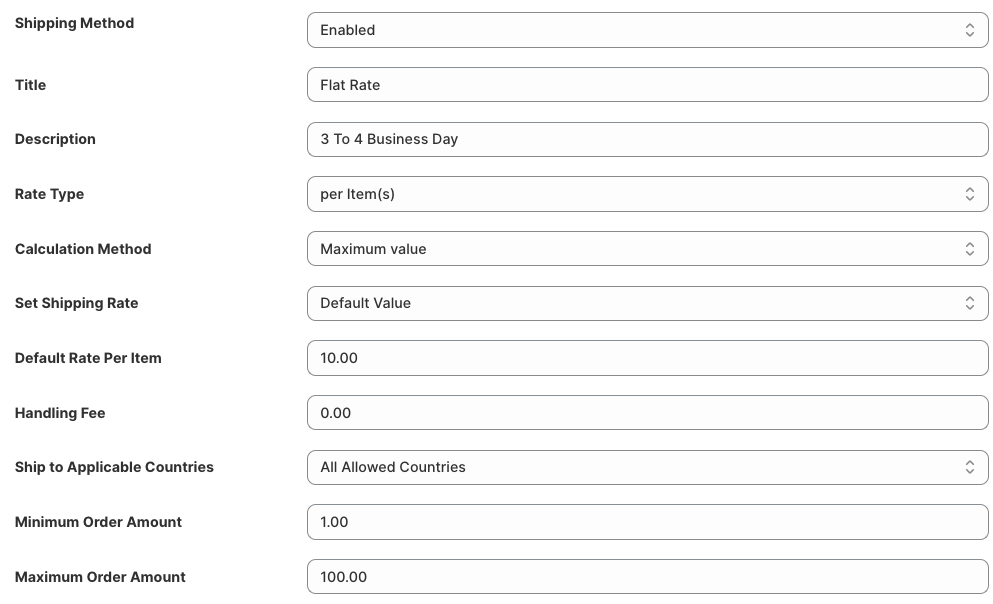
Step 2: Assign Rates to Individual Products
Navigate to the Product-wise Rates section, and here you can manually enter a shipping price for each product.
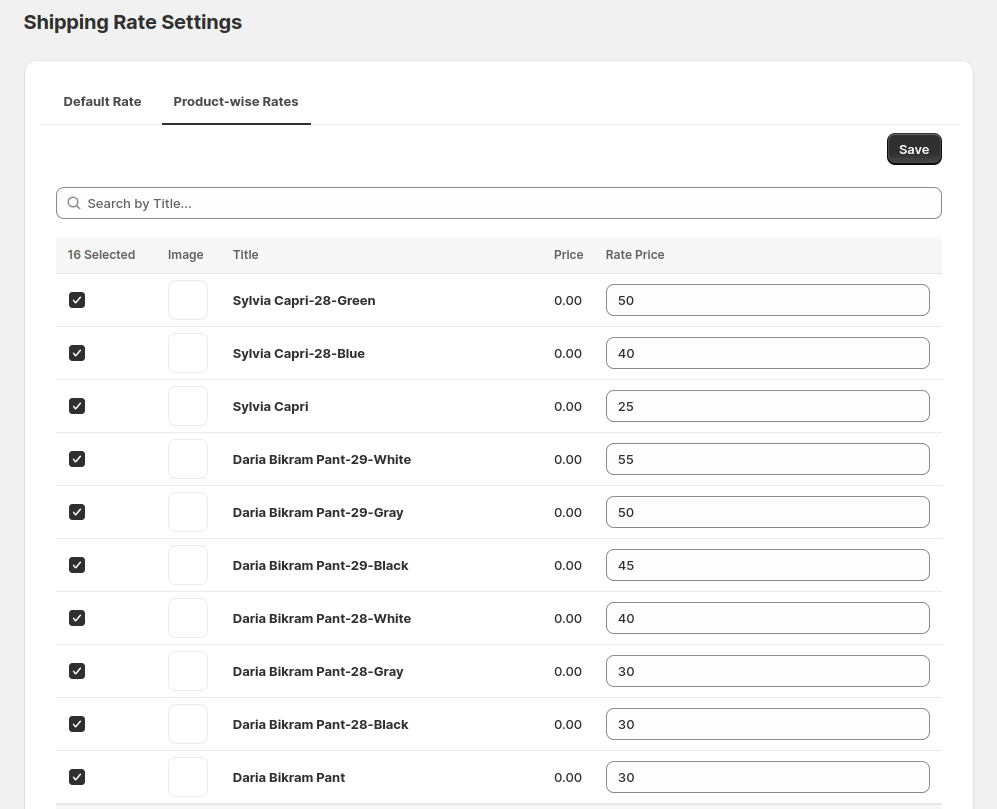
Step 3: Save and Check Rates in the Frontend
At checkout, it’ll automatically apply the shipping rates you’ve set for each product.
The final shipping cost is calculated based on your chosen rate type, per item or per order, and any product-specific settings.
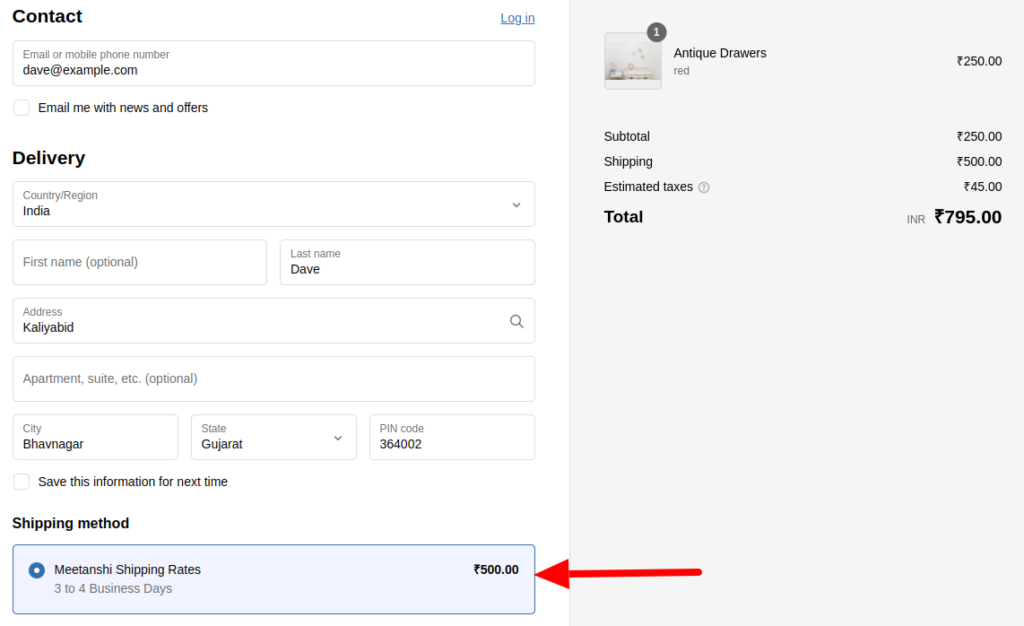
Here is how the calculation works at checkout: a quick example using Product A ($10 shipping) and Product B ($5 shipping) bought together.
The final total also depends on whether you have set the Rate Type to “Per Item” or “Per Order.” What the customer pays based on the calculation rule:
- If Sum value is selected ➜ $10 + $5 = $15
- If Maximum value is selected ➜ Highest rate = $10
- If Minimum value is selected ➜ Lowest rate = $5
Add a shipping rate for each product to charge a fair price based on different factors.
Add Today
Shopify Shipping Profiles vs. Meetanshi Shipping Per Item – Quick Comparison
Choosing the right method depends on how much control you need over your checkout experience.
While Shopify’s native profiles are great for beginners, the Meetanshi Shipping Per Item app provides the flexibility needed for more complex shipping strategies.
| Feature | Shopify Shipping Profiles (Native) | Meetanshi Shipping Per Item (App) |
| Cost | Free (Included in Shopify) | Paid App |
| Setup Complexity | Simple, manual groups | Easy, product-level settings |
| Rate Calculation | Always sums rates together | Sum, Maximum, or Minimum |
| Product Limit | Max 99 profiles | Unlimited products |
| Bulk Updates | Manual selection | CSV Import/Export supported |
| Custom Rules | Basic (Price/Weight based) | Advanced (Per item/Per order) |
Use Shopify Shipping Profiles if your catalog is simple, shipping costs don’t vary much, and you just need basic control.
Use the Meetanshi Shipping Per Item app when your products have different sizes, weights, or handling costs, and you need accurate, flexible logic that prevents overcharging or undercharging at checkout.
This level of precision is especially helpful if you want to remove shipping calculated at checkout in Shopify and instead provide your customers with clear, upfront shipping costs that build trust and reduce cart abandonment.
Frequently Asked Questions
Can Shopify charge different shipping rates for different products natively?
Yes, Shopify can set different shipping rates per product using Shipping Profiles, but the options are limited.
What is the easiest way to set per-product shipping rates on Shopify?
The easiest way is to use the Meetanshi Shipping Per Item app that lets you assign custom shipping rates to each product with flexible calculation rules.
Does the Meetanshi Shipping Per Item app work on all Shopify plans?
The Meetanshi Shipping Per Item app requires Shopify’s Carrier Calculated Shipping feature to be enabled, which isn’t available on all plans by default (e.g., Basic without carrier-calculated shipping will need an upgrade or add-on).
Can I set different shipping rates for product variants?
Yes, you can set different shipping rates for product variants in Shopify by using custom shipping profiles to group specific variants based on weight or size
Will setting per-product shipping rates affect my existing shipping setup?
No, setting per-product rates won’t affect your existing setup; it simply adds product-level rules that work alongside your current Shopify shipping settings.
Wrap Up
Shopify’s native shipping profiles offer a solid starting point for basic control, but they often fall short as your business grows.
The Meetanshi Shipping Per Item app provides a dedicated solution for merchants who need to know how to set up product-wise shipping rates in Shopify with true flexibility.
With features like Sum/Max/Min logic, flat rates, country-specific rules, and variant-level pricing, you can stop losing money on heavy shipments and prevent high shipping costs from driving customers away at checkout.
Add a shipping rate for each product to charge a fair price based on different factors.
Add Today
