Learn here how to display the lowest price in the last 30 days in Magento 2 to comply with the EU Omnibus Directive.
Automating 30-day price tracking removes the need to manually manage discounts and helps you avoid fines.
What is the “Lowest Price in 30 Days” Rule?
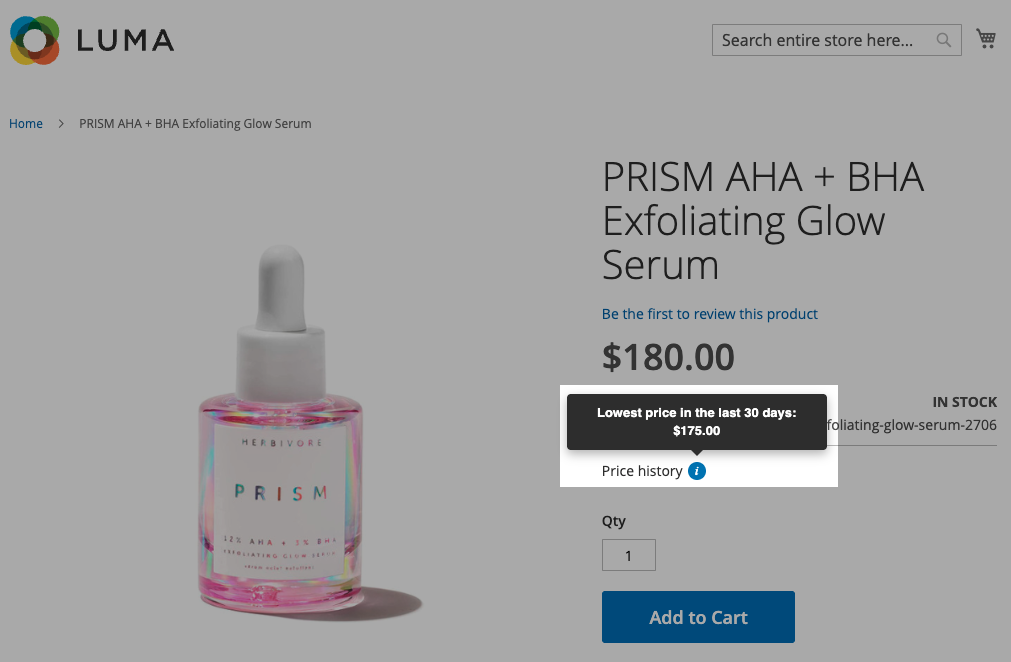
The “Lowest Price in 30 Days” rule is a EU Omnibus Directive law that requires you to show the lowest price that the item had in the last 30 days. This helps to offer better pricing transparency and avoid fake discounted pricing to pretend to show they are offering a huge discount.
Essentially, it ensures that when you see a sale, the pricing is accurate.
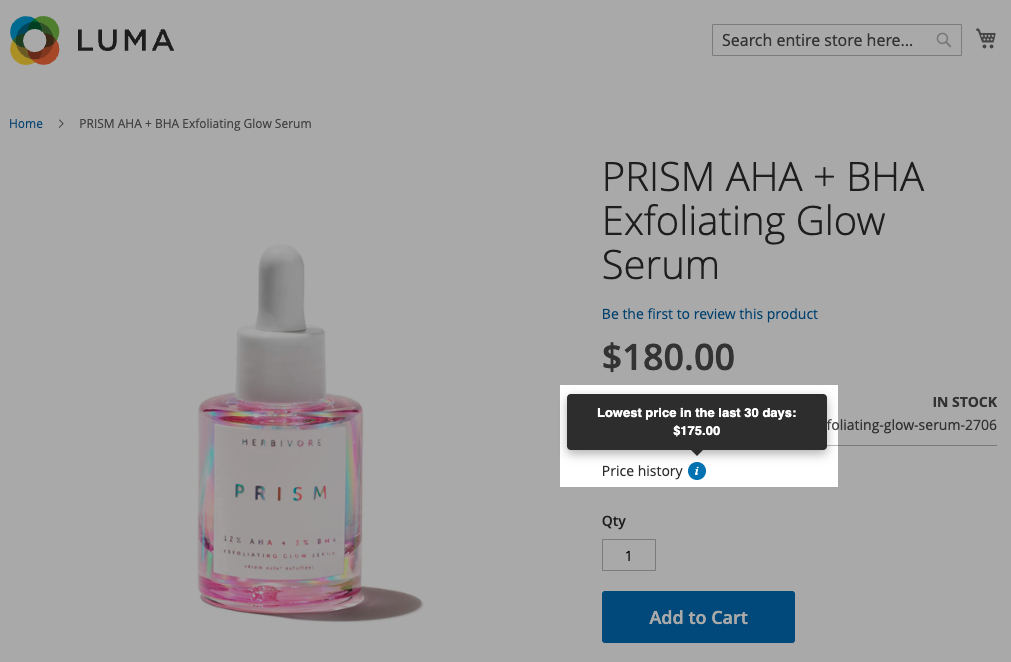
It looks like this:
Method to Display Lowest Price in 30 Days in Magento 2
Use the Meetanshi Magento 2 Omnibus Price Tracker extension to track historical pricing and dynamically display the prior price during discounts.
Here’s the simple way to configure the extension.
Step 1: Configure General Tracking Settings
Log in to your Magento admin and navigate to Stores > Configuration > Meetanshi > Omnibus Price Tracker.
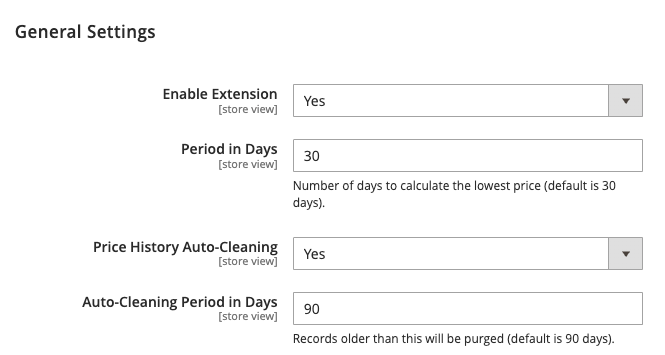
Set Enable Extension to “Yes” and set the tracking period (usually 30 days), and enable options like automatic price history cleaning to manage data efficiently.
Step 2: Set Display Logic and Page Visibility
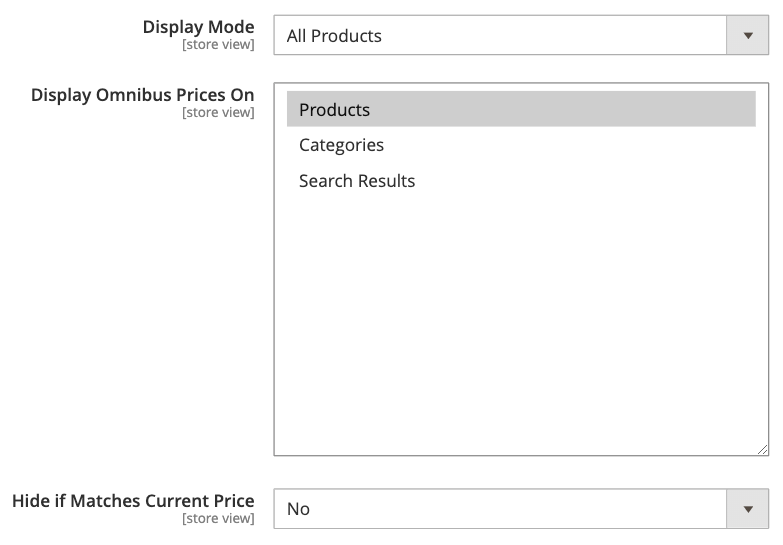
In Display Settings, choose whether to show the Omnibus price for all products or only discounted ones.
You can also select where it appears (product, category, or search pages) and hide it if the price is the same as the current price.
Step 3: Customize the Frontend Appearance
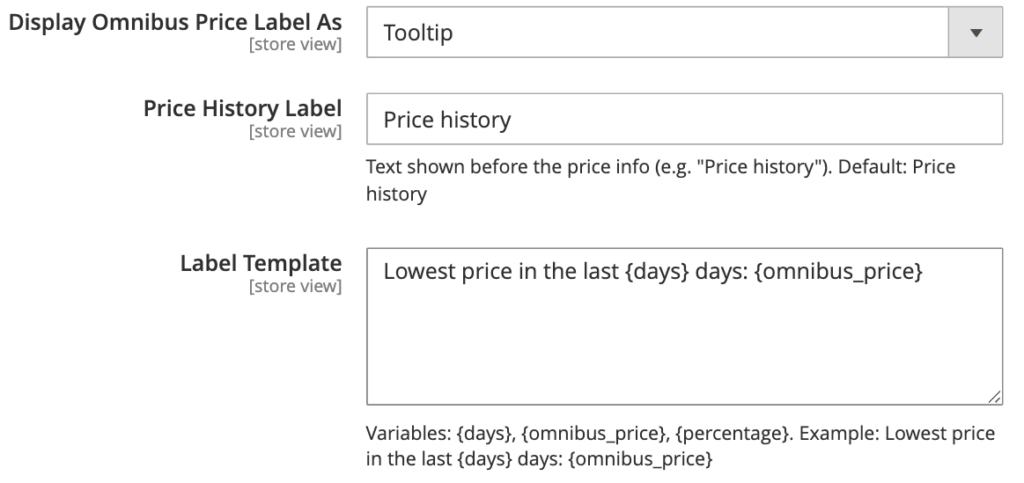
Choose how the price info appears, use Text for a simple message or Tooltip for a hover icon. You can also customize the message using variables like days, price, and percentage.
And this is how it will look in the frontend:
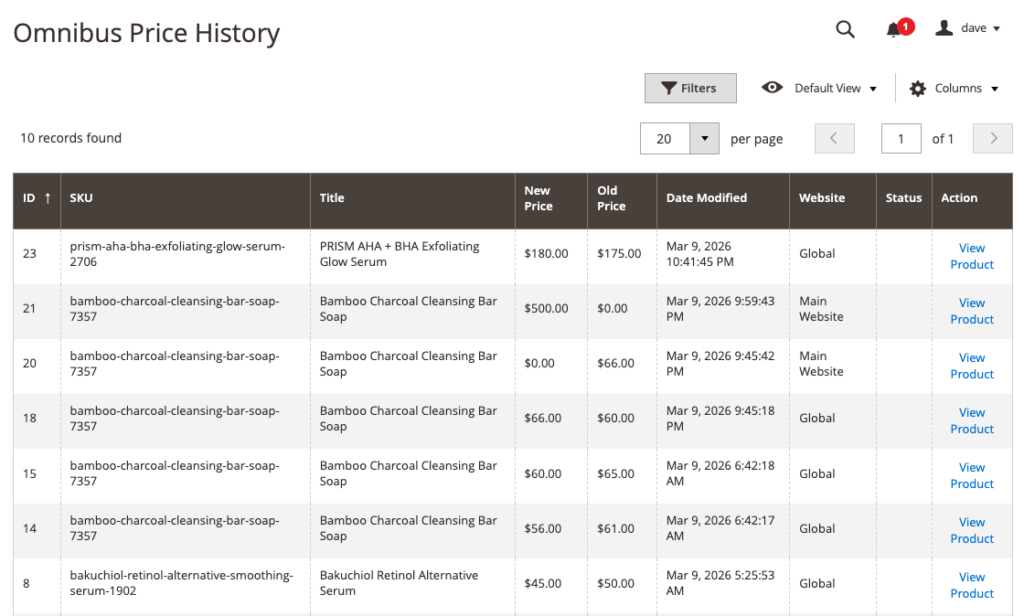
Step 4: Monitor the Backend Price History in Backend
Go to Catalog > Omnibus Price History. Here, you can see all price changes, including old and new prices, and easily identify the lowest price.
Benefits of Using Magento 2 Omnibus Price Tracker Extension
Using our Omnibus price tracker for Magento 2 extension helps your store stay compliant with the EU Omnibus Directive and show clear pricing.
Here are the main benefits of using this extension:
The extension automatically tracks prices and shows the correct prior price, helping you avoid penalties of up to 4% of your annual turnover.
The extension is flexible, allowing you to customize how and when price history is displayed based on your store’s needs.
- Adjust the tracking period to suit different regional laws (standard is 30 days)
- Can choose between a clean Text format or a Tooltip (i) icon to save space and maintain a minimalist UI
- Set the extension to only appear for discounted products, ensuring your regular-priced items stay uncluttered
Managing large catalogs can be a technical burden, but this extension prevents your database from becoming bloated using its auto-cleanup feature that automatically purges old records after a set period.
Moreover, it auto-updates the prior price across product, category, and search pages, ensuring consistent pricing information throughout the customer journey.
To ensure these updated price pages are properly indexed by search engines, it is also important to create a Magento 2 XML sitemap for your store.
Frequently Asked Questions
Does Magento 2 track price history?
No, Magento 2 does not natively track or store historical price changes for products, which is why an extension is required to log these updates for compliance.
How can I show the previous lowest price in Magento 2?
You can show the previous lowest price using the Meetanshi Magento 2 Omnibus Price Tracker extension, which automatically monitors price changes and displays the 30-day low on your storefront.
Is the Omnibus Directive mandatory?
Yes, the Directive is legally mandatory for any eCommerce business, regardless of its home country, that sells products or services to consumers located within the European Union.
Display the Pricing Rule Today
So, that’s all about how to display the lowest price in 30 days.
With the Magento 2 Omnibus Price Tracker by Meetanshi, it becomes easy to maintain transparency, build customer trust, and prove your discounts are genuine. By showing a verified price history, you reduce doubt and give shoppers the confidence to complete their purchase.
Auto-track and display the lowest price from the last 30 days to protect your business.
Get the Extension