

Pre-orders require commitment. Cash on Delivery does not guarantee that.
If you run a Shopify store with pre-order products, you already know the frustration — a customer places an order, you reserve inventory or kick off production, and then they cancel at the door. COD makes this far too easy.
The solution is straightforward: accept only prepaid orders.
This guide walks you to disable Cash on Delivery (COD) for pre-order products in Shopify
Can Native Shopify Handle This?
Short answer: not precisely enough.
Shopify does give you some control over payment methods.
You can disable Cash on Delivery entirely from your payment settings, or you can use Shopify Functions (available on select plans) to write custom checkout logic.
However, there is a critical gap Shopify cannot automatically detect pre-order products at checkout and hide payment methods based on that.
Your options with native Shopify are limited to:
- Disabling COD store-wide (which also blocks it for regular in-stock products where it might be useful)
- Using product tags manually in workflows that don’t connect to payment visibility
- Writing custom code via Shopify Functions, which requires a developer and ongoing maintenance
None of these give you a clean, condition-based rule that says: “If the cart contains a pre-order product, hide COD.”
How to Disable COD for Pre-Order Products Using the Payment Hider App
The Meetanshi Payment Hider app lets you hide, sort, and rename payment methods at checkout based on flexible conditions including product tags.
This makes it the most practical solution for merchants who want to restrict COD specifically for pre-order items without touching the experience for regular products.
The app supports four types of customizations:
- Country-based — show or hide payment methods based on the customer’s location
- Customer-based — control payment options for specific customer groups like wholesale or retail
- Simple Conditions — hide payment methods based on a single rule (cart total, product tag, discount code, etc.)
- Advanced Conditions — combine multiple rules with AND/OR logic for layered control
For disabling COD on pre-orders, you’ll use either Simple or Advanced Conditions depending on your needs.
Step-by-Step: Set Up the COD Rule for Pre-Order Products
Step 1: Create a New Customization
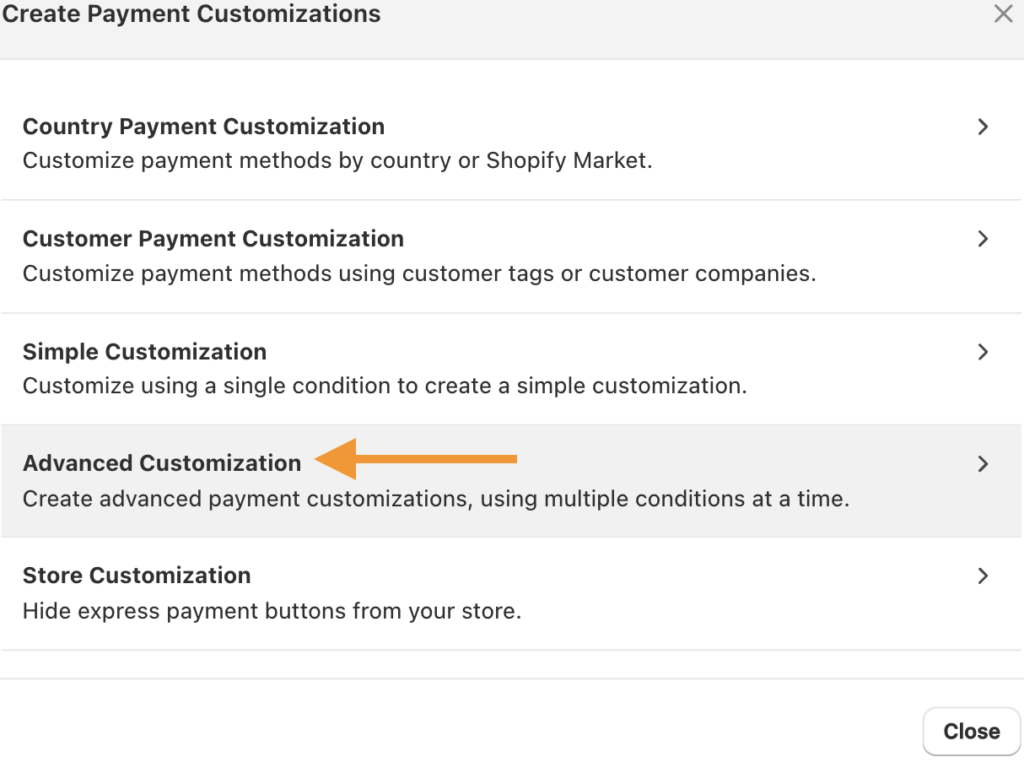
Go to the Payment Hider app on the Shopify App Store and install it on your store. Once installed, open the app dashboard.In the dashboard, click Create Customization > Advanced Customization as we are applying a single rule.
Step 2: Set Your Advanced Condition
Now, add the customization.
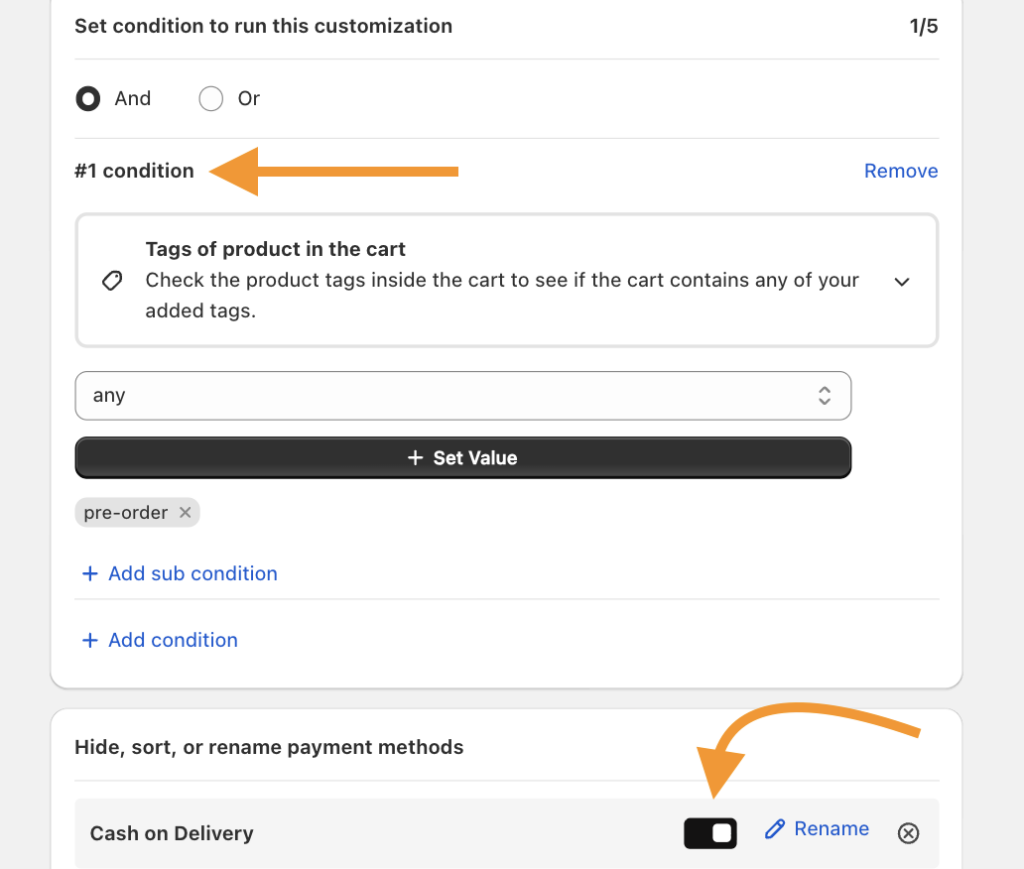
Choose the standard input and set your conditions as follows:
- Set the logic operator to AND
- Select tags of product in the cart
- Set pre-order as the tag.
In the Available Payment Methods section, find Cash on Delivery and enable the toggle to hide it. If COD does not appear in the list automatically, you can add it manually by name.
Step 3: Save and Test
Click Save to activate the rule.
Then go to your storefront, add a pre-order product to your cart, and proceed to checkout. Cash on Delivery should no longer appear as a payment option. Test with a non-pre-order product as well to confirm COD remains available for regular items.
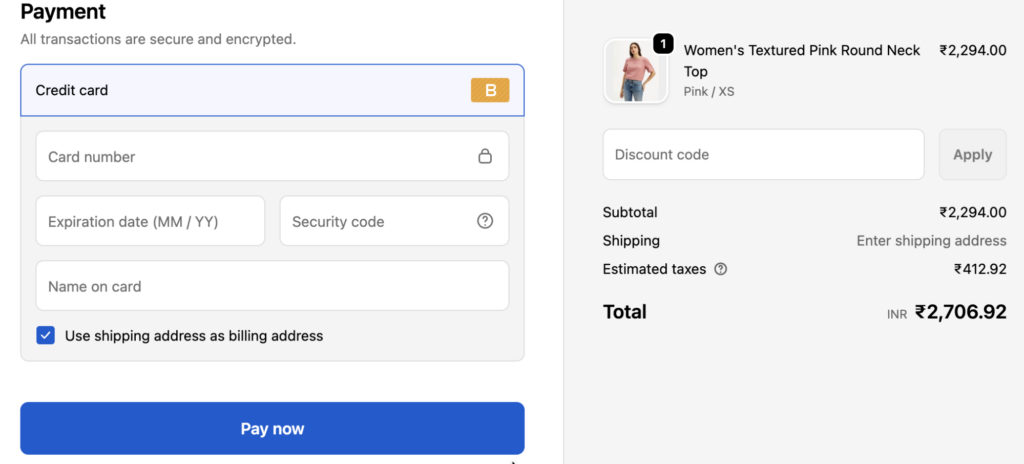
Once your rule is live, the logic works automatically in the background:
- Customer adds a pre-order product → COD is hidden → only prepaid methods are available
- Customer adds a regular in-stock product → COD remains visible as normal
- Customer has a mixed cart (pre-order + in-stock) → COD is hidden because the pre-order tag is present
This conditional behavior is what makes a dedicated app valuable over a store-wide disable. You protect your pre-order cash flow without degrading the checkout experience for customers buying regular products.
The same principle applies when you want to hide COD for certain customers in Shopify like guest users or high-risk profiles. The logic is identical; only the condition changes.
Hide, sort, and rename payment options in your Shopify store without editing the theme file.
Edit Now
Other Advanced Condition Use Cases
If your store has more complex requirements, the Advanced Conditions mode gives you additional flexibility:
Hide COD for pre-orders above a certain value.
Combine the product tag rule with a cart total threshold for high-value pre-orders where financial risk is higher.
Country-specific rules.
If you offer COD in certain regions but want to disable it for pre-orders internationally, you can layer countries and tag conditions together. The same approach works if you need to exclude payment methods for a specific Shopify Market altogether.
Multiple pre-order tags.
If you use different tags for different pre-order campaigns (e.g., pre-order-2025, limited-edition), you can add multiple tag conditions with OR logic to cover all of them.
Rename COD for clarity.
In some stores, it makes sense to keep COD visible for regular products but relabel it for different customer groups. The app also supports renaming payment labels useful if you want to rebrand “Cash on Delivery” to “Pay on Delivery” for cleaner communication. Learn more about how to rename payment methods in Shopify.
Frequently Asked Questions
Can I disable COD for only specific products, not all pre-orders?
Not with native Shopify settings. However, with the Payment Hider app by Meetanshi, you can target any product or group of products using tags. Simply tag the specific products you want to restrict and set the rule accordingly.
Will this affect the checkout experience for regular products?
No. The rule only triggers when a tagged pre-order product is present in the cart. Customers buying standard in-stock items will continue to see COD as an option if it’s enabled for your store.
Does this work on all Shopify plans?
The Payment Hider app works across Shopify plans. Check the app listing for the most current plan compatibility details.
Summary
Shopify does not natively connect product type or product tags to payment method visibility at checkout.
If you want to disable Cash on Delivery specifically for pre-order products without affecting the rest of your store you need conditional payment rules.
The Meetanshi Payment Hider app gives you exactly that.
Tag your pre-order products, create a simple condition rule, and COD disappears from checkout automatically when those products are in the cart. Your cash flow stays protected, your cancellation risk drops, and your regular customers see no difference.
It takes about five minutes to set up and pays for itself the first time a COD pre-order cancellation doesn’t happen.
Hide, sort, and rename payment options in your Shopify store without editing the theme file.
Edit Now
