

After upgrading your Magento to the latest version, a commonly encountered frontend console error is: jquery.js:9612 Uncaught TypeError: url.indexOf is not a function
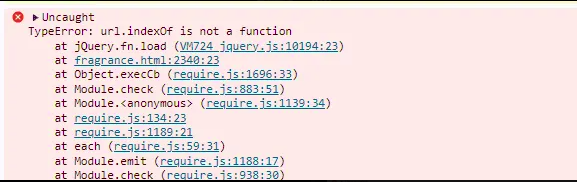
This typically occurs because upgrading Magento also updates the underlying components such as PHP, Elasticsearch, jQuery, etc.
However, certain elements—especially within custom or older themes may still be using the outdated jQuery methods.
As a result, the console throws errors when deprecated functions like .load(), .unload(), and .error() are used, since these are no longer supported in newer versions of jQuery.
No need to worry—we’re here with a simple solution.
In Magento, jQuery code is generally found within .phtml files. To resolve this issue, you need to replace deprecated jQuery methods like .load(), .unload(), and .error() with the .on() method.
For example:
Change this:
$( “img” ).load(fn);
To this:
$( “img” ).on(“load”, fn);
Let’s look at a full example:
Old Code:
<script type="text/javascript">
 $(window).load(function ()
 { // run code initializeCode(); });
 $(window).unload(function()
 { Cleanup(); });

 </script>
Updated Code:
<script type="text/javascript">
 $(window).on('load', function ()
 { // run code initializeCode(); });
 $(window).on('unload', function()
{ Cleanup(); });
 </script>
By updating your jQuery methods, you’ll ensure compatibility with the latest version and eliminate these frontend errors.
Looking to upgrade your Magento store to the latest version?
Let our expert team handle it for you—ensuring a smooth, secure, and hassle-free upgrade with full compatibility and performance optimization.
