

Businesses, B2B or B2C, must follow the rules for TAX or VAT number. The rules may be stricter for B2B businesses.
Also, the rules differ for businesses based on the country of their origin and international transactions that they carry out.
Based on the country, there are different laws of taxes. Therefore, merchants have to validate the VAT number and charge per the rules and regulations to customers. Magento 2 VAT Number Validation in Magento 2 is a feature that allows store owners to validate VAT number during checkout in real-time.
The store admin can show tax/VAT number in registration form in Magento 2.
Check the method for the same below:
Steps to Show Tax/VAT Number in Registration Form in Magento 2:
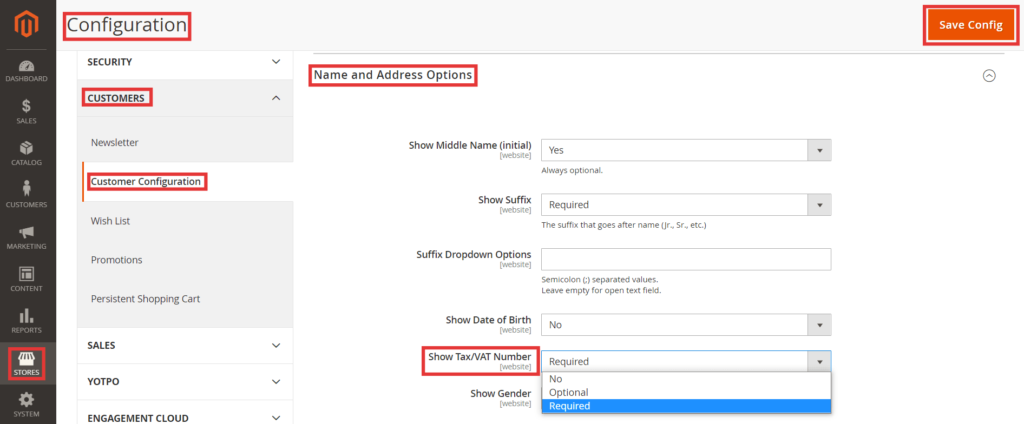
- Login to Magento 2 admin panel
- Navigate to Stores > Settings > Customers
- Under Customer, select Customer Configuration
- Expand Name and Address Options
- Set Required in the field “Show Tax/VAT Number”
- Save the configuration
That’s it.
You can also refer to the video tutorial to configure pagination controls in Magento 2 from our Magento 2 video tutorial series:
Now, you can see the TAX/VAT number field in the registration form:

Also, do share this post with Magento Community via social media.
Thank you.
Related Posts:
