

Traditional Magento 2 themes like Luma are heavy, complex, and often slow down your store. That’s where the lightweight Hyvä themes come in.
If building a Hyvä theme doesn’t sit right with you, the Hyvä theme templates are here for your rescue.
Learn in detail about the Hyvä theme templates here.
What are Hyvä Theme Templates?
Hyvä theme templates are pre-designed layouts in the Hyvä theme for Magento 2.
Instead of creating from scratch, you can use these pre-designed templates for your homepage, product page, category page and more.
The Magento 2 Hyvä templates are designed using modern technologies like Tailwind CSS and Alpine.js. That means they load faster, use less code and are easier to customize.
Hyvä templates are more clean compared to old Magento themes. There is no unnecessary code or scripts that slow things down. Everything is built with speed and simplicity in mind, making your store user-friendly.
Hyvä Templates vs. Designing from Scratch
Creating a theme from scratch can take weeks or even months. Even if you’re using Hyvä which simplifies the process, there is still a lot of design work, coding and testing involved.
Here is a simple comparison to help you understand the difference between using Hyvä theme templates and building your store from scratch:
| Factors | Hyvä Templates | Designing from Scratch |
| Setup Time | Much Faster, templates are ready to use | Slower, everything has to be built manually |
| Ease of Use | Beginner friendly, minimal coding needed | Requires advanced Magento & frontend skills |
| Design Workload | Pre-designed layouts, only some customization needed | Full design needed from ground up |
| Development Cost | Lower, no need to higher a full design team | Higher, More investment in development time & design team |
| Performance | Optimized with Hyvä’s speed-first approach | Depends on how it’s built |
| Best for | Small to midsize businesses, quick launches | Larger custom projects |
This comparison helps you to decide what works best for your project. If speed and cost are your priorities, Hyvä theme templates are an ideal choice. On the other hand, if you want something unique and custom, then opt for Hyvä theme development services.
Ready-made Hyvä Theme Templates
Thanks to many eCommerce agencies that have ready-to-use Hyvä theme templates, you can directly use the template in your Hyvä theme. Here are the 2 best options that you have.
Werra by Meetanshi

Werra is a clean, professional and highly flexible theme template designed to work seamlessly within the Hyvä theme.
Werra offers a stylish and modern design that is best for businesses with a large inventory. Built using Tailwind CSS and Alpine.js, it is a fully responsive theme template that passes Google’s core web vitals.
Features:
- Multiple marketing features like: announcement bar, social icons, currency switcher, and more
- Add sections like trust icons slider, featured products, and newsletter signup form
- Provides semantic HTML tags, schema markups, and more for improved SEO
Pricing:
- $299.00 (Lifetime license)
This Hyvä theme template for Magento 2 comes with multiple preset options like Allura, polish, glow, flash, and more to set the design requirement as per your needs. This way, you are not stuck with the default design but have customization freedom.
Our Werra template comes with only a one-time cost with no subscriptions or recurring payments.
Enjoy 90+ page speed score with an industry preset using the lightweight Werra template.
Get Now
L’Éclat Bakery by Meetanshi
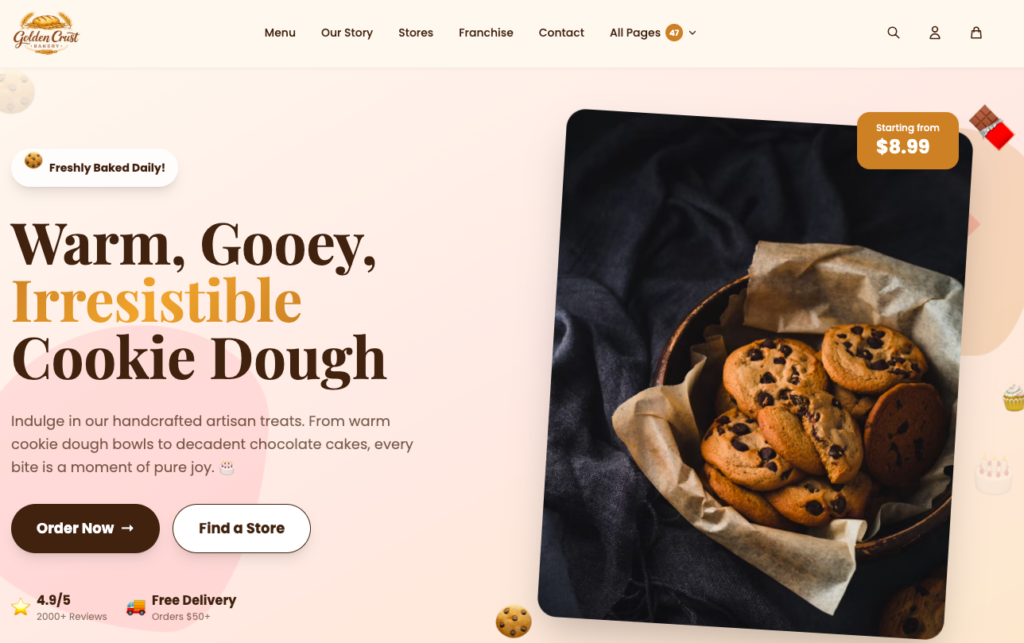
L’Éclat Bakery is a minimal and attractive Hyvä theme template designed for bakery, food, and dessert stores.
It offers a visually appealing design that helps businesses showcase products, categories, offers, and other store elements in an organized way. Built for Magento 2 with Hyvä, it provides a responsive and modern shopping experience.
Features:
- Clean and attractive layout for bakery and food stores
- Dedicated sections to showcase products, categories, and offers
- Responsive design for a smooth shopping experience across devices
Pricing:
- $299.00 (Lifetime license)
This Hyvä theme template is a suitable choice for bakery businesses that want to launch a professional Magento 2 store without investing heavily in custom design and development.
Aurora Jewelry by Meetanshi
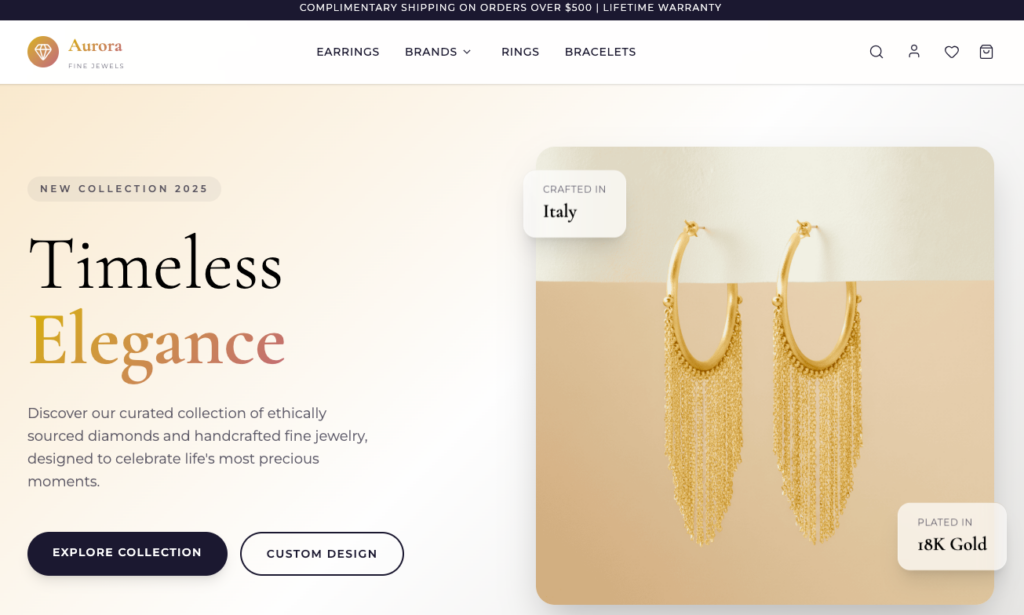
Aurora Jewelry is an elegant and modern Hyvä theme template designed for jewelry, fashion, and other premium eCommerce stores.
It focuses on product presentation with a clean layout and sophisticated design. The template helps businesses create a premium storefront while saving the time and effort required for designing a Magento 2 theme from scratch.
Features:
- Elegant design focused on showcasing products
- Clean layouts for a premium shopping experience
- Responsive design optimized for different screen sizes
Pricing:
- $299.00 (Lifetime license)
Aurora is a good choice for businesses looking for a modern and customizable Hyvä storefront with a premium look and feel.
Instabuild by Aureate Labs
Aureate Labs Hyvä theme templates called Instabuild which is designed to provide a quick launch experience for Magento stores. This is best for businesses that want to launch their store in days, not weeks.
Instabuild focuses on delivering performance, ease of customization and excellent UI/UX.
Pricing: Basic $550
- Add-on price includes:
- Installation (Add-on) + $275
- Figma File Design(Add-on) + $220
- Hyvä Theme Licence (Add-on) + $1150
How to Use Hyvä Theme Templates?
Here are the steps to properly use the Hyvä theme template.
Override a Template
Copy the original template file
From
vendor/Hyvä-themes/magento2-default-theme/Magento_Catalog/templates/product/view/addtocart.phtml
To
app/design/frontend/Meetanshi/Hyvä-child/Magento_Catalog/templates/product/view/addtocart.phtml
Now edit the template inside your theme. Hyvä uses Alpine.js for interactivity, so you can use attributes like x-data, x-show, x-on:click, etc.
Use Tailwind and Alpine.js
You can use Tailwind CSS classes for layout, spacing, typography, etc.
Add interactivity using Alpine.js:
<div x-data="{ open: false }">
  <button @click="open = !open">Toggle</button>
  <div x-show="open" class="mt-2">Hello from Alpine</div>
</div>
Use Template from Custom Module
If you created a module like Meetanshi_HyväFeature, and want to use a custom Hyvä-style template:
Layout XML
<page xmlns:xsi="http://www.w3.org/2001/XMLSchema-instance" layout="1column" xsi:noNamespaceSchemaLocation="urn:magento:framework:View/Layout/etc/page_configuration.xsd">
    <body>
        <referenceContainer name="product.info.main">
            <block class="Magento\Framework\View\Element\Template" name="custom.Hyvä.block" template="Meetanshi_HyväFeature::custom.phtml"/>
        </referenceContainer>
    </body>
</page>
Template File
app/code/Meetanshi/HyväFeature/view/frontend/templates/custom.phtml
Use Hyvä-style HTML inside:
<div class="p-4 bg-blue-100 rounded" x-data="{ show: true }">
    <h2 class="text-lg font-semibold">Custom Hyvä Block</h2>
    <button @click="show = !show" class="mt-2 bg-blue-500 text-white px-4 py-2 rounded">
        Toggle Content
    </button>
    <div x-show="show" class="mt-2">This is toggled content.</div>
</div>
Why Pick Hyvä Theme Templates by Meetanshi?
Meetanshi is known for its high-quality Hyvä theme.
Industry experience and the template cost are what make Meetanshi stand out.
Our Magento experts, who have been working closely with Hyvä since its launch, have built the template to strike the right balance between flexibility and customization.
Secondly, we charge a one-time cost so you don’t need to keep paying for a template. Werra is among the first templates among the multiple templates coming your way soon.
Choosing Meetanshi means you are getting a reliable partner, expert support, and timely upgrades.
Reduce Hyvä Theme Development Costs Today
Building a Hyvä Magento theme using a pre-built template; you get a fast and modern site without much effort. So, if you want to launch a store in a short time and with a minimal budget, the Werra theme templates by Meetanshi is a smart choice for you.
