This guide provides a complete step-by-step process, covering both the complex legal requirements and the critical localization steps needed to launch a successful Shopify store in Brazil.
Legal Requirements to Start a Shopify Store in Brazil
To start a Shopify store in Brazil, you must comply with several legal requirements related to business registration, tax obligations, and e-commerce regulations.
Here is a complete checklist for it.
Business Registration
- Registering your e-commerce business as a commercial company at Junta Comercial (Board of Trade) is mandatory in each state where your business has a physical presence or infrastructure.
- Draft and register the Articles of Association (Contrato Social) with the Junta Comercial. This document outlines the company’s purpose, structure, and rules.
- Obtain a CNPJ (Cadastro Nacional da Pessoa Jurídica) number from the Brazilian Federal Revenue Service. This is the national business registration and tax identification for your company.
- Register with the municipality offices where the business operates for local tax and permit compliance.
- Obtain the state registration (Inscrição Estadual, IE) for ICMS tax collection on goods circulation, often done concurrently with CNPJ registration
E-commerce Legal Compliance
- Follow Brazil’s e-commerce laws, including transparency, consumer rights, and data protection under LGPD (Lei Geral de Proteção de Dados)
- Ensure your store meets legal requirements for providing full product information, pricing, including taxes, and clear communication with customers
Taxation and Import Regulations
- Comply with ICMS (state tax on goods and services), which varies by state but is generally set at 17% for e-commerce
- For imported goods, register with SISCOMEX and SECEX, and obtain a RADAR license if you are importing directly
- Brazil has a Programa Remessa Conforme (PRC) for e-commerce that offers tax incentives and simplified customs clearance if you register and comply with predefined criteria, such as collecting ICMS and import taxes upfront
- Import duties vary: shipments up to $50 may have reduced rates, while shipments over $50 face higher import taxes and formal customs processing
How to Set up a Shopify Store in Brazil?
Here is a simple and easy-to-follow process to start a Shopify store in Brazil. Let’s see the steps for it.
Step 1: Create Your Shopify Account
You can easily begin your Shopify journey with a free trial.
- Create your Shopify account by adding the required details of your business.
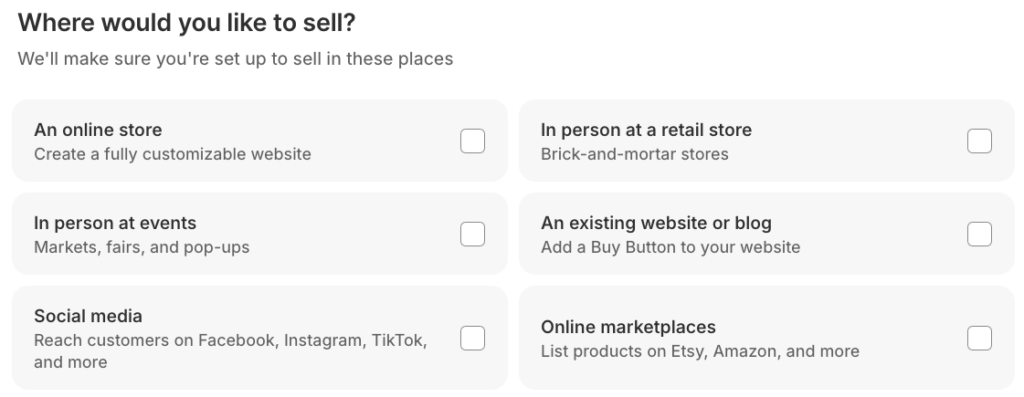
Step 2: Add Theme, Products, & Collection
To add a theme, go to Online stores > Themes. You’ll find a selection of free and paid themes, or you can create a custom theme with the new AI feature.
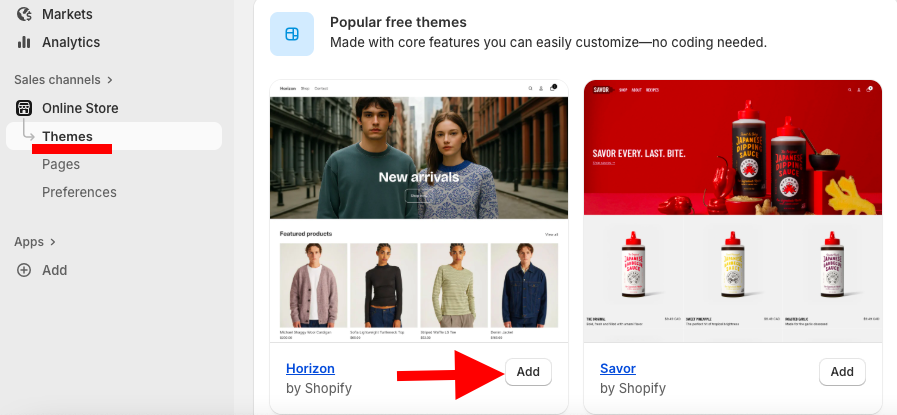
Access the theme editor to customize your store’s layout, default sections, colors, and more. To do this, go to Online Store > Theme > Customize.
Now add your first product to the store. For that, go to Products > Add Product. You can add items manually or upload them in bulk via CSV. Here we’ll see the manual method.
Fill in product details:
- Title: Clear and catchy
- Description: Informative and benefits-focused
- Images: High quality
- Category: Relevant product category
- Status: Active
Set pricing:
- Price: Actual selling price
- Compare-at Price: Original price (for discounts)
- Charge tax: Check if applicable
Adjust inventory & shipping:
- Manage stock levels under Inventory
- Add shipping details for physical products
Add variants:
- For products with multiple sizes, colors, or styles, set variant-specific pricing and inventory.
Search Engine Listing Preview:
- Page Title: visible in store
- Meta Description: short summary for search engines
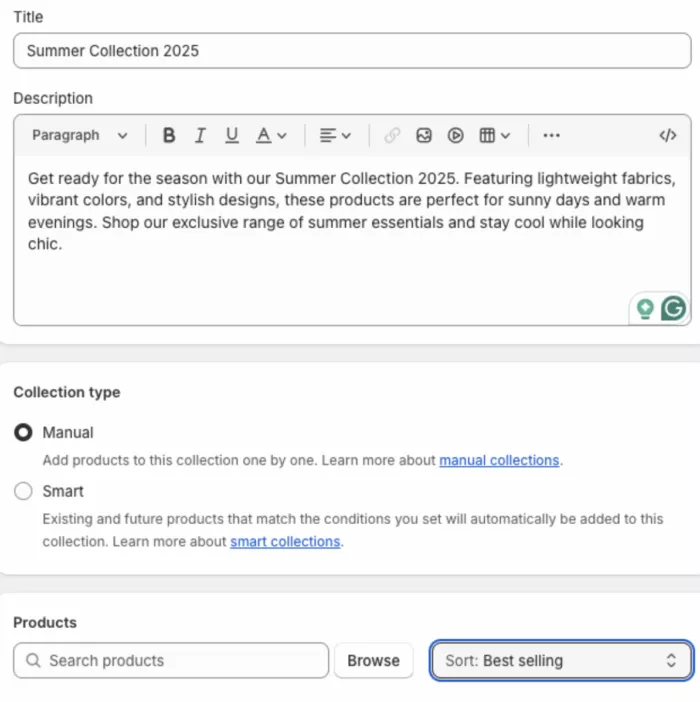
The next step is to create collections to help customers find products by category and keep your store neat and tidy for that click, Collections.
There are two types of collections:
- Manual Collections: Add products individually
- Automated Collections: Assign products based on set conditions
To add one, click Add collection, then add the title of the collection and a crisp description about the collection.
Then select the type of collection you want to add.
Step 3: Create & Add Other Important Pages
Unlike default product and collection pages, these custom, static pages, such as an About Us, FAQ, or a Size Chart, provide the necessary information that gives your store a professional and organized appearance. You can even add a size chart to Shopify to help customers make informed choices.
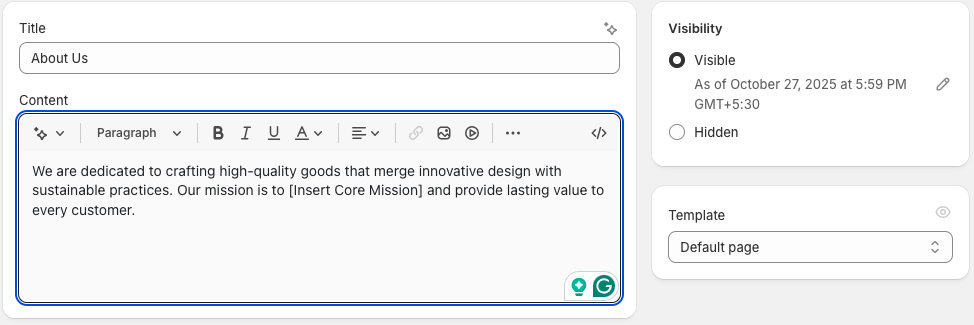
To create a page in your Shopify store, go to Online store > Pages.
- Click Add page
- Write a neat title
- Add description, using the rich text editor for formatting, images, and videos
- Set visibility (visible by default, but can be hidden or scheduled)
- Click Save
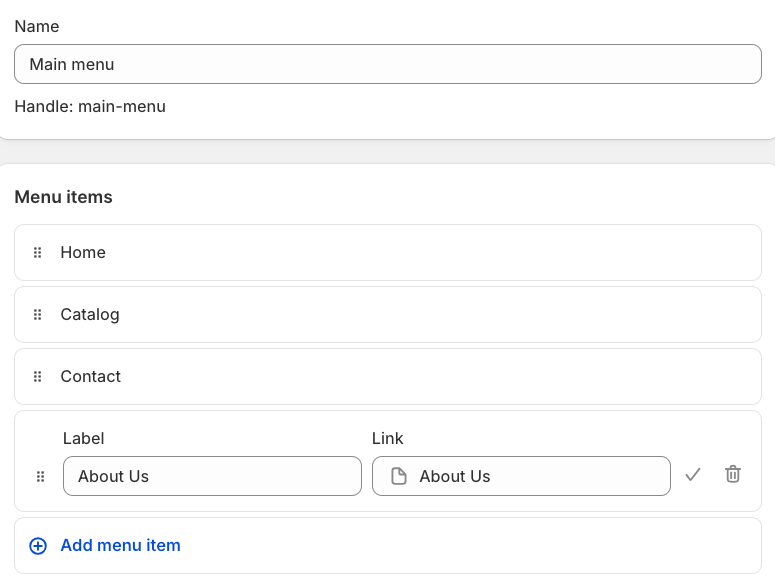
Then add this created page to the navigation menu. From the admin panel, go to Content > Menus.
- Select the menu you want to add a page to (e.g, main menu, footer menu, etc.)
- Click Add menu item
- Enter the desired name for the menu (for example, About Us)
- In the Link field, select Pages, then choose the page you created
- Click Add, and finally, click the Save menu to apply the changes
Step 4: Add Payment Solution
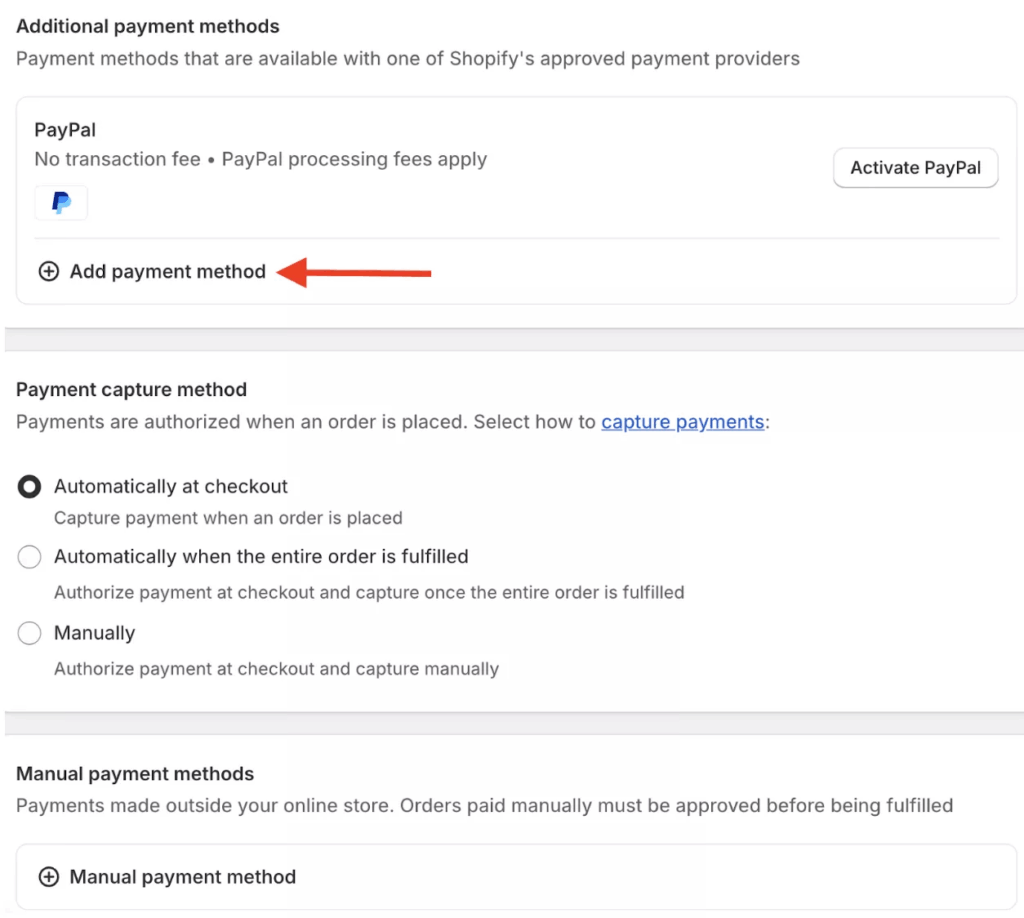
To configure your payment options, navigate to Settings > Payments in your Shopify admin.
You can connect third-party providers such as Pix or add a different payment gateway from the Shopify App store. Make sure to enter your bank account and business details to receive payouts without delays.
Payment settings include two important configurations:
- Payment Capture – Decide whether to capture payments automatically or manually after an order is placed.
- Manual Payment Methods – Offer alternative options like cash on delivery or bank transfers to give customers more flexibility at checkout.
Step 5: Add Shipping & Tax Details
You can add the postal service provided by Correios. Correios and integrate its rates at the checkout. Additionally, you can manually add different shipping zones.
Then, navigate to Settings > Taxes and duties. Add the correct state-level tax rate. You will likely need an app to add fields to your checkout for customers to enter their CPF (for individuals) or CNPJ (for businesses), which is required for tax invoicing (Nota Fiscal).”
Step 6: Launch Your Shopify Store
Once the above steps are completed, your store is ready to launch.
You can then remove password protection from Online Store > Preferences.
Begin your marketing efforts by establishing a social media presence, running ads, and utilizing Shopify’s integrated tools for SEO and email marketing.
Hire a Shopify Professional
Building a Shopify store requires more than just setting up products; it’s about creating an unforgettable shopping experience that drives sales.
Our Shopify store development service helps you achieve:
- Build an end-to-end, SEO-optimized store that drives visibility
- Maintain lightning-fast page speed for better performance
- Add smart customizations without breaking your theme
- Get expert guidance to keep your store running smoothly and profitably
So why take the risk of managing it on your own? Let our Shopify experts turn your eCommerce vision into reality, while you focus on growing your business.
Create a Customized Shopify Store in Brazil
So, this guide totally breaks down how to set up your Shopify store in Brazil. We have covered everything, from localization to optimization. With custom themes, intuitive layouts, and personalized features, you can create a store that stands out in Brazil’s competitive e-commerce market.
Don’t settle for a generic store. Hire our Shopify theme customization team to craft a store that’s truly yours, optimized, unique, and ready to grow your business.
Let our Shopify experts create a custom theme to boost and elevate your customer experience.
Learn More