

Setting the right shipping rates can largely impact both your Shopify store’s profitability and customer satisfaction.
No matter what you are selling, calculating accurate shipping per item ensures transparency and builds trust. In this article, we will discuss how to set shipping rate per item on Shopify.
Let’s dive in!
Can You Charge Shipping Rate Per Item in Shopify?
Yes, you can charge shipping per item in Shopify. However, there is no direct native approach.
By default Shopify, calculates shipping based on:
- Shipping zones
- Shipping profiles
- Weight-based rates
- Price-based rates
- Carrier-calculated rates
There is no built-in “charge ₹X per quantity” setting.
You must use an app to get more flexible shipping rules. This way, you can customize the shipping cost to match each item in the cart, giving you more control over your shipping pricing.
Charging the standard shipping cost, makes 48% of the shoppers leave the cart.
Set up Shipping Rate Per Item on Shopify Using an App
Use the Meetanshi Shipping Per Item app to customize pricing for each item or apply flat rate for all orders.
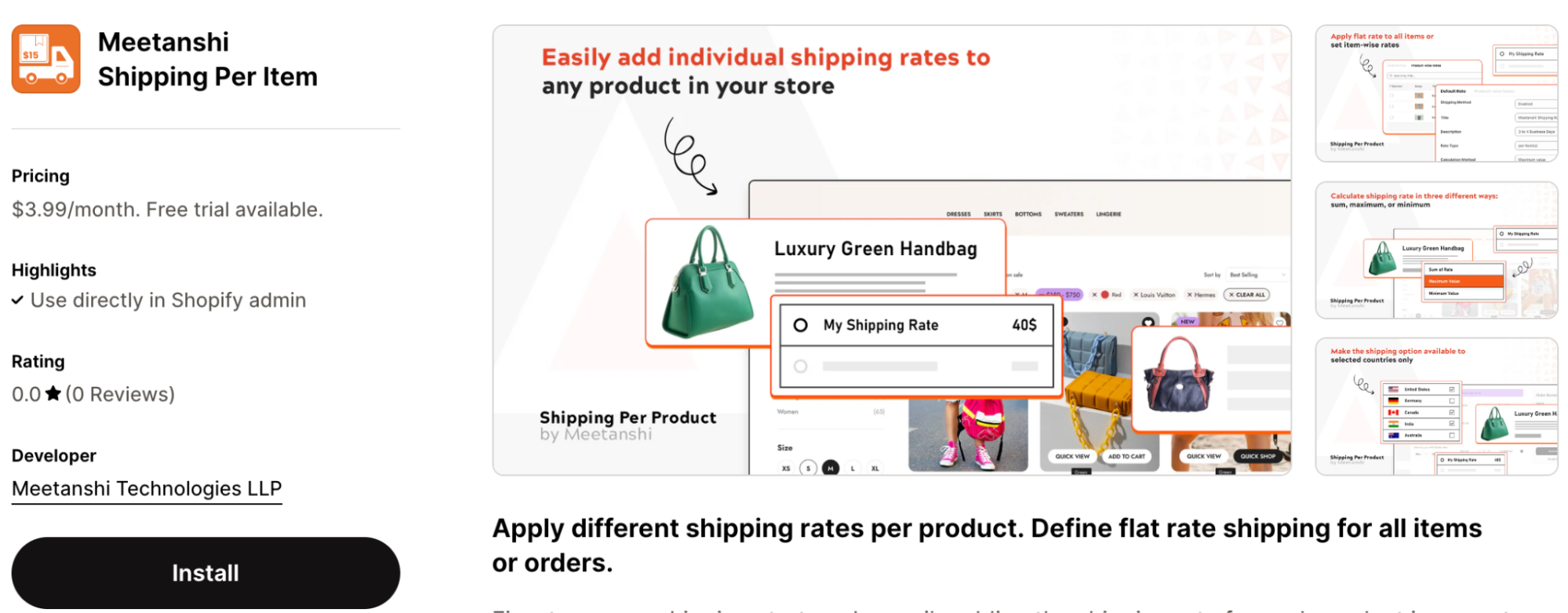
Here are the steps on how to set Shopify shipping rates by product.
Step 1: Add Default Shipping Rate
Here, you will include the default pricing in case you don’t want to include a shipping fee for all the products in your store.
- Install the app and go to the app settings in your Shopify admin.
- Toggle the shipping method to “Enabled.”
- Enter a title for the shipping method and a description that will appear at checkout.
- Choose between Rate type: charging per item or per order
- If you select per item, decide how rates are calculated: sum, highest rate, or lowest rate.
- Set either a default rate for all products or specify rates for each.
- Add an optional handling fee if needed.
- Choose where the shipping method applies: globally or in specific countries.
- Set minimum and maximum order amounts, if applicable.
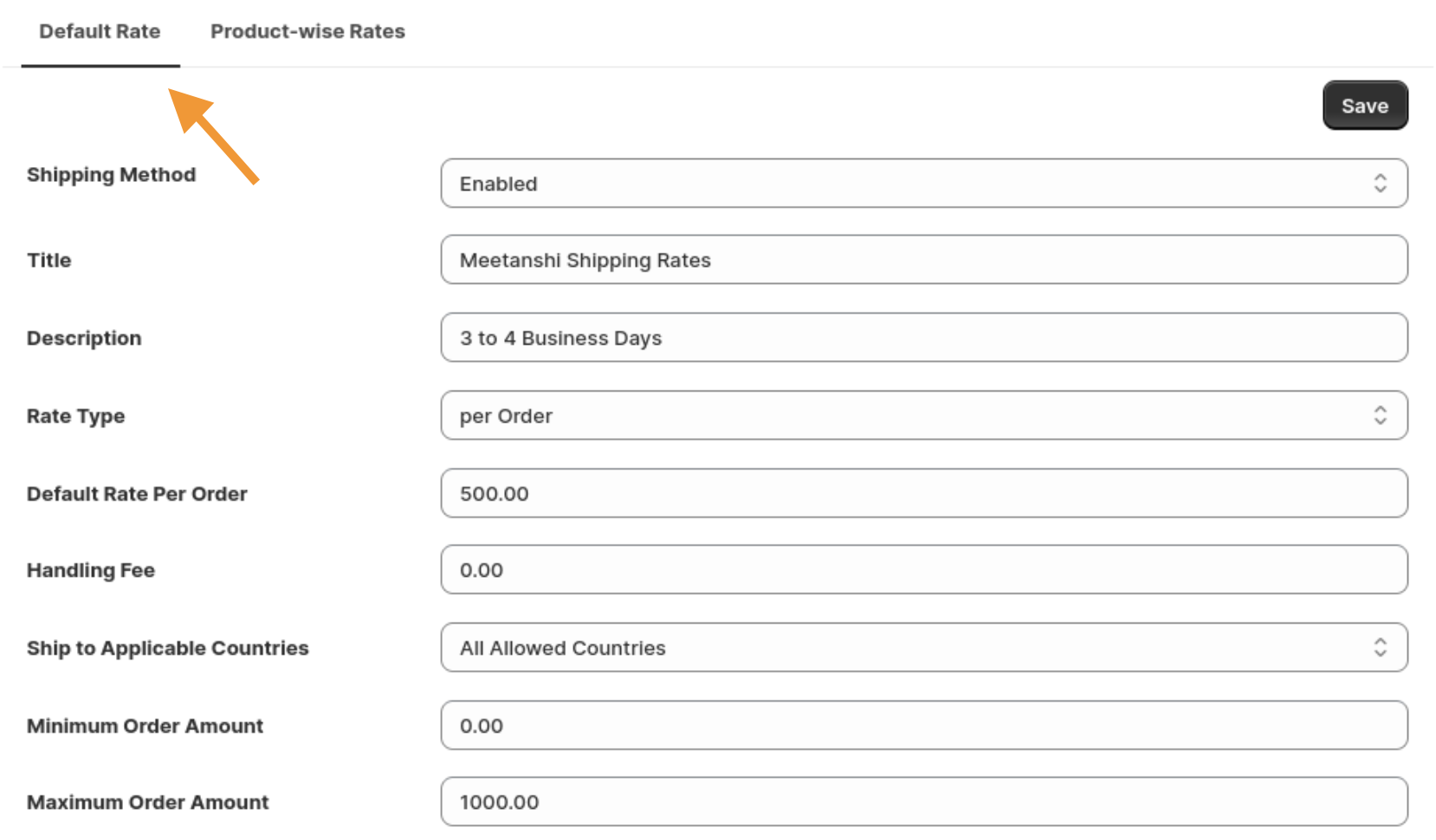
Step 2: Add Per Item Shipping Charge
Now, you need to add different Shopify shipping rates per product. You can add the shipping rate for multiple products in one go.
- Go to the Product-wise Rates tab in the app settings.
- Use the search bar to find and select the products you want to apply custom shipping rates to.
- Enter the shipping rate in the “Rate Price“ field for each product and click Save to apply the changes.
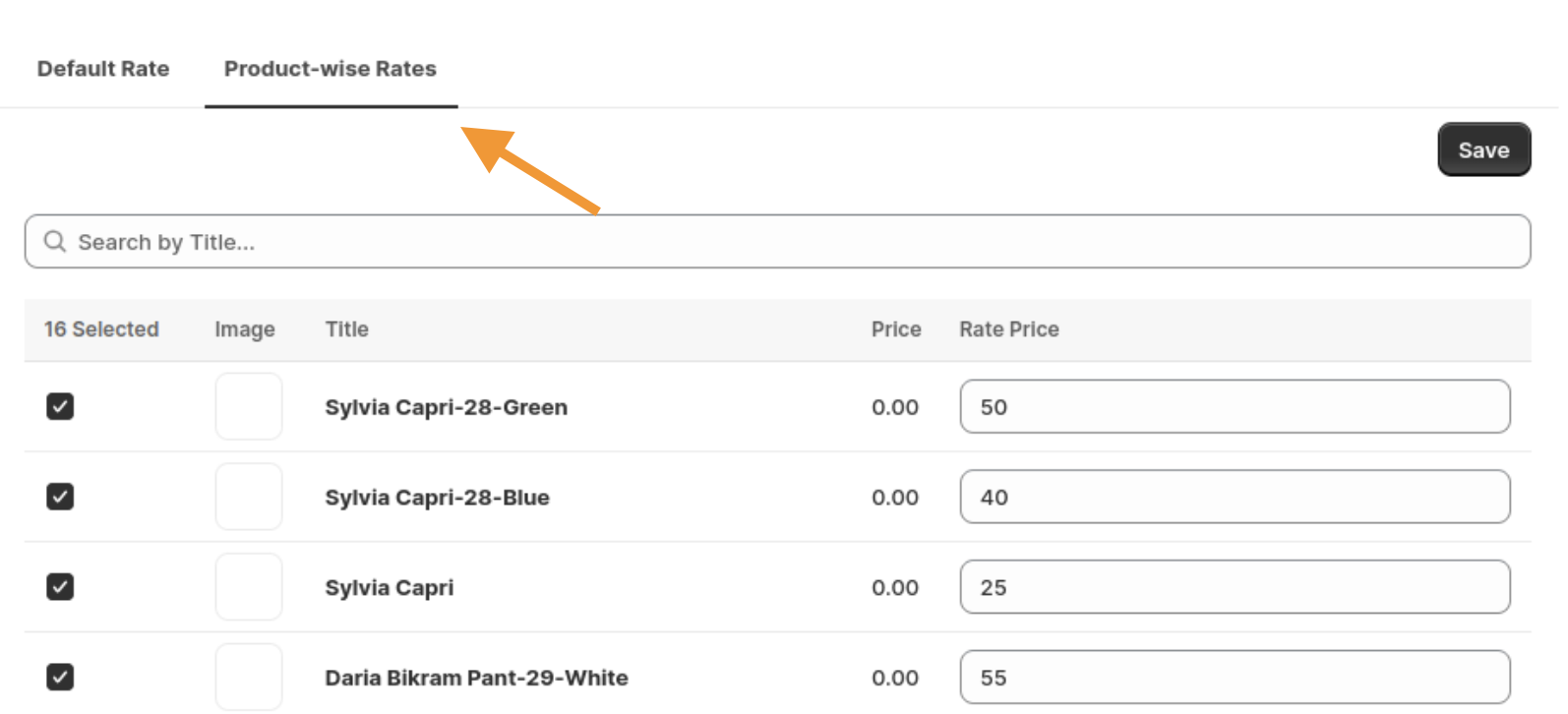
Alternatively to charge shipping per item on Shopify, go to Products and select the product you want to edit. Scroll down to the Metafields section, enter the shipping rate in the “Shipping Price“ field for the product variant.
Step 3: Shipping Charged Applied in the Frontend
Now, let’s discuss how things will look from your customer’s perspective:
When a customer adds items to their cart and heads to checkout, the shipping rates you’ve set up — whether product-specific or default will automatically apply.
The total shipping cost will be calculated based on the rate type you’ve chosen, either per item or per order, along with any custom rates you’ve set for individual products
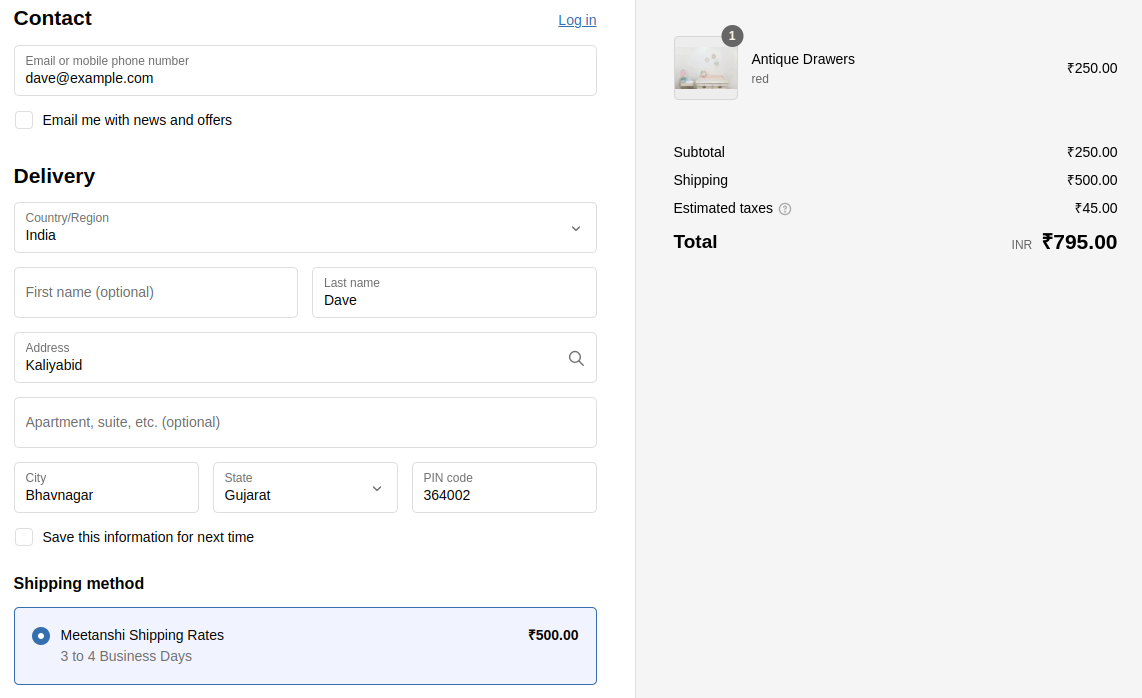
By following these steps, you can offer precise shipping options that align with your business needs.
Add a shipping rate for each product to charge a fair price based on different factors.
Add Today
Alternate Way to Add Per Product Shipping in Shopify
The default Shopify shipping options per product is not a direct feature available in the admin to change. You edit shipping rates manually through Shipping Profiles. This is the standard non-app method to manage how much you charge.
Shipping profiles help you group products together.
You can create a profile for specific products and assign unique rates to that group. For example, if you have a “Heavy Goods” profile and a “Standard” profile, you can set different rules for each.
Here are the steps to create a shipping profile.
- Log in to your Shopify Admin > Setting > Shipping and delivery.
- In the Shipping section > Click Create custom profile.
- Add details like profile, zone, and rates.
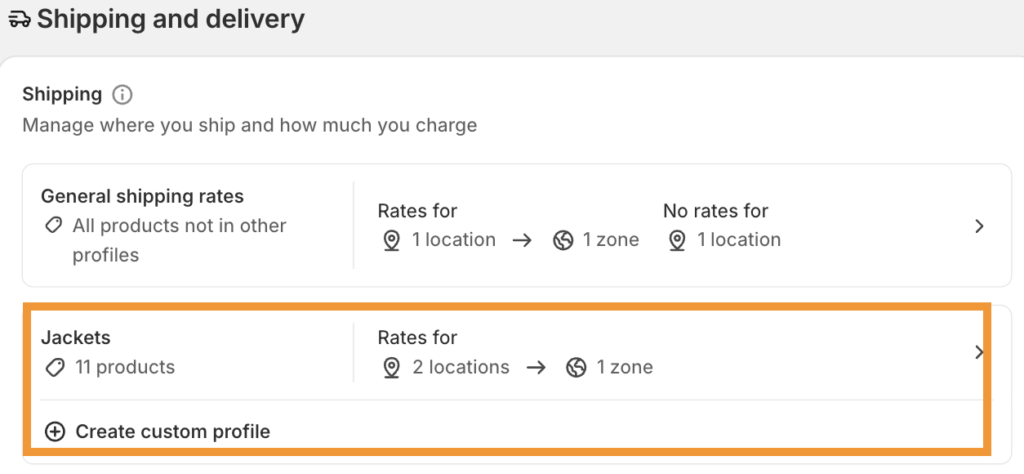
If a customer purchases items from two different profiles (e.g., a “Standard” item and a “Heavy” item), Shopify will add the cheapest rate from each profile together at checkout.
This is the closest native way to achieve a per-category shipping cost.
How to Change Shopify Shipping Cost?
If you need to update your existing rates perhaps due to a carrier price hike or a seasonal promotion follow these steps within your Shopify Admin:
- Go to Settings and select Shipping and Delivery.
- Click on the General shipping rates profile (or a custom profile you’ve created).
- Scroll down to the “Shipping zones” section you want to edit and click the three dots (…)
- Adjust the price or the weight/price conditions and click Done, then make sure to hit Save at the top of the page.
Manual changes apply globally to the products in that profile. If you need to change the rate for just one specific item without affecting others, using the Meetanshi Shipping Per Item app is significantly faster and more precise.
Key Benefits of Using Meetanshi Shipping Per Item App
Meetanshi Shipping Per Item app is the perfect solution for you to have the flexibility in their shipping setup.
Here are some key benefits of the app:
Flexible Shipping Rates Per Item
One of the biggest benefits of the Meetanshi Shipping Per Item App is the ability to set different shipping rates for each product.
You’re not stuck with just one flat rate for all orders—you can tailor shipping charges based on the specifics of each product, whether they vary in size, weight, or type. This way, you never undercharge or overcharge, leading to more accurate costs and happier customers.
Easy Apply Shipping Charges
The app makes it easy to configure shipping rates globally or on a per-product basis. You can quickly add and adjust rates either from the product edit section or within the app’s product-wise rates tab.
This ease of use saves you time and ensures your shipping setup stays accurate.
Tailored Shipping for Different Regions
With Meetanshi Shipping Per Item App, you can apply shipping rates only to specific countries or globally. This means you can offer different rates based on where your customers are located, making the process more seamless for everyone involved.
Customizable Titles and Descriptions
To further personalize the customer experience, the app allows you to create custom titles and descriptions for the shipping method that your customers will see at checkout.
This small but impactful feature helps clarify shipping timelines and options, which is important for setting expectations.
Support for Handling Fees
If your business charges additional costs for packaging or special handling, you can easily include a handling fee into the shipping rate.
This optional feature ensures that all your costs are covered without having to include them in your product prices.
Tailor Your Shipping Charges With Ease
It is important for Shopify store owners to set up per-item shipping rates on Shopify in order to optimize their shipping costs and provide a transparent experience to their customers.
You can check out Shopify apps for geolocation that automatically detect your customers’ locations help to set up per-item shipping rate
The Meetanshi Shipping Per Item app gives flexibility and control, allowing you to apply specific shipping rates per product, choose different rate calculation methods, and tailor charges for various regions.
Add a shipping rate for each product to charge a fair price based on different factors.
Add Today
