

Your best marketing? Real customer feedback. The Google Reviews Widget helps you showcase them live on your Magento 2 site, without any complex setup.
Displaying them on your Magento 2 store is straightforward with a widget extension.
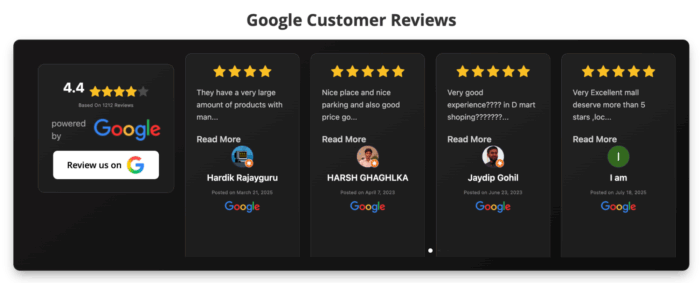
This is how it appears.

Adding a Google review can immensely boost trust with new visitors by showcasing real, verified customer feedback. Additionally, it serves powerful social proof, the store’s credibility, and improves SEO.
Options to Display Google Reviews
There are mainly three ways to display Magento 2 Google customer reviews, let’s see them real quick.
1. Using a Google Review Widget Extension (Recommended)
You can use a third-party extension like Meetanshi Magento 2 Google Reviews Widget to pull and display real Google reviews directly on your store. Using it is easiest to manage with basic coding skills.
It offers a backend panel where you can:
- Add Place ID and API key
- Customize layout, colors, button text, and number of reviews
- Control display on desktop, tablet, and mobile
- Embed reviews via CMS blocks, pages, or .phtml templates
2. Use API Integration
If you are good with coding and developing, then use Google’s Places API to fetch and display reviews dynamically. This method will give you full control over customization and appearance.
3. Add Screenshot or Clickable Badges
If you prefer a lightweight approach, then opt for taking screenshots of standout Google Reviews and uploading them as images under the “Testimonials” section or page.
You can also add a clickable link or badges that redirect users to Google business review page, but the method won’t show reviews directly on your Magento store.
How to Use Magento 2 Google Reviews Widget Extension?
To use the Magento 2 Google Reviews Widget extension, once it is installed successfully, you will need to follow the steps below:
Step 1: Get Place ID and Maps API Key
Get your Place ID using Google’s Place ID Finder and a Maps API key from the Google Cloud Console.
Step 2: Configure the Extension
In Magento admin, go to Stores > Configuration > Meetanshi > Google Customer Reviews to configure it and then adjust display settings like layout, colors, and review count.
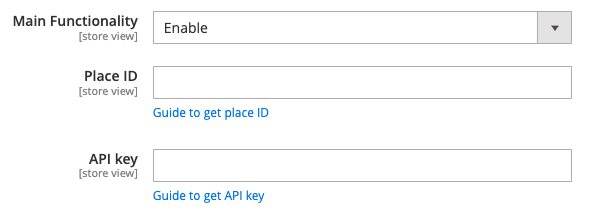
Then, click the Save button.
Step 3: Include the Widget Code on Any Page
Paste the widget block code where you want reviews to appear:
{{block class="Meetanshi\GoogleCustomerReviews\Block\Reviews" template="Meetanshi_GoogleCustomerReviews::review.phtml"}}
Use it in CMS pages, static blocks, or .phtml templates.
Step 4: Widget Added to the Page on Frontend
Flush the Magento cache. The reviews will now be visible on the frontend, styled as per your settings.

Bonus: Change the Design of the Google Reviews Widget
You can easily match the widget design with your store using the Custom CSS option. Just enter custom CSS code to fully control the widget’s design and responsiveness.
For example:
Why Choose Our Extension Over Other Options?
Our extension offers a simple yet powerful way to display real-time, verified Google customer reviews in Magento. It is quick and easy to set up, offers numerous customization options, all of this without any coding.
Plus, it also has an advanced option for custom CSS and is specifically built for Magento 2. It integrates swiftly and is backed by expert support.
Build Trust. Show Proof. Grow Sales – Install the Widget Now!
Install Now
FAQs
Is the Extension Hyvä Compatible?
Yes, the extension is fully compatible with Hyvä themes and works seamlessly with its structure.
How to Display Google Reviews in Magento 2 Footer?
Add the widget block code to a static block and assign that block to the footer container via layout settings or XML. Use this code:
{{block class="Meetanshi\GoogleCustomerReviews\Block\Reviews" template="Meetanshi_GoogleCustomerReviews::review.phtml"}}
It will display your Google reviews in the footer section of your store.
