If starting a Shopify store feels overwhelming, AI is here to save your day.
AI now integrates directly into the Shopify admin, helping you build a store using simple prompts and quick actions. Learn here how to build Shopify store with AI that is ready to bring in quality search traffic.
Key Pillars of Building a Shopify Store Using AI
There are three main pillars to build a Shopify store with AI: Shopify Magic, Shopify Sidekick, and AI-powered Shopify apps.
They help to bring your store version to life, effectively handling design, operations, and marketing without needing a developer team.
Shopify Magic
- Pricing: Free Shopify AI tool
- Availability: Directly in the Shopify Admin
It uses simple instructions to quickly create store content, like product descriptions, SEO metadata, emails, and more. Since it’s integrated with your store’s media and theme, it uses your images to write accurate, SEO-friendly descriptions and uses text prompts to create theme-consistent layouts or custom image backgrounds that match your brand.
With Shopify Magic, you can:
- Generate content such as headlines, product descriptions, emails, and more that match your brand style and work in multiple languages
- Turn simple product photos into professional images by removing backgrounds or creating new scenes using AI
- Create theme blocks automatically without the developer requirement, by just describing the section or feature you need
- Suggest instant, accurate answers to customer questions using your store’s policies and live order data
Shopify Sidekick
- Pricing: Free Shopify AI tool
- Availability: Directly in the Shopify Admin
Shopify Sidekick is a conversational AI in your admin that knows your store’s data, settings, and inventory.
Simply talk to Sidekick to change settings, generate content, or get guidance while building your store, rather than searching through menus. For new store owners, it’s especially helpful for creating product descriptions, setting up pages, and getting step-by-step help to launch the store faster using AI.
With Shopify Sidekick, you can:
- Give simple instructions in plain language, and it handles the setup for you automatically
- Jump to the right Shopify settings or reports instantly using simple commands
- Remember your preferences, such as tone or writing style, so future tasks align perfectly with how you like to work
AI-powered Apps
- Pricing: Free and Paid
- Availability: Shopify App Store
The Shopify App Store acts as your extended AI workforce to get AI to manage various store tasks.
Additionally, there are also specialized apps like AI store builders that craft an entire store. However, these often involve a cost and might still require some level of developer knowledge or fine-tuning.
Here are some of the ways the Shopify apps can be used:
- For personalizing storefronts and product recommendations using real-time customer data
- To build smart email segments, generate campaigns, and create SEO-optimized content with minimal effort
- Resolves customer issues and manages orders, cutting support costs
How to Build a Shopify Store for Free Using AI(Step-by-Step)
Here are the steps to build your Shopify store using the native AI tools like Shopify Magic and Sidekick without any challenges. Since both are built-in tools, there is no need to integrate them as they are easily available in your store.
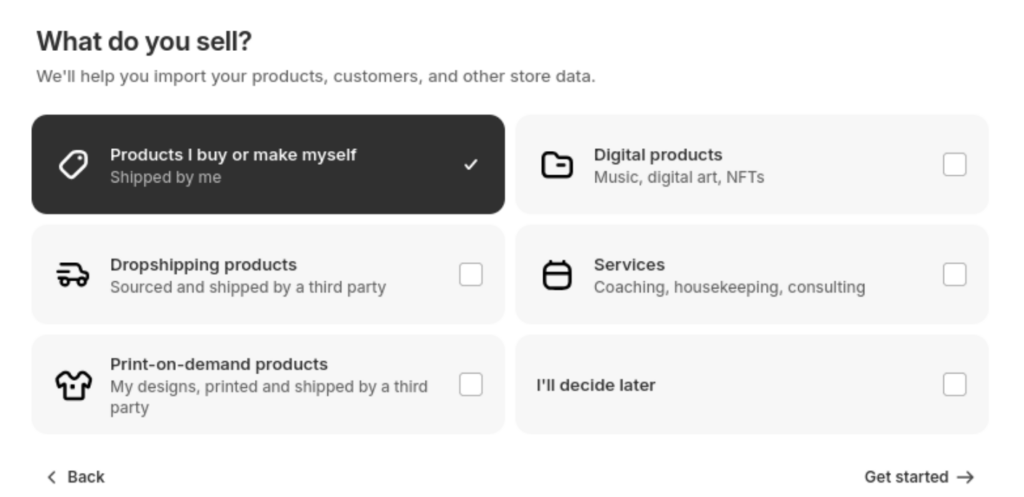
Step 1: Take a Shopify Free Trial
Start with a Shopify free trial and fill in the details to help Shopify to know more about your business. The AI tools Shopify Magic and Shopify Sidekick are available to use on the free trial.
Step 2: Activate Sidekick & Set Brand Vision
Click on the Shopify Sidekick icon in the top-right corner of your Shopify admin; it will open a chat window on the right side. Then, describe your brand idea; for example, what are you building, who is your target audience, and more.
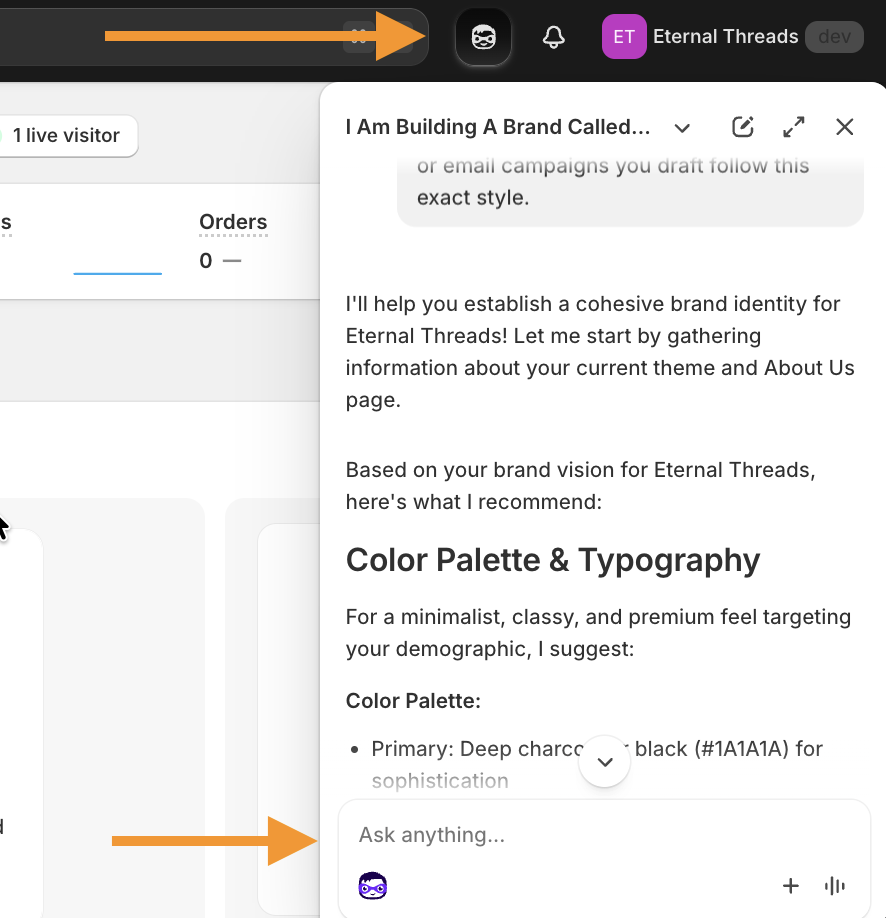
Once you provide a clear prompt, Sidekick automatically updates your brand settings and memorizes your tone of voice for all future content. This creates a seamless workflow as it remembers your explicit preferences and past conversations, allowing it to adapt to your specific communication style over time for better continuity.
Step 3: Add a Shopify Theme
Shopify stores start with the default Dawn theme.
In order to discover other free and paid Shopify themes, head to Online stores > Themes > Visit Theme Store to find a theme that matches your branding.
After adding the theme, use Shopify Sidekick to fine-tune the theme elements. For example, ask Sidekick to change the button color for all your products in bulk.
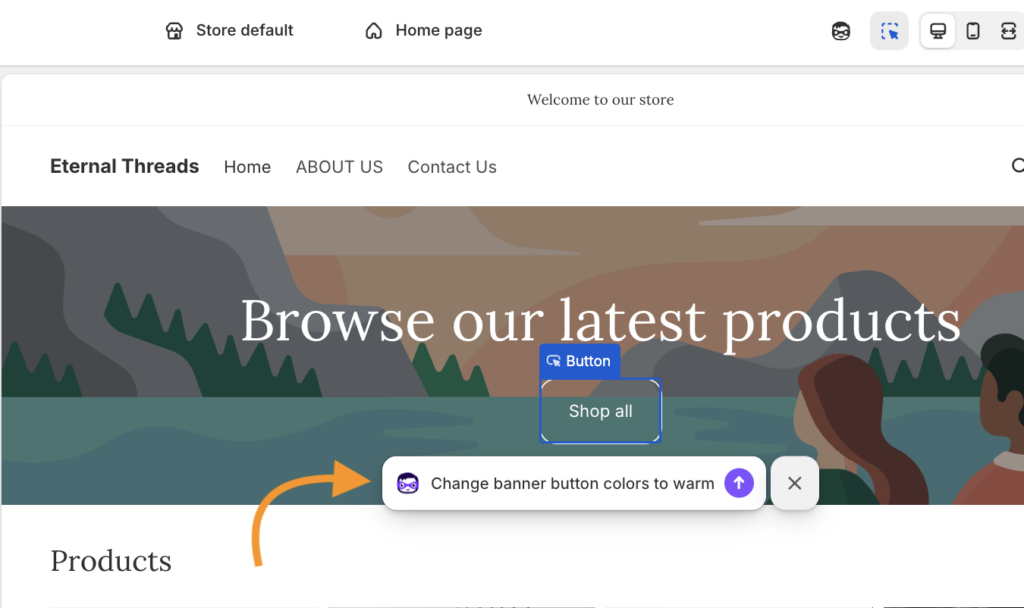
Within a few seconds, the changes are done, saving you time from manually updating each button.
Additionally, to give your store a truly professional edge without coding, you can use the free MIT Custom Sections Shopify app to easily add high-converting, pre-designed sections to your AI-generated layout.
Your all-in-one solution to create a professional Shopify store
Install App Now
Step 4: Create Products & Collections Content
We have noticed Shopify store owners struggle with writing, but with Shopify Magic AI, everything changes.
From your Shopify admin panel, click Product > Add product, then add the basic details about your products like images, variants, category, price, etc.
For writing a product description, using the sparkle icon and from the dropdown, add the needed information for Shopify Magic to create a specific description.
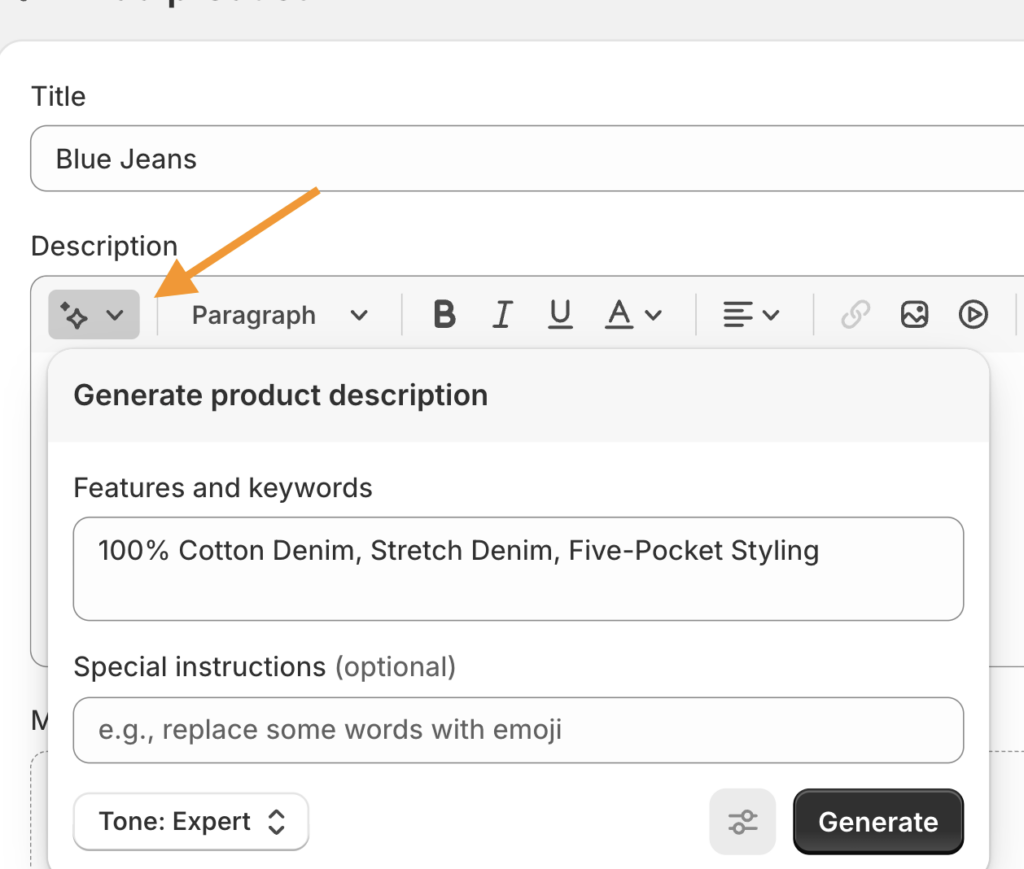
While Shopify Magic is popular for writing product descriptions, you can either opt for an AI content generator to write your SEO-friendly product title and meta description or give a prompt to Shopify Sidekick to help you write it.
Save your product and follow a similar process to add other products.
Then, instruct Sidekick to create a new collection and automatically add all products that share a specific tag to it.
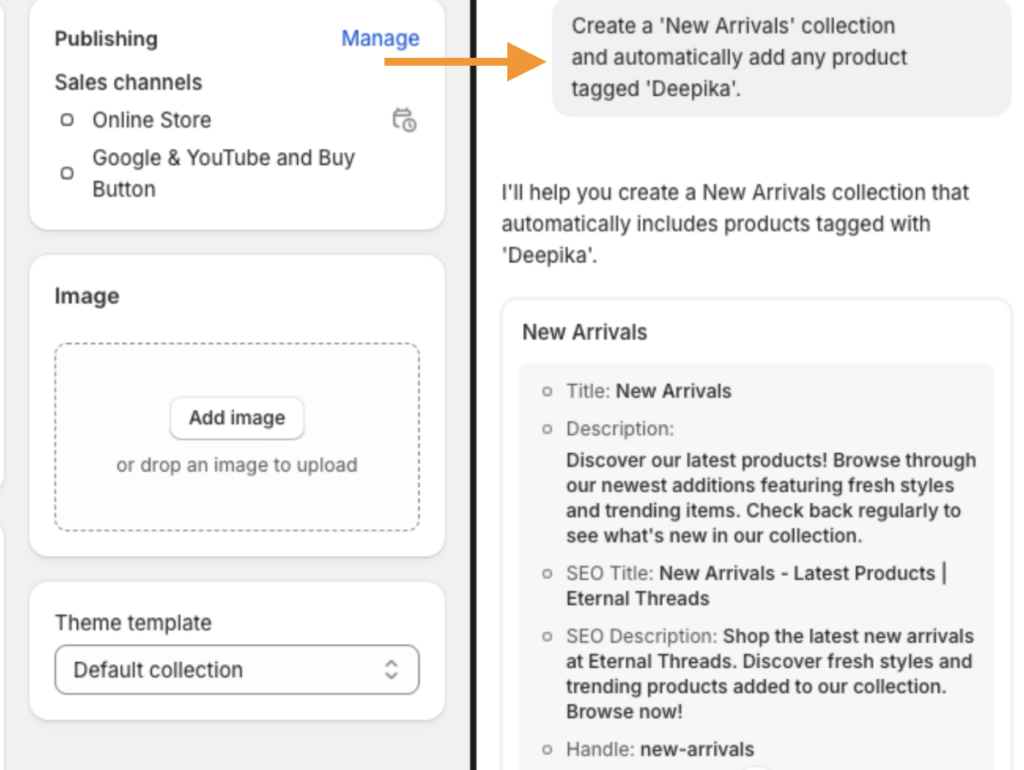
However, while AI handles the writing, you still need a solid strategy to rank on Google. It is imperative to follow a Shopify SEO checklist alongside your AI implementation to ensure your new products are actually visible on search results.
Step 5: Add Payment and Shipping Rules
Sidekick simplifies payment and shipping management in your Shopify admin panel. It helps you quickly set up and manage payment options, understand settings, and complete tasks faster.
For shipping, Sidekick guides you through shipping profiles, policies, supplier rates via Shopify Collective, and split shipping at checkout, all from one intuitive assistant. For example, set up free shipping thresholds (like “free shipping over ₹2,000”).
Step 6: Launch Your Store
Before going live, let the AI do a final quality check.
Ask Sidekick to check for missing product descriptions, broken links, or empty collections. Once the AI gives the green light, tell Sidekick to remove my store password and go live.
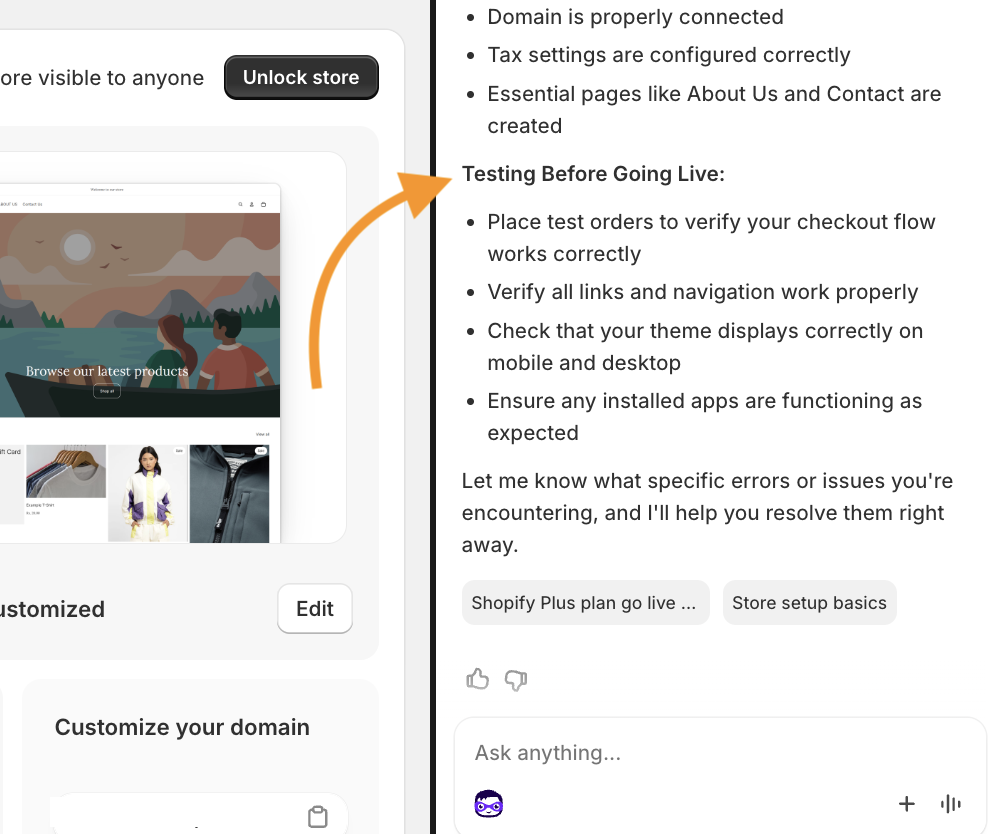
Highly Effective Shopify Prompts for 2026
A good prompt is key because it tells the AI exactly what you need. By being clear about your goals and brand style, you’ll get better results right away, all while saving and reducing guesswork.
To make the most out of Shopify AI, here are the worthwhile prompts you can use with Shopify Sidekick to build, optimize, and manage your store in seconds.
Establish your store’s look and voice
“I am launching a [e.g., sustainable skincare] brand called ‘[Name]’. Our vibe is [e.g., minimalist and earthy]. Set my store’s primary colors to [Color 1] and [Color 2], update my headings to a [e.g., Serif] font, and ensure all AI-generated text uses a [e.g., sophisticated and eco-conscious] tone.”
Make design changes without editing CSS or Liquid code
“On my product pages, increase the spacing between the price and the ‘Add to Cart’ button. Make the ‘Add to Cart’ button full-width on mobile devices and change its hover color to match my brand’s primary green.”
Set up workflow automation
“Create a recurring workflow: When a customer spends over $200 in a single order, tag them as ‘VIP’, send them a personalized ‘Thank You’ email with a 15% discount code for their next purchase, and notify me on Slack.”
Best Free Shopify AI Apps to Use
While with Shopify Sidekick and Magic, you can easily build your store, here are some of the best Shopify AI apps built to manage various functions of your store without increasing your budget.
| App Name | AI Features | Price | Key Features |
| MIT AI Chatbot & Sales Bot | AI chatbot & sales automation | Free | – 24/7 AI customer support – Order tracking & FAQs – Product recommendations |
| Meetanshi AI Content Generator | AI content generation | Free | – AI-written product descriptions – Blog & article creation – SEO-friendly content |
| Junip – Product Reviews | Reviews & social proof | Free | – Automated review collection – Review display widgets – Basic AI insights |
| Bundle & Upsell AI ‑ LimeSpot | AI personalization | Free | – Smart product recommendations – Upsell & cross-sell blocks – Behavior-based targeting |
| Transcy – Multiple Languages | AI translation & localization | Free | – AI-powered translations – Multi-language store support – Currency & language switcher |
Tips to Make Your First Sale
Launching a Shopify store is about building early trust, visibility, and momentum. Start by sharing your launch with friends, family, and colleagues. Early sales often come from people who already trust you and are happy to support your new venture. These initial orders also help establish social proof for new visitors.
After your store goes live, boost its launch with these key actions:
- Create a limited-time discount to encourage quicker purchase decisions
- Partner with smaller niche creators, as their audiences are often more engaged
- Make your About Us page compelling and ensure Contact details are easy to find
- Use TikTok and Instagram Reels for organic discovery through simple product or behind-the-scenes videos
- Add virtual try-on feature for shoppers to get check product before buyign
You don’t need a large marketing budget to be discovered organically. Platforms like TikTok and Instagram Reels are perfect for low-cost brand awareness. Simple, authentic behind-the-scenes videos or quick product demos often resonate better with modern shoppers than polished, expensive ads.
Finally, focus on conversion and visibility:
- Check for common Shopify SEO issues so your store can be found
- Use a simple email pop-up to capture leads from first-time visitors
- Test your checkout on mobile to remove friction at the final step
Start Now
Learning how to build a Shopify store with AI allows you to launch and grow your business more efficiently than ever before.
AI simplifies everything, from creating product content and personalizing shopping experiences to automating support and improving conversions. By using Shopify’s built-in AI features and smart apps, you can reduce manual effort and focus on scaling your store.
Take a free trial of Shopify and continue using the platform for only $1 for 3 months.
Grab Now