

Magento 2 is an open source E-commerce platform with features like flexibility, scalability, and cost-effectiveness. With Magento 2 as your online business platform, you have the power to create a highly unique user experience in harmony with enhanced sales chart!
Magento 2 has a worldwide presence and the admin can localize the storefront to maximize the sales potential. One of the ways to do so is the translation! There are two methods in Magento 2:
- Add a language pack
- Enable Magento 2 Inline translation
Thanks to the latter method, it makes it easy to translate the static blocks and CMS pages too!
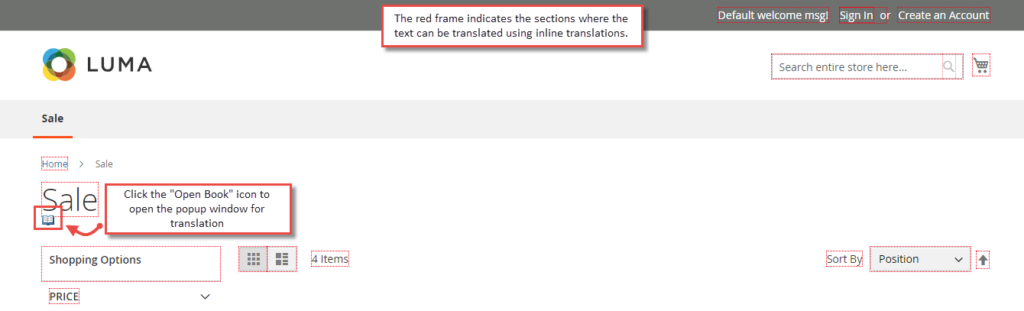
Using the translate inline tool in developer mode, when the translate inline mode is activated, the editable text is outlined in red. This way, you can edit the field labels, messages, and other text both in the frontend and the admin panel. All the inline translations are stored in the database under the core_translate table.
Add a new translation to the Default Config or to a specific store view. The overridden string has the format: Module_Name::Original_Translation.
It’s because you add the changes to a specific place (specific module), the same string can also appear in a different module.
How to Enable Magento 2 Inline Translation:
Step 1: Login to Admin Panel
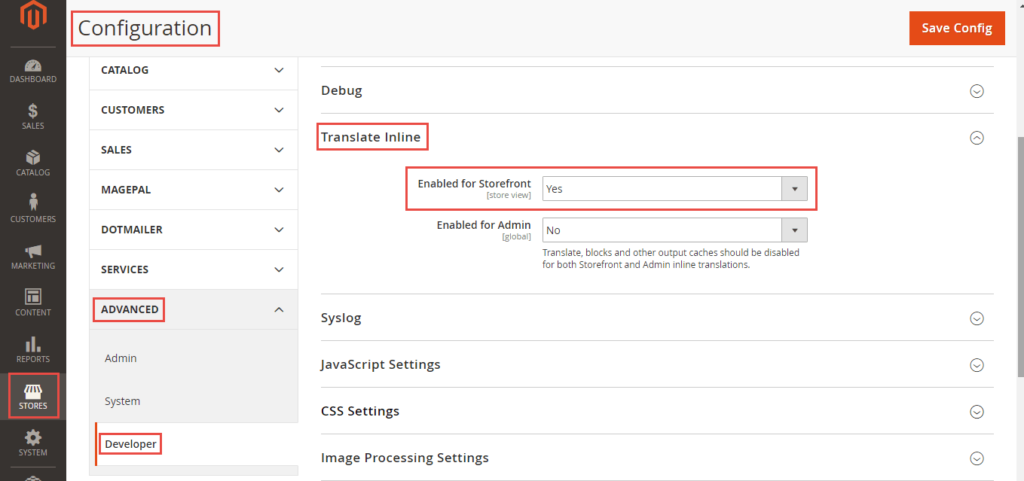
Step 2: Navigate to Stores > Configuration
Step 3: Under Advanced, select Developer
Step 4: Expand the Translate Inline
Step 5: Set “YES” for the Enabled for Storefront option.
Step 6: Go to frontend where you can see the sections in a red frame that can be translated. Hover the mouse over the frame and you’ll see an “Open Book” icon.
Step 7: On clicking that icon, a popup is displayed. In the Custom option, enter your custom text and click the Submit button.

Step 8: The custom text is now displayed in the frontend.

Step 9: Also, under the Developer Client Restrictions in the Stores > Configuration> Advanced > Developer, enter your IP address in the Allowed IPs option. Doing so, the visitors cannot see the red frame in the frontend.

Pros and Cons of Magento 2 Inline Translation:
- A non-technical and easy method, add a new translation, without being an expert in translations!
- A time-consuming method if there are changes to be made in bulk.
- Magento 2 Inline Translation is theme specific, if you change the store theme, you need to do it again.
That’s all about the easy way out for Magento 2 translations!
