

Store owners try to get maximum information about their customers in order to understand their purchase behaviour, the pattern of thinking, and purchase power. It helps craft an effective marketing strategy that benefits the business.
Similarly, Magento 2 store owners try to get customer information while registering or checkout process.
However, the story does not end here. The admin may want to operate on these details or in some cases, update them from the backend.
You can create Custom Tab to Product Page in order to include detailed product specifications, customer reviews, and frequently asked questions, making it easy for customers to understand without overcrowding the main description of products.
For example, if the admin wants to get the list of all the products purchased in the store till now, and based on order total, update the customer group from the backend, he may need to create a tab and load grid in Magento 2 customer admin edit page. Likewise you can also hide unnecessary tabs in product page frontend to not let your visitors distract from their main goal, for that you need to hide empty custom tab in Magento 2.
Doing so makes it easier for the admin to check and update the customer details of any particular customer from the backend.
The below solution shows how to do the same for any custom fields added on the checkout page or any page in the store frontend that is responsible to collect customer data.
Get that customer data in the grid of the customer admin edit page under the custom tab you create using the below method:
Method to Create a Tab and Load Grid in Magento 2 Customer Admin Edit Page
1. Create registration.php file at app\code\Vendor\Module and use the below code.
<?php

use Magento\Framework\Component\ComponentRegistrar;

ComponentRegistrar::register(ComponentRegistrar::MODULE, 'Vendor_Module', __DIR__);
2. Create module.xml file at app\code\Vendor\Module\etc and paste the below code.
<?xml version="1.0"?>
<config xmlns:xsi="http://www.w3.org/2001/XMLSchema-instance"
        xsi:noNamespaceSchemaLocation="urn:magento:framework:Module/etc/module.xsd">
    <module name="Vendor_Module" setup_version="1.0.0"/>
</config>
3. Create customer_index_edit.xml file at app/code/Vendor/Module/view/adminhtml and use the below code.
<page xmlns:xsi="http://www.w3.org/2001/XMLSchema-instance" layout="admin-2columns-left"
xsi:noNamespaceSchemaLocation="../../../../../../../lib/internal/Magento/Framework/View/Layout/etc/page_configuration.xsd">
    <body>
           <referenceBlock name="customer_form">
             <block class="Vendor\Module\Block\Adminhtml\Edit\Tab\Custom" name="customer_edit_tab">
              <action method="setTabLabel">
                  <argument name="label" xsi:type="string">Custom Tab</argument>
              </action>
            </block>
          </referenceBlock>
    </body>
</page>
4. Create Custom.php file at app/code/Vendor/Module/Block/Adminhtml/Edit/Tab directory.
<?php

namespace Vendor\Module\Block\Adminhtml\Edit\Tab;

use Magento\Customer\Controller\RegistryConstants;
use Magento\Ui\Component\Layout\Tabs\TabInterface;

class Custom extends \Magento\Backend\Block\Template implements TabInterface
{

    protected $_coreRegistry;

    public function __construct(
        \Magento\Backend\Block\Template\Context $context,
        \Magento\Framework\Registry $registry,
        array $data = []
    )
    {
        $this->_coreRegistry = $registry;
        parent::__construct($context, $data);
    }

    public function getTabLabel()
    {
        return __('Custom Tab');
    }

    public function getTabTitle()
    {
        return __('Custom Tab');
    }

    public function canShowTab()
    {
        if ($this->getCustomerId()) {
            return true;
        }
        return false;
    }

    public function getCustomerId()
    {
        return $this->_coreRegistry->registry(RegistryConstants::CURRENT_CUSTOMER_ID);
    }

    public function isHidden()
    {
        if ($this->getCustomerId()) {
            return false;
        }
        return true;
    }

    public function getTabClass()
    {
        return '';
    }

    public function getTabUrl()
    {
        return $this->getUrl('module/*/custom', ['_current' => true]);
    }

    public function isAjaxLoaded()
    {
        return true;
    }
}
5. Create module_index_custom.xml at app/code/Vendor/Module/view/adminhtml directory.
<?xml version="1.0"?>

<layout xmlns:xsi="http://www.w3.org/2001/XMLSchema-instance"
        xsi:noNamespaceSchemaLocation="../../../../../../../lib/internal/Magento/Framework/View/Layout/etc/layout_generic.xsd">
    <container name="root" label="Root">
        <block class="Vendor\Module\Block\Adminhtml\Edit\Tab\View\Custom" name="custom_tab"/>
    </container>
</layout>
6. Create Custom.php at app/code/Vendor/Module/Block/Adminhtml/Edit/Tab/View directory.
<?php

namespace Vendor\Module\Block\Adminhtml\Edit\Tab\View;

use Magento\Backend\Block\Template\Context;
use Magento\Backend\Helper\Data;
use Magento\Customer\Controller\RegistryConstants;
use Magento\Framework\Registry;
use Vendor\Module\Model\ResourceModel\ModuleName\CollectionFactory;

class Custom extends \Magento\Backend\Block\Widget\Grid\Extended
{
    protected $_coreRegistry = null;

    protected $_collectionFactory;

    public function __construct(
        Context $context,
        Data $backendHelper,
        CollectionFactory $collectionFactory,
        Registry $coreRegistry,
        array $data = []
    ) {
        $this->_coreRegistry = $coreRegistry;
        $this->_collectionFactory = $collectionFactory;
        parent::__construct($context, $backendHelper, $data);
    }

protected
function _construct()
{
    parent::_construct();
    $this->setId('view_custom_grid');
    $this->setDefaultSort('created_at', 'desc');
    $this->setSortable(false);
    $this->setPagerVisibility(false);
    $this->setFilterVisibility(false);
}

protected function _prepareCollection()
{
    $collection = $this->_collectionFactory->create()->setCustomerId(
        $this->_coreRegistry->registry(RegistryConstants::CURRENT_CUSTOMER_ID));
    $this->setCollection($collection);
    return parent::_prepareCollection();
}


protected function _prepareColumns()
{
    $this->addColumn(
        'product_id',
        ['header' => __('ID'), 'index' => 'product_id', 'type' => 'number', 'width' => '100px']
    );
    $this->addColumn(
        'product_name',
        [
            'header' => __('Product Name'),
            'index' => 'name',
        ]
    );
    return parent::_prepareColumns();
}

public function getHeadersVisibility()
{
    return $this->getCollection()->getSize() >= 0;
}

public function getRowUrl($row)
{
    return $this->getUrl('catalog/product/edit', ['id' => $row->getProductId()]);
}
}
The display will be look like as shown below.
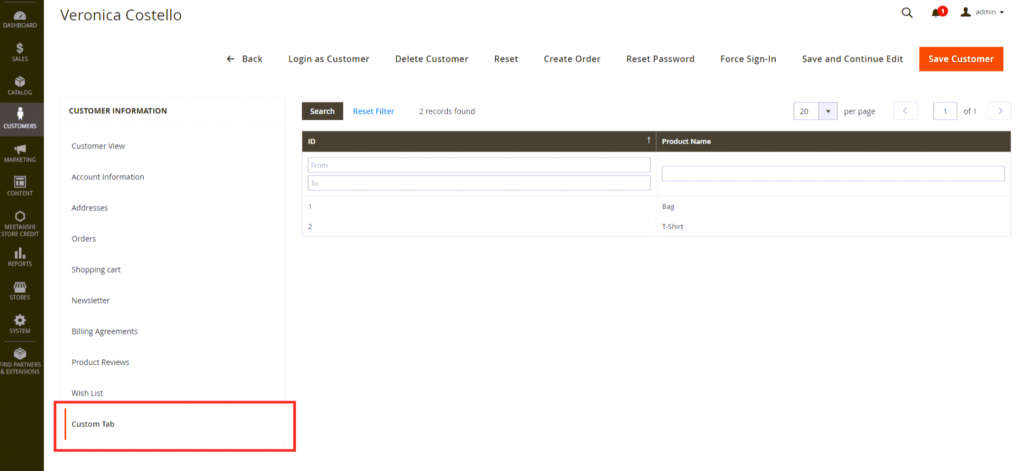
The custom tab is created in the customer information section and the custom grid is now displayed with loading data from the table using the above solution.
That’s it.
You can also add a custom tab view in Magento 2 to enhance page speed and optimize overall performance
Also, please share the solution with Magento Community via social media.
Thank you.
