Customers often get confused when comparing products with the competitors’ products. A comparison table in Shopify solves this by showing features and prices side by side.
In this blog, we will instruct you to add a comparison table in Shopify without touching any code.
Let’s get started.
Ways to Add a Comparison Table in a Shopify Store
A Shopify comparison table can be added using several methods. Some themes offer in-built support, while others may require manual or app-based solutions for more control.
You can also add tabs to Shopify to keep your product clean and concise.
- Via Shopify Theme Editor, some Shopify themes allow adding a comparison table directly in the Theme Editor for easy setup, but this option is limited to select themes and typically basic in design
- Using Advanced custom code, like HTML, CSS, and Liquid, can be created and added manually in the theme files, which requires technical knowledge and developer help
- Shopify section apps offer a dedicated interface to build and style comparison tables, letting users select products and customize features in a no-code environment
- Visual page builders enable drag-and-drop functionality, but typically start at $39/month, making them an expensive solution
The easiest way for you to create a compare products chart in Shopify is by using the section app, like the MIT Pro section, based on its flexibility and reasonably priced option.
How to Add a Shopify Comparison Table? (Zero-code Method)
The MIT Sections Pro App allows you to add a professional-looking comparison table to your Shopify store without writing a single line of code, which looks like this.
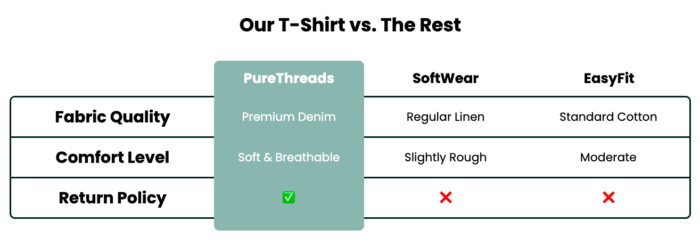
It’s super simple to modify, gives you full control over customization, is free to install and configure, and serves you with hundreds of wonderful, ready-made sections.
Our app integrates seamlessly with your Shopify theme editor, and the best part is that you can swap sections anytime according to your growing store.
The following are the steps to add one to your store.
Step 1: Install & Find Your Desired Section
Install MIT Sections Pro (free) from the Shopify App Store.
Then, from the app dashboard, click Browse Section and search for the comparison table section

Step 2: Click on the “Try for Free” Button
Then select the section and click the Try for Free button to get access to the section without making any commitment.
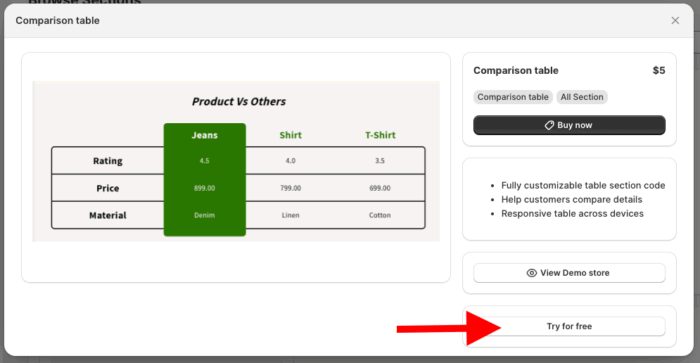
After that, you will be redirected to the MIT Demo Store, as we’ve opted for a free trial. Once you purchase the section, you can apply it to your theme.
Step 3: Directly Add Section to Your Theme
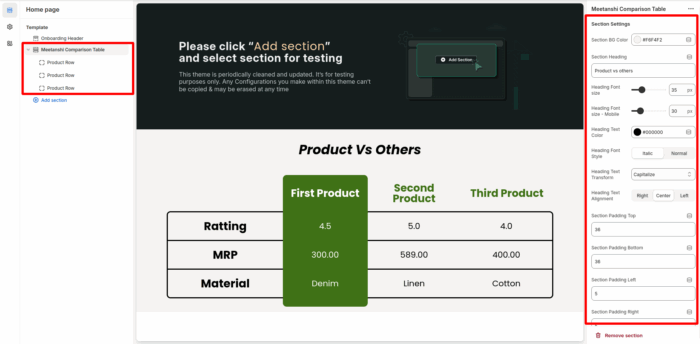
Now, from the theme editor, click the Add section and find Meetanshi Comparison Table and select it to add.
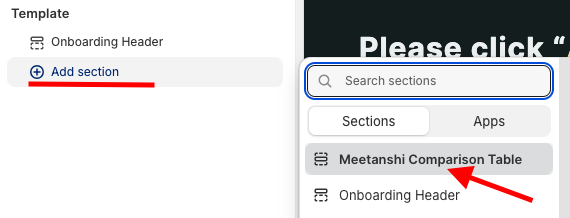
Here you get 30+ customization options, and you can make changes according to your needs.
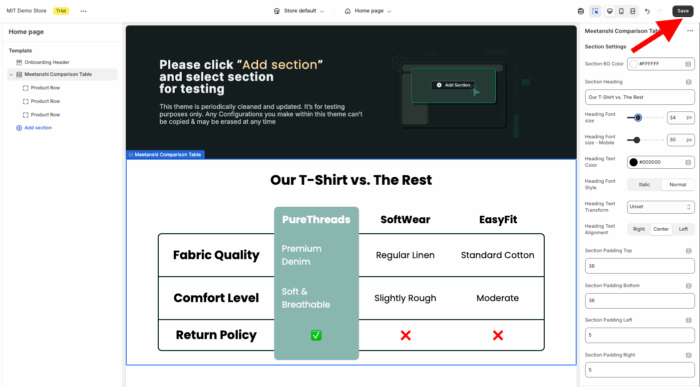
Save the changes.
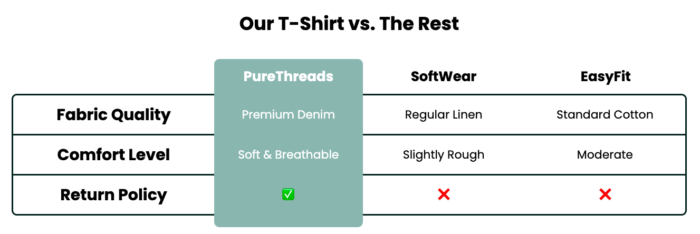
This is how it’ll look on your storefront.
Our App vs. Other Methods to Add a Comparison Table in Shopify
Here’s a quick comparison table of why to choose our app and not any other method.
| Features | Our App (MIT Sections Pro) | Other Methods |
| Ease of Use | Drag-and-drop, zero coding needed. Intuitive interface. | The theme editor is limited; custom code requires developer skills. |
| Pricing | Free to install; many free sections; optional premium. | Custom code-free but time-consuming apps are usually paid monthly. |
| Customization | Complete control over all sections, including free templates. | The theme editor is limited; coding offers full control, but is complex. |
| Integration & Compatibility | Compatible with all major Shopify themes. | Custom code varies; some apps have compatibility issues. |
| Options availability | 130+ versatile Shopify sections, including comparison tables and more. | The theme editor has limited comparison features; apps vary. |
This free, easily installed app offers advanced customization with no upfront cost. It provides essential, beautifully designed sections like product sliders, banners, testimonials, and FAQs, which can be added to any page without technical knowledge.
You can easily add or swap sections as their business grows, allowing the design to evolve with their needs.
Your all-in-one solution to create a professional Shopify store
Install App Now