

Confused about whether Shopify payments is the right choice for you? Well, read this blog till the end to find out what is Shopify Payments, its setup process, pricing plans, and more.
Every store owner wants to start making dollar bills as soon as they launch their store on Shopify.
And, the most important thing you need for that is — a secure payment processing system.
Shopify is easy-to-integrate with most of the big names in the payment industry — PayPal, Stripe, and 2CheckOut are a few Shopify payment gateway integrations. The platform also comes pre-integrated with its own payment processing system — Shopify Payments. This puts many merchants in the dilemma of choosing between multiple payment processing solutions.
A lot of problems!!
Let’s ease things now 🙂
What is Shopify Payments?
Shopify payments is a payment processing solution offered to all merchants by Shopify. It processes the payments through Shopify Payments, Shop Pay, Shop Pay Installments, and Paypal Express, and does not charge any extra third-party transactional fees (except for merchants from Austria, Belgium, and Sweden).
The payment method allows accepting secure online payments from customers using payment methods such as Credit & Debit Cards, Amazon Pay, Apple Pay, and more. It is available for merchants selling from 20+ countries/regions. Get more info at Supported countries for Shopify Payments.
Shopify Payments Fees & Pricing
Shopify payments may cut down the additional third-party payment processing charges, but there are some additional costs associated with it. First of all, it requires you to have an active Shopify plan (which would also be necessary for using any other third-party payment processors.)
Although Shopify does not charge any third-party transactional fees for Shopify payments, you need to pay the standard processing fees. The processing fee structure is different for different plans. Complete the Shopify payments processing fees structure tabulated below:
| Shopify Payments Pricing ↓ | Shopify Starter | Shopify Basic | Shopify | Shopify Advanced |
|---|---|---|---|---|
| Monthly | $5 | $29 | $79 | $299 |
| Online | 2.9% + $0.30 | 2.9% + $0.30 | 2.6% + $0.30 | 2.4% + $0.30 |
| Offline (In Person) | No POS | 2.70% | 2.50% | 2.40% |
| Transaction Fee (With External Processor) | 2% | 2% | 1% | 0.50% |
Furthermore, some of the additional charges and fees that you may need to pay while using Shopify payments are:
- Currency conversion fee: Flat 1.5% if you are selling from the United States and 2% for sellers outside the U.S.
- Chargebacks: $15 per chargeback for U.S. sellers. The charges may vary for sellers from other countries.
Also, Shopify does not waive the processing fees of the orders returned by the customers, which means you still need to pay the processing fees of the orders that are returned or canceled by the customers.
Recommended Reads: Shopify Plus Pricing 2024: A Complete Breakdown
Requirements for Using Shopify Payments
First of all, you need an active Shopify plan to use the Shopify payments. The Shopify payment services are limited to 22 countries only.
You are eligible to use Shopify payments if you are selling from:
- Australia
- Austria
- Belgium
- Canada
- Denmark
- Czechia
- Finland
- France
- Germany
- Hong Kong SAR
- Ireland
- Italy
- Japan
- Netherlands
- New Zealand
- Portugal
- Singapore
- Spain
- Sweden
- Switzerland
- United Kingdom
- United States
Other requirements of Shopify Payments include:
- Two-step authentication enabled in the Shopify account
- Personal/business information & bank details
- The bank account should be accepting electronic money transfers
- The bank account should be using Shopify payout currency
Furthermore, you should also note that Shopify payments are not compatible with virtual accounts or savings accounts.
Method to Set Up Shopify Payments
Before you head towards settings up Shopify payments, make sure your store fulfills the eligibility criteria. Log into your Shopify admin, and simply follow these steps to set up Shopify payments:
Step 1: Select Your Store Currency
In your Shopify admin, go to Settings > Store details and select your preferred store currency.

Step 2: Fill Up the Required Details & Configure Shopify Payments
Now, go to Settings > Payments and click on the Complete account setup button.

Enter all the required business information, personal details, and bank details.
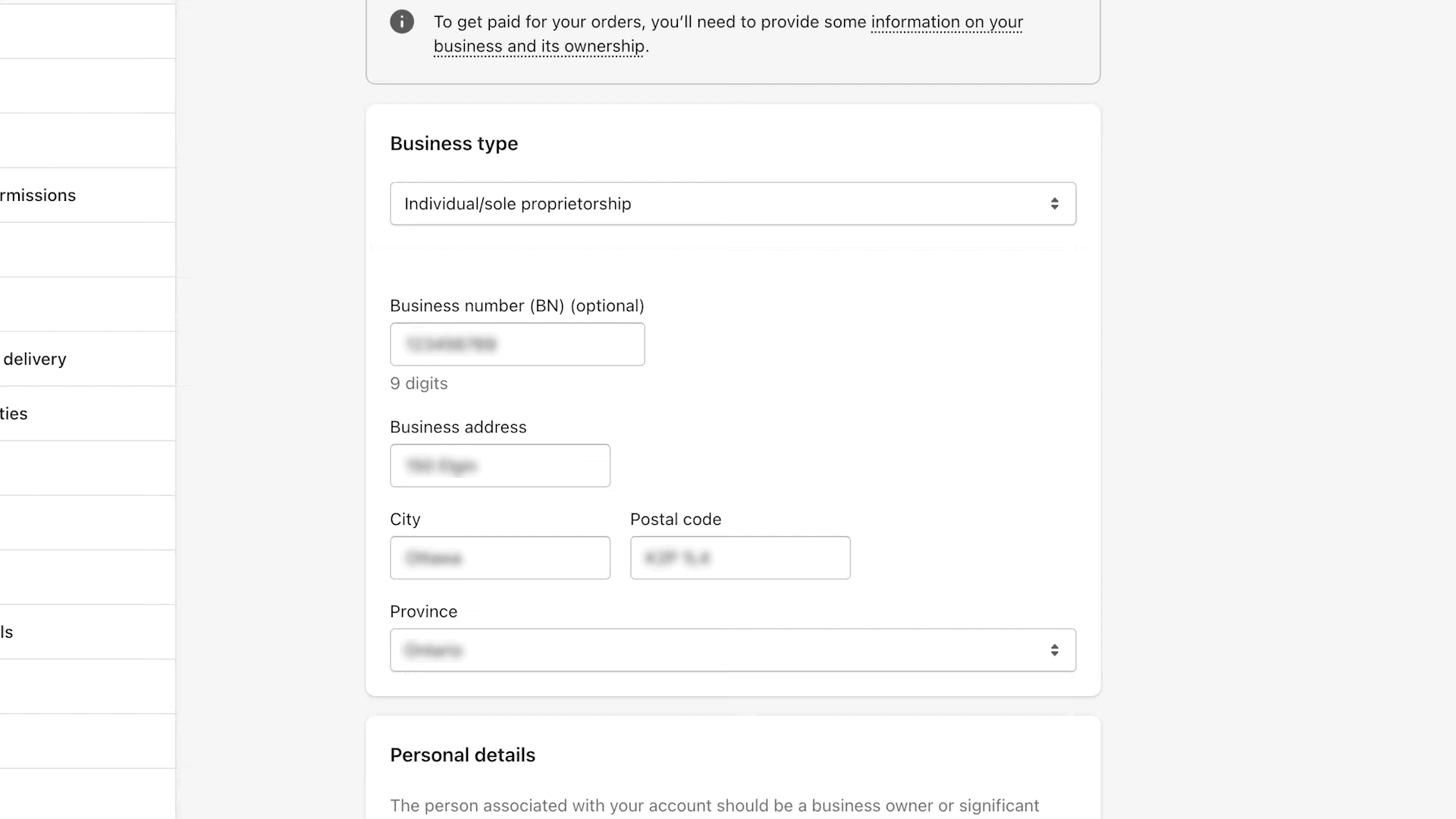
After submitting the details, the Shopify team will manually review the details and activate your Shopify payments account.
The manual review process may take around 24 hours.
Once your Shopify payments account is activated, you can configure other settings for the payment process. You can also configure the pre-integrated payment options, such as PayPal and Amazon Pay to offer convenient payment methods to your customers. Learn here to test Shopify Payments.
Pros & Cons of Using Shopify Payment Gateway
Is Shopify payments the right choice for you? Let’s look at the positive and negative aspects of using Shopify Payments.
ProsCons
| Pros | Cons |
|---|---|
| Easy to set up No transactional fees All-in-one payments dashboard Supports offline sales Multiple payment gateways Built-in integration PCI-compliant payment solution | Only available in certain countries High chargeback fees 30-day payout period for risky products |
Shopify Payments – Quick Recap
Processing online payments are simplified using Shopify payments. It is a secure, easy, and quick way to get paid by your customers. Furthermore, there are other available options to accept online payments in your Shopify store.
Think long-term, do your own math, and choose the one that’s the most suitable for you. You can take reference from our list of top international payment gateways.
Thanks for reading!
Also Read:
- Shopify Launch Checklist
- How to Add Apple Pay to Shopify Store?
- How to Add Stripe to Shopify
- Learn Different Types of Shopify Order Statuses
- Shopify Login for Admin, Partner, and Customer Accounts
- Method to Set Compare At Price in Shopify
Frequently Asked Questions
Should I Use Shopify Payments or PayPal?
Shopify payments is a built-in payment processing method offered by Shopify with zero additional fees. It also offers integration with other payment gateways such as Amazon Pay and PayPal. Shopify payments can be a good choice over PayPal provided that your store is eligible for it.
Is Shopify Payments Safe?
Yes, Shopify Payments is a highly secure processing solution offered by Shopify. It comes with PCI compliance and assures utmost payment security.
How do Shopify Payments Work?
Shopify Payments is an integrated part of the Shopify ecosystem. It uses Stripe in the backend to process the online payments and deposit the payments into the seller’s bank. The waiting period is 3 days.
Is Shopify Payments Powered by Stripe?
Yes, Shopify payments are powered by Stripe. In fact, it is the Stripe payment processing solution that is white-labeled as Shopify Payments.
