

Hyvä themes outperform Luma in terms of performance optimization and responsiveness. The theme is known to reduce store development time and cost.
However, some store owners still look for a traditional Magento approach for certain pages on their website. That’s where the Luma theme fallback in Hyvä comes into play.
This blog post will guide you through everything about Luma theme fallback, from benefits to implementation, configuration, and challenges you may face while using the feature.
What is Luma Theme Fallback in Hyvä?
Luma theme fallback is one of the noteworthy features in Hyvä themes. It allows Hyvä users to utilize the Luma theme as a fallback option for any missing styles or templates in the Hyvä themes.
Does that mean that your store will be using the Luma theme? No.
It implies that when you configure and enable the Hyvä theme for your Magento store, it will be your active theme, which comes with its own set of theme templates and styles.
But if the Hyvä theme doesn’t have a particular template or design element or when you like to use Luma’s elements, then Magento will automatically fallback on the default Luma theme—for the corresponding template or style.
The feature helps all the Hyvä users leverage design elements for customization.
Benefits of Luma Theme Fallback in Hyvä
Reduced Development Time
Fallback to the Luma theme lets developers access a range of pre-built elements. It fastens prototyping and utilizes the Luma and Hyvä complements. When migrating from the Luma theme to Hyvä, the fallback mechanism lets you perform phased implementation for the theme without hindering your sales and regular business from your e-store.
Flexibility in Customization
You will have access to Hyvä theme features, design elements, and the Luma theme’s functionalities, so you can choose the design elements you want to include from both themes. The right mix of new and existing design elements simplifies theme customization. Since developers can use the Luma theme’s components for prototyping, they can quickly test new features before committing to full Hyvä implementation.
Improved Cost Efficiency
Since your development team will be reusing Luma theme components with Hyvä theme design elements, it will save on development costs. The fallback feature gives you the upper hand to leverage the benefits of using two themes’ features and design components at the price of one.
Proven Stability
As you are already aware that the Luma theme is Magento’s default website theme. So, a fallback on Luma ensures your site will be more stable. Since many extensions are designed with the Luma theme in mind, the fallback option lets Hyvä inherit the properties and implement those third-party extensions seamlessly for your web store.
Improved User Experience
Maintain a cohesive look and feel across your site by keeping Luma and Hyvä’s design elements in sync. This will improve your overall user experience on the front end. Luma theme fallback will allow the usage of existing components, layouts, and blocks from the default theme. It ensures your site can function seamlessly with a Hyvä-based theme even with the core functionalities of Luma.
How to Configure Luma Theme Fallback in Hyvä?
To configure the Luma theme fallback in Hyvä, you first need to set up the Hyvä theme or its child theme on your store. Then, follow these steps:
Step 1 – Install the Module for Magento Luma Theme Fallback
Add theme fallback module as a dependency in your project using composer.
composer require hyva-themes/magento2-theme-fallback
Next, run the Magento installer and run these commands.
php bin/magento setup:upgradephp bin/magento setup:static-content:deployphp bin/magento cache:flush
Step 2 – Enable Fallback in Magento Admin
Open your Magento admin panel and go to Content > Design > Configuration. Select your Store View to apply the Hyvä theme with Luma fallback here.
Edit the theme configuration for your store view and set your Hyvä theme as the active theme.
Step 3 – Set Theme Path & Specify URLs
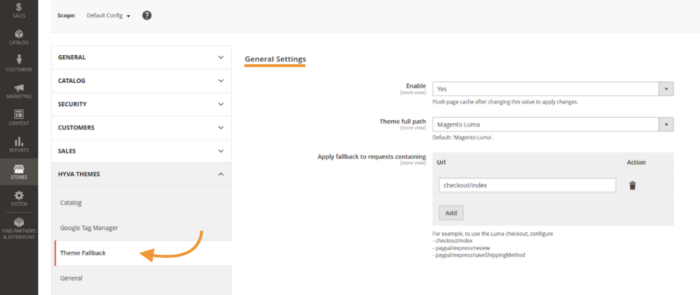
Configure fallback theme path to frontend/Magento/luma. Then, mention the specific URLs here to use Luma fallback in the ‘Apply fallback to requests containing’ section.
Save your changes, and Magento will now use your Hyvä theme with a fallback to Luma.
Remember to ‘Flush Magento Cache’ to ensure the changes are applied. Now, navigate your website to see if Luma Fallback works correctly for your store.
How Does Theme Fallback Work?
As you can see in the above image of your store’s admin panel, you can mention the URL path for the pages of your website where you would like to apply the fallback theme version.
Let’s say you add the path customer/account/ to the ‘Apply fallback to requests containing‘ section.
Then,
- for all requests such as
customer/account/*, the fallback will be applied. - Example: the configured url is
customer/account/login. Then, the fallback will be applied only for the login page.
When you use the fallback option for those pages, you can see the frontend design of the Luma theme applied instead of Hyvä.
Are There Any Potential Challenges With Luma Theme Fallback?
Developers inevitably face specific challenges associated with Luma Theme Fallback in Hyvä. Let me list crucial ones here –
- Technical Debt & Debugging Challenges: It may become harder to manage the code and troubleshoot issues that may arise over time. When both Hyvä and Luma elements are in use, the debugging process will need some extra effort.
- Increased Maintenance Complexities: Every time a theme upgrade comes for Hyvä or Luma, your developers have to check the compatibility of new updates with the design elements used and fix issues wherever they occur.
- Potential for future deprecation: Hyvä themes are comparatively newer in the market and constantly evolving. If you rely heavily on Luma theme elements, some of the functionalities may depreciate over time. In short, your website will not be future-proof in this case.
Well, challenges outperform the benefits of Hyvä themes being an reason of moving to Hyvä . That’s why the Hyvä theme grew successfully.
Make Most Out of Luma Theme Fallback
Style your store your way and redesign your Hyvä theme’s layout, adapting standard Magento approaches with Hyvä’s theme fallback feature.
To make the most out of Hyvä themes with Luma’s support, connect with our Magento experts for our end-to-end Magento 2 Hyvä Theme Development services.
