

If you are willing to keep your Shopify store tidy, then product sorting is a good solution.
It will help you display featured items, highlight new arrivals, and direct customers towards what matters most; ultimately, directly affecting customers’ shopping experience and sales.
Here, you will learn to sort products in Shopify in the easiest possible way.
Importance of Sorting Products
Sorting products isn’t just about staying organized; it’s essential for creating a better shopping experience that will help you drive more sales.
Here are some key benefits of sorting products in your Shopify store:
- Allows customers to easily navigate and find faster what they are looking for
- Highlight your popular products, new arrivals, or high-margin products, so they get seen first
- Customers can make a quick decision by comparing the products based on price, reviews, and popularity
- Gives your store a clean and professional look, with a clean and well-organized layout
How to Sort Products on Shopify?
The following are the simple steps to sort products from your Shopify admin panel.
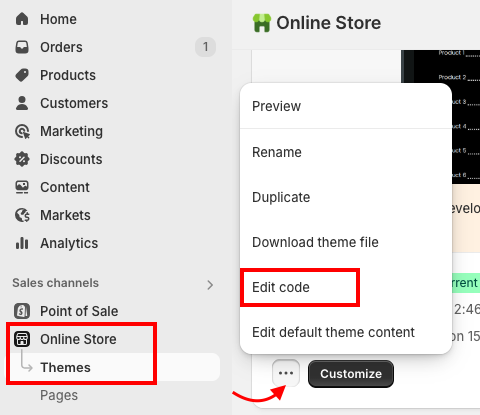
Step 1: Open the Theme Code
Log in to your Shopify admin > Online Store > Themes > …(three dots) > Edit code
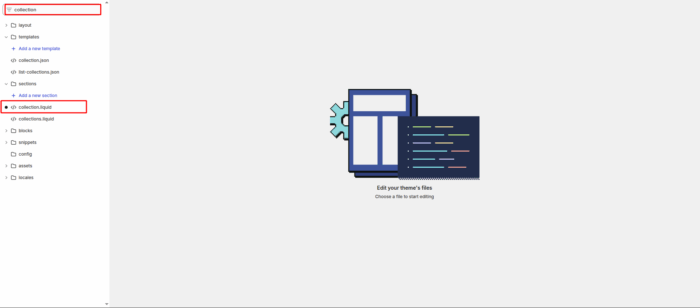
Step 2: Edit the Collection File
Then, in the theme editor, use the search bar and type collection to find the relevant file (e.g., collection.liquid or main-collection-product-grid.liquid).
Find this line: {% for product in collection.products %}
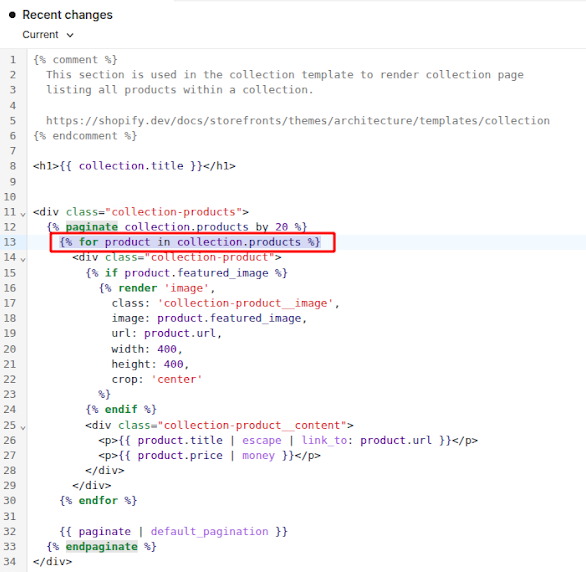
Above this line, paste the following code:
<select id="sort-by">
  {% assign sort_by = collection.sort_by | default: collection.default_sort_by %}
  {% for option in collection.sort_options %}
    <option value="{{ option.value }}" {% if option.value == sort_by %}selected="selected"{% endif %}>
      {{ option.name }}
    </option>
  {% endfor %}
</select>
<script>
  Shopify.queryParams = {};
  // Preserve existing query parameters
  if (location.search.length) {
    var params = location.search.substr(1).split('&');
    for (var i = 0; i < params.length; i++) {
      var keyValue = params[i].split('=');
      if (keyValue.length) {
        Shopify.queryParams[decodeURIComponent(keyValue[0])] = decodeURIComponent(keyValue[1]);
      }
    }
  }
  // Update sort_by query parameter on select change
  document.querySelector('#sort-by').addEventListener('change', function(e) {
    var value = e.target.value;
    Shopify.queryParams.sort_by = value;
    location.search = new URLSearchParams(Shopify.queryParams).toString();
  });
</script>
Step 3: Save the Changes
Click Save. Visit your collection page to see the new sorting dropdown in action.
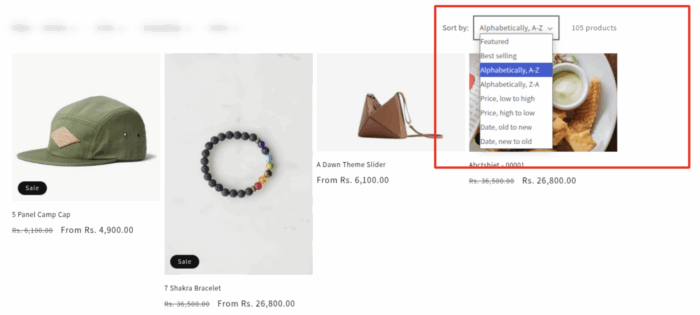
And that’s it, you have sorted products successfully.
Way of Sorting Products in Shopify
Shopify offers various ways to sort products within your store to improve the browsing experience.
1. By Price
This is a very common way; you can sort products from high to low or low to high, making it easier to find the items that fit their budget. This option is especially useful when customers are looking for the best deals or during sales.
2. By Date
It allows you to sort products from newest to oldest, helping customers to see the latest arrival first or browse older products they prefer first. This is a perfect way to showcase seasonal products, recently added items to keep your store fresh and up-to-date.
3. By Manually
Merchants can arrange products in a custom order based on their strategy and priorities. You can show off specific products at the top of the page, push slow-moving items forward, or arrange products to match a specific marketing strategy or visual flow.
4. By Options
Products can also be sorted according to different options such as price, size, color, or any other specific attributes. Very important for stores with a large variety of products, as it helps customers find exactly what they’re looking for without scrolling endlessly.
5. By Best-selling
Sorting by best-selling highlights popular products first, which encourages new customers and boosts conversion rates by leveraging social proof and showcasing proven customer favorites.
So that’s all for how to sort products in Shopify, hope you find it helpful and make the most out of it.
