This guide explains how to restrict Apple Pay to US shipping addresses in Shopify.
Shopify offers global control, not address-level rules. It can remove Apple Pay from all the markets and customers, but can’t customize to US addresses.
Shopify-native options are not the best option specific to the country.
This is where the MIT Payment Hider Shopify app comes in.
It allows you to hide Apple Pay dynamically when the shipping country is not the United States. You can create rules to:
- Hide Apple Pay if the shipping country ≠ United States
- Show Apple Pay only for U.S. addresses
- Combine country rules with order value or product logic
This ensures Apple Pay appears only when the shipping address qualifies.
Steps to Restrict Apple Pay to US Shipping Addresses
Firstly, install and enable the MIT Payment Hider app. Then, follow the 3 simple steps to show Apple Pay to only US shipping addresses.
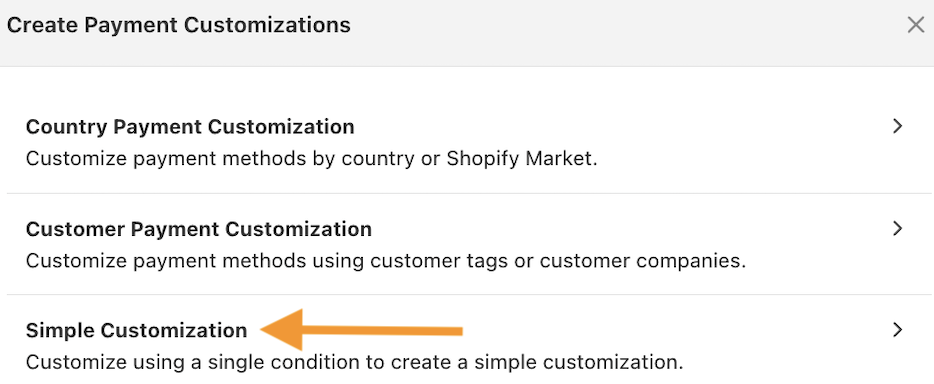
Step 1: Select Hide Payment Method by Shopify Market
Navigate to the app dashboard and select Create Customization > Simple Customization.
Step 2: Create a Simple Custom Hide Rule
Now, click the cart condition and select the shipping country. Then, add the logic “Is Not” and the value “United States.”
This tells the app, “If the customer is NOT from the US, run this rule.”
Then, scroll down to the available payment methods list and Apple Pay. Toggle the switch to hide the payment method.
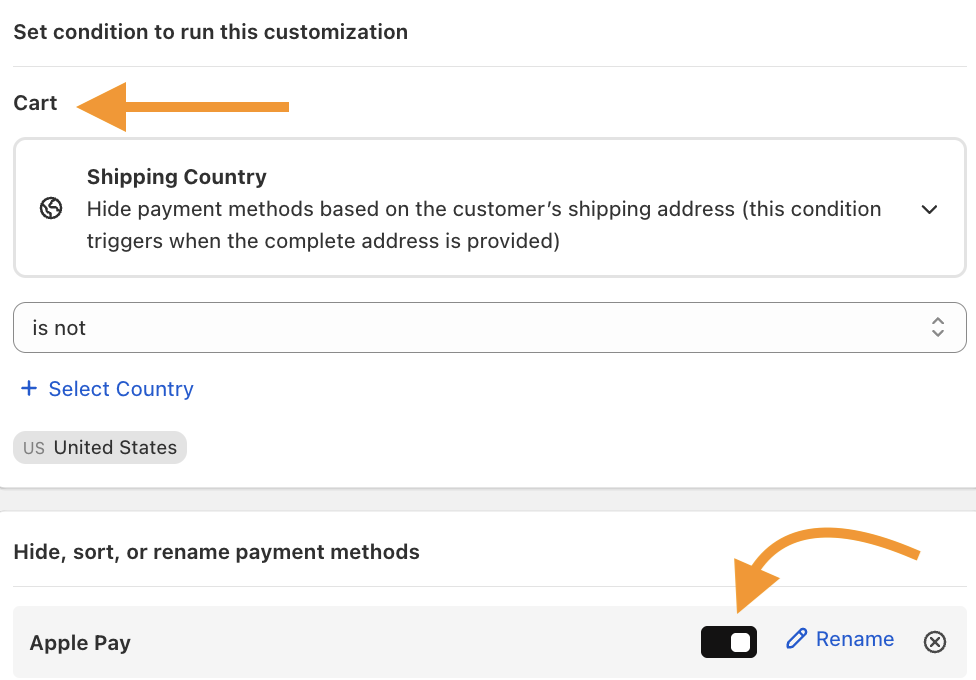
Note: If you don’t see it listed automatically, click the option to Add it manually by name.
Step 3: Save and Test the Payment Option
Now, save the changes and check the payment option visibility at the checkouts.
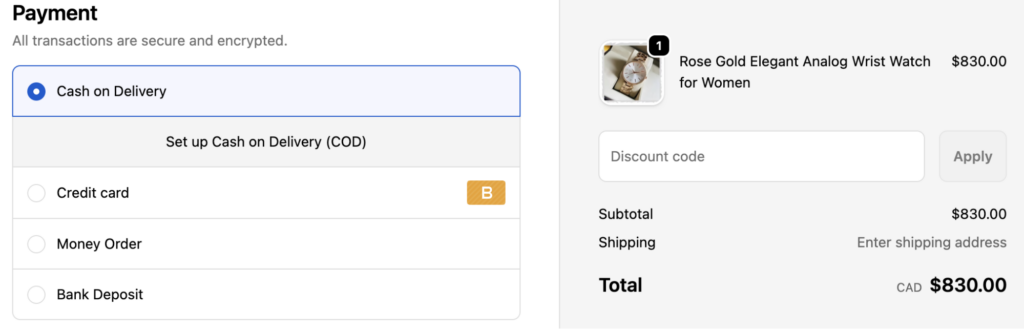
The Apple Pay payment option is hidden from the shipping address in Canada.
Frequently Asked Questions
Can I Restrict Apple Pay to the U.S. Without an App?
No. Shopify does not provide a native option to restrict Apple Pay based on shipping country. Apple Pay can only be enabled or disabled globally.
Can I Hide Apple Pay Based on Shipping Address at Checkout?
Yes, with conditional logic. Checkout-level rules can evaluate the shipping address and hide Apple Pay if the country is outside the U.S.
Will This Affect Other Express Payment Methods?
No, if configured correctly. Rule-based setups can target Apple Pay specifically, without impacting Google Pay or other gateways.
Wrapping Up
Apple Pay is a strong conversion tool, but only when used in the right context.
Shopify cannot restrict Apple Pay by shipping address. The MIT Payment Hider allows Apple Pay only for U.S. shipping addresses, saving you from check frictions.
Hide, sort, and rename payment options in your Shopify store without editing the theme file.
Edit Now