

Magento 2 offers a feature of static content signing to invalidate the browser cache for static resources. To do so, it adds a deployment version to the URL of the static files.
However, these files’ URLs contain the deployed version due to which 404 error occurs.
The solution is to remove the version number in file paths in Magento 2 and there are two methods given below for the same.
Methods to Remove Version Number In File Paths in Magento 2:
Method 1: From Admin Panel
1. Login to admin panel
2. Go to Stores > Configuration
3. Under Advanced, select Developer
4. Expand Static Files Settings
5. Set “No” to Sign Static Files
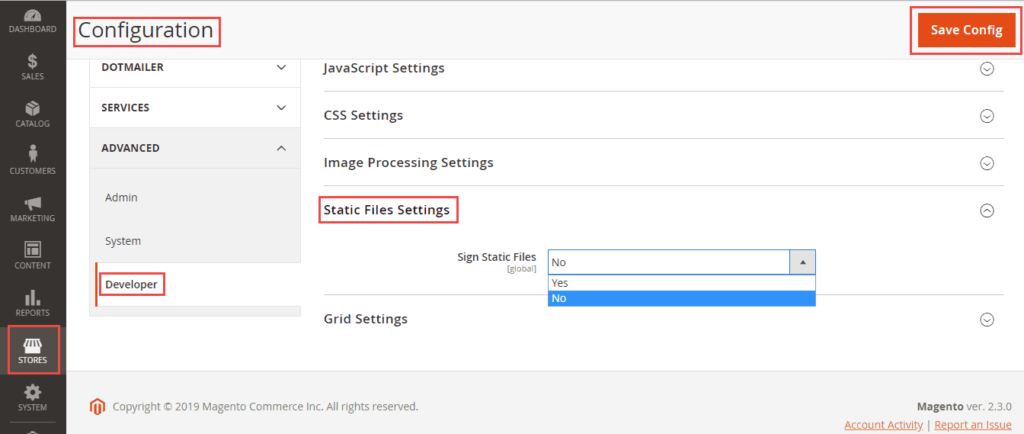
Method 2: Run the below commands
INSERT INTO `core_config_data` (
    `config_id`,
    `scope`,
    `scope_id`,
    `path`,
    `value`
) VALUES (
    NULL,
    'default',
    0,
    'dev/static/sign',
    0
);
Now, run the below commands
php bin/magento setup:static-content:deploy -f
php bin/magento cache:flush
php bin/magento cache:clean
Try any of the above methods to disable static content signing in Magento 2.
Feel free to share the solution with fellow developers via social media.
Thanks.
