Thinking of moving your online store from Magento to Shopify?
Migration might be challenging, but don’t worry, you are not alone; many merchants are moving to Shopify for its user-friendliness interface and powerful marketing tools.
In this article, we’ll walk you through the steps of Magento to Shopify products migration.
Data You Migrate Products From Magento to Shopify
When you migrate products from Magento to Shopify, it is essential to transfer all the data to keep your store running smoothly and ensure customers still find what they are looking for.
Here’s what usually gets transferred:
- Product names and descriptions are the core details that tell customers about your products
- Prices, so you don’t have to manually update them later
- SKU(Stock Keeping Units), to keep your inventory organized
- Product images, to show off your products
- Variants like color, size, etc., and inventory quantity
- Categories and collections to help sort products on the new Shopify store
How to Migrate Products from Magento to Shopify?
Here is a simple step-by-step process to transfer product data from Magento to Shopify.
Step 1: Export Data from Magento 2
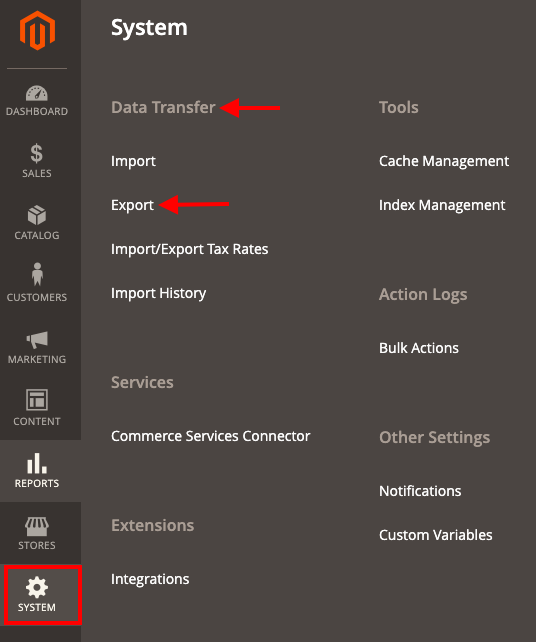
Now export Magento products to Shopify in CSV format. In your Magento dashboard, go to System > Data Transfer > Export.
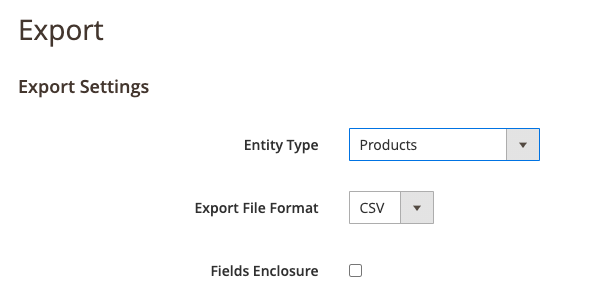
Then, select the entity types as ‘Products’, export the file format as CSV, and check the field enclosure if needed.
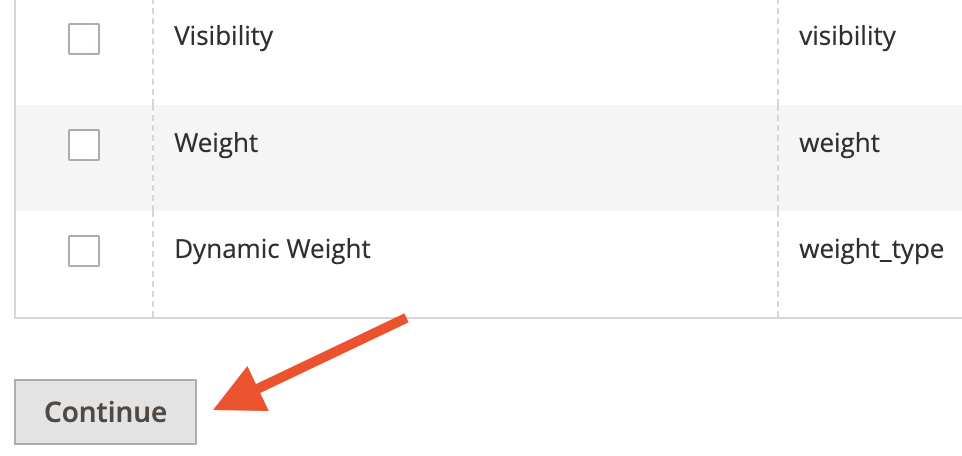
Now, scroll down and click ‘Continue’. Your file will then be quickly generated, which you can download in CSV format.
Step 2: Convert Magento 2 CSV As per Shopify Format
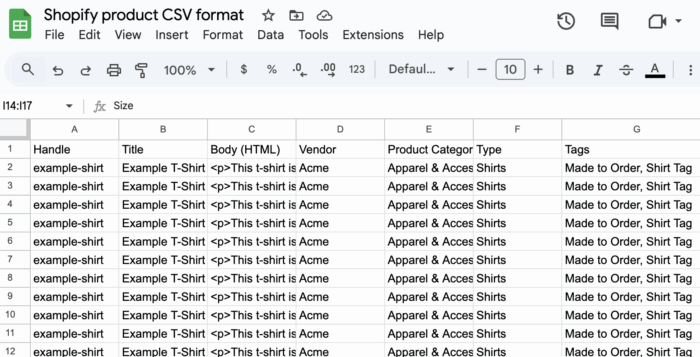
Now, the downloaded Magento CSV file can’t be directly imported into the Shopify store. You will need to modify the CSV file according to the Shopify supported format.
The Shopify CSV format is less complex compared to the Magento 2 CSV format. You can download the Shopify sample CSV file from here and format it accordingly.
Use Google Sheets to make this process easy. Open Google Sheets> Files> Import and upload the Shopify CSV file. Then, start editing your Magento 2 product CSV as per Shopify standard.
Step 3: Import Data to Shopify
Then, you will need to modify your downloaded Magento 2 CSV file according to the Shopify standard format. You can check the sample CSV file from the official site and make the needed edits using Google Sheets.
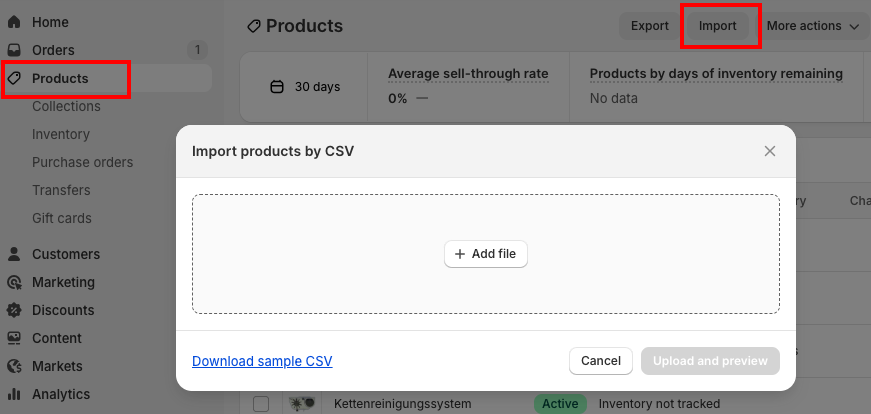
Log in to your Shopify store, navigate to Products > Import > Add file, and upload the Magento CSV file.
Review imported products to make sure everything works correctly.
Optionally, you can also use a dedicated third-party Shopify app to migrate.
It’s essential to know how to set up your Shopify store during migration to keep your business running smoothly and provide a seamless shopping experience.
Step 4: Optimize Your Product Page
After the Magento to Shopify migration, check that each product is polished and ready to convert.
- Update descriptions and product titles for better clarity and SEO
- Check images and add high-quality photos if needed
- Verify prices, SKUs, and inventory quantities
And that’s it, you have successfully learned to migrate your Magento Products into Shopify with zero hassle and your store is ready to launch.
Alternate Ways to Migrate Magento 2 Products to Shopify
If you don’t want to handle migration manually, there are easier options available.
As a store owner, if you have a large inventory, then manual migration products will become a hectic task, since you will have to edit each product detail in the Shopify CSV file to match the Shopify format.
You can opt to hire our professional Shopify migration service to get a fully managed solution, where experts manage everything on your behalf, ensuring a smooth transition.
Switch to Shopify from any platform stress-free using our trusted migration expertise.
Switch Now