Let customers check the order status without having to log in with Magento 2 Order Tracking extension.
The Magento 2 store owners leave no stones unturned to offer rich customer service. Its importance is not unknown in competitive E-commerce!
One of the features that can be offered to improve the customer experience even after sales is order tracking! It is an essential and must-have feature because:
- Make your business appear trustworthy and reliable to the customers which are crucial to customer retention.
- Reduce costly calls from customers inquiring about their order status.
- The after sales service helps earn positive reviews about the business, eventually beneficial to the store!
- No more customer anxiety after an order is placed.
Hence, providing an order tracking facility is undoubtedly an E-commerce best practice and Meetanshi’s Magento 2 Order Tracking extension helps to implement it in the Magento 2 store.
The Magento 2 Order Status extension allows customers to track the status of their order without having to log in! All they require is the order ID and Email address.
With such a transparent shipping process, let customers enjoy the rich shopping experience at your Magento 2 store! Take a quick look at the features that the module has to offer!
Configure Magento 2 Order Tracking Extension by Meetanshi
Enable the order tracking facility from the backend and configure it.
Once configured, the storefront displays the order tracking link in the top link section and the top menu as configured from the admin panel. A customer has to enter the order ID and the Email address and click on the “Track Order” button. The order and shipment tracking details with the tracking and shipping method are displayed.

Also, the order confirmation Email consists of the order tracking link for customers.

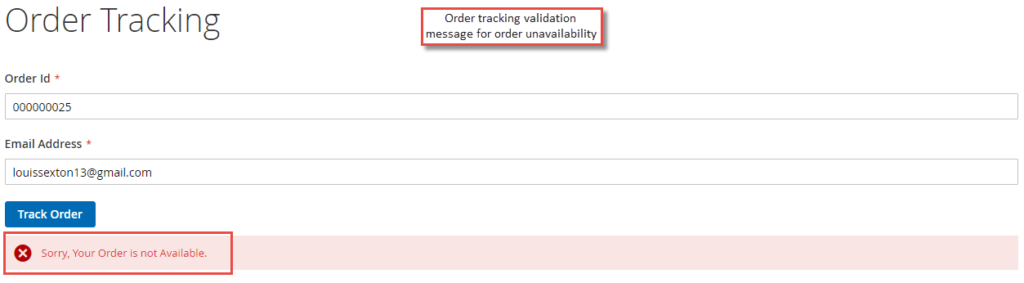
If the order tracking information is unavailable or the details entered by the customers is not valid, an error message is displayed as shown here:
You can also refer the UserGuide to check the installation and configuration steps of Magento 2 Order Tracking.