

Hyvä is lightweight and fast compared to Luma or other storefronts.
But still, you must fully optimize for your store. As each website has unique requirements and additional factors that impact the overall performance.
Let’s explore what steps are involved in optimization and why it matters.
8 Important Hyvä Speed Optimization Steps
Step 1 – Check Google PageSpeed
The first and most important step is to run a Google PageSpeed Insights audit.
This tool provides a detailed report on your site’s performance, highlights key bottlenecks, and gives you a baseline to measure improvements against. It is often the starting point for any performance optimization project.
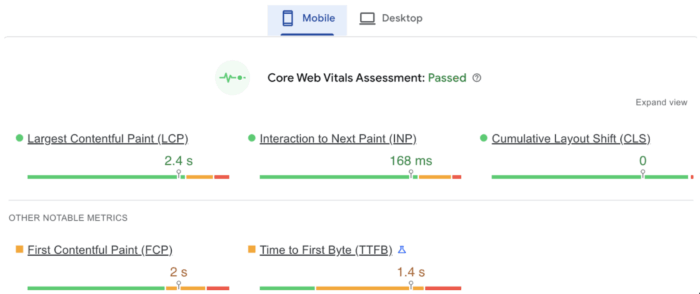
This is the general performance score criteria.
| Score | Indicated | Action |
| 90–100 | Excellent performance | No action needed |
| 50–89 | Require optimization | Aim to optimize score 90-100 |
| 0–49 | Performance issues | Actively work on the suggested changes |
If your score falls under 50–89 or 0–49, analyze the issue and take the needed action as suggested. Additionally, follow the ones mentioned here.
Step 2 – Convert Images to WebP
Images are often the heaviest assets and one of the primary causes of slow page loads.
To optimize image performance, use a module like Yireo_Webp2, which automatically converts your images into the modern and highly compressed WebP format.
Implementing WebP can significantly reduce image file sizes, resulting in faster loading times and improved Google Lighthouse scores.
Step 3 – Optimize CSS & JavaScript
Although Hyvä is inherently lightweight, adding custom scripts or third-party extensions can add unnecessary bloat.
Follow these practices to maintain the store performance while adding store-specific customizations.
- Minify CSS & JS files to reduce file size.
- When adding custom CSS or JS, ensure the code is clean, minimal, and free of unnecessary components.
- Use modern Hyvä Approach as Hyvä avoids Magento’s traditional bundling and minification process by leveraging Tailwind CSS and Alpine.js.
Step 4 – Edit Image Attributes
Ensure all images have proper alt tags and height/width attributes.
Add descriptive alt text to maintain a good SEO. This helps search engines understand the image context better.
It is important to not repeat the image alt text as surrounding text to avoid repetition.
Example:
<p><a href=”index.html”><img src=”images/home-icon.png” alt=”Home Page” width=”24″ height=”25″>Home Page</a></p>
As you can notice in the above example, “Home Page” is written twice, affecting the usability.
Additionally, missing attributes can cause layout shifts (CLS issues) and negatively impact performance. Always define them to maintain stable rendering.
You can use site audit tools or conduct manual inspections to identify images missing these attributes, ensuring improved usability, SEO, and compliance.
Step 5 – Ensure ARIA Labels are Properly Implemented
Make sure ARIA labels are correctly passed to elements. This improves accessibility for users relying on screen readers and ensures better semantic structure for your site.
It is important to note that unnecessary aria labels are not added to the code like <button aria-label=”Send”>Send</button>
For example;
Do this: <input placeholder=”Enter search term” aria-label=”Enter search term”>
Avoid this: <button id=”alempty” aria-label=””></button>
Step 6 – Use WOFF2 for Fonts
Use the Web Open Font Format (WOFF2) to optimize font files.
They offer superior compression compared to older formats like TrueType (TTF) or OpenType (OTF). This reduces file sizes and speeds up font loading, leading to faster page rendering and a smoother user experience.
Step 7 – Use Different Images for Desktop and Mobile
In order to avoid a poor Largest Contentful Paint (LCP) score, optimize images for different devices.
- Use smaller, compressed images for mobile screens.
- Serve high-resolution images only for desktop where needed.
<picture>

                        <!-- Mobile Image -->

                        <source srcset="https://bedwenplants.co.uk/media/wysiwyg/home/inspirations-shady-plants-banner-PB-mobile.jpg" type="image/webp" media="(max-width: 768px)">

                        <source srcset="https://bedwenplants.co.uk/media/wysiwyg/home/inspirations-shady-plants-banner-PB-mobile.jpg" media="(max-width: 768px)">

                        <!-- Desktop Image -->

                        <source srcset="https://bedwenplants.co.uk/media/wysiwyg/home/inspirations-shady-plants-banner-PB.webp" type="image/webp">

                        <img src="https://bedwenplants.co.uk/media/wysiwyg/home/inspirations-shady-plants-banner-PB.jpg" width="400" height="205" alt="Green shade loving foliage of ferns and hostas." class="pb-2 w-full h-auto">

                    </picture>
This HTML code with <picture> elements helps to load the correct images based on the device, reducing load time and improving performance.
Step 8 – Optimize Loading of External Scripts
External JavaScript files (e.g., analytics, chat widgets, tracking scripts) can block rendering and significantly reduce PageSpeed scores.
The best practice is to use the standard Hyva script code structure:
window.addEventListener('init-external-scripts', () => {

Put code here

}, {once: true, passive: true});
Key Reasons for Hyvä Theme Speed Optimization
By following these steps, you can significantly improve your website’s speed with the Hyvä theme.
A proper optimization helps you to:
- Go beyond the default theme, most stores include custom scripts, widgets, or third-party extensions. These can add weight and reduce performance if not optimized.
- Avoid large banners, uncompressed images, and auto-play videos often slow down page load times. Proper optimization ensures speed without compromising quality.
- Fine-tuning essential SEO elements and scripts to achieve high Lighthouse scores, especially for CLS, LCP, and FID.
- Add additional server-side caching for stores with large catalogs and higher traffic to maintain peak performance.
Whenever you check your website’s performance using Google PageSpeed Insights, you can use the suggestions generated by Google to guide your optimization efforts as there are a lot of other steps that need to be applied that are different considering your website structure.
Simply address each suggestion one by one to further enhance your website’s speed.
