

While using the Hyvä theme in Magento 2, you may have already encountered the need to create a custom form.
Magento by default does not provide any form builders such as contact forms, request-a-quote forms, feedback forms, or similar functionality.
After all, Magento with Hyvä is not a CMS- it’s primarily a frontend theme designed for performance and flexibility.
Below is a step-by-step guide to building a custom form in the Hyvä theme.
Steps to Create a Custom Form in Hyvä
All the steps would remain the same as the Magento 2 module development excluding some of the steps.
Let’s check them all one by one.
Step 1: Create a Directory
You will first need to create the directory with your preferred name under app/code/company Name/module name.
Let’s say:
app/code/Meetanshi/Hyva-form
Step 2: Create a Module.xml File
Create a module.xml file in the app/code/Meetanshi/Hyva-form/etc folder with the below code:
<config xmlns:xsi="http://www.w3.org/2001/XMLSchema-instance" xsi:noNamespaceSchemaLocation="urn:magento:framework:Module/etc/module.xsd">

<module name="Meetanshi_HyvaForm" setup_version="1.0.0"> </module>

</config>
The below code registers Meetanshi_HyvaForm so Magento recognizes it as a valid module and loads its features.
Step 3: Create a Registration.php File
Create a registration.php file in the app/code/Meetanshi/Hyva-form folder to register the module. Implement the below code:
<?php

\Magento\Framework\Component\ComponentRegistrar::register(

   \Magento\Framework\Component\ComponentRegistrar::MODULE,

   'Meetanshi_HyvaForm',

   __DIR__

);
This code is responsible for registering the new module ‘Meetanshi_HyvaForm’ with Magento’s system when the application loads.
Step 4: Add a Routes.xml File
Define the router with routes.xml file in the app/code/Meetanshi/Hyva-form/etc/frontend folder with the below code:
<config xmlns:xsi="http://www.w3.org/2001/XMLSchema-instance" xsi:noNamespaceSchemaLocation="urn:magento:framework:App/etc/routes.xsd">

<router id="standard">

<route id="meetanshi_hyvaform" frontName="hyvaform">

<module name="Meetanshi_HyvaForm"/>

</route>

</router>

</config>
This defines a custom frontend route for the module Meetanshi_HyvaForm, setting how URLs are mapped to your module’s controllers and actions.
Step 5: Add an Index.php File
Create the Index.php file in the app/code/Meetanshi/Hyva-form/Controller/Index folder with the below code:
<?php

namespace Meetanshi\HyvaForm\Controller\Index;

use Magento\Framework\App\Action\Context;

use Magento\Framework\View\Result\PageFactory;

class Index extends \Magento\Framework\App\Action\Action

{

   /** @var  \Magento\Framework\View\Result\Page */

   protected $resultPageFactory;

   /**

    * @param Context $context

    * @param PageFactory $resultPageFactory

    */

   public function __construct(

       \Magento\Framework\App\Action\Context $context,

       \Magento\Framework\View\Result\PageFactory $resultPageFactory

   ) {

       $this->resultPageFactory = $resultPageFactory;

       parent::__construct($context);

   }

   /**

    * Hyva Form

    *

    * @return \Magento\Framework\View\Result\PageFactory

    */

   public function execute()

   {

       $resultPage = $this->resultPageFactory->create();

       $resultPage->getConfig()

           ->getTitle()

           ->prepend(__('Hyva Form'));

       return $resultPage;

   }

}
Step 6: Add meetanshi_hyvaform_index_index.xml File
Create a meetanshi_hyvaform_index_index.xml file in the app/code/Meetanshi/Hyva-form/view/frontend/layout/ folder with the below code:
<page xmlns:xsi="http://www.w3.org/2001/XMLSchema-instance" layout="1column" xsi:noNamespaceSchemaLocation="urn:magento:framework:View/Layout/etc/page_configuration.xsd">

<body>

<update handle="hyva_form_validation"/>

<referenceContainer name="content">

<block class="Magento\Framework\View\Element\Template" name="meetanshi_hyvaform" template="Meetanshi_HyvaForm::hyva/hyva_custom_form.phtml"/>

</referenceContainer>

</body>

</page>
Step 7: Add helloworld.phtml File
Create a helloworld.phtml file in the app/code/Meetanshi/Hyva-form/view/frontend/templates/hyva folder
<?php

use Hyva\Theme\ViewModel\ReCaptcha as HyvaRecaptcha;

/**

 * @var \Magento\Framework\View\Element\Template $block

 * @var \Magento\Framework\Escaper $escaper

 */

$recaptcha = $block->getData('recaptcha') ?? null;

?>

<form x-data="hyva.formValidation($el)" @submit.prevent="onSubmit">

    <?= $block->getBlockHtml('formkey') ?>

    <div class="field w-full required">

        <label class="label" for="firstname">

            <span><?= $escaper->escapeHtml(__('First Name')) ?></span>

        </label>

        <div class="control">

            <input type="text"

                   id="firstname"

                   name="firstname"

                   title="<?= $escaper->escapeHtmlAttr(__('First Name')) ?>"

                   class="form-input"

                   data-validate='{"required": true}'

            >

        </div>

    </div>

    <div class="field w-full required">

        <label class="label" for="lastname">

            <span><?= $escaper->escapeHtml(__('Last Name')) ?></span>

        </label>

        <div class="control">

            <input type="text"

                   id="lastname"

                   name="lastname"

                   title="<?= $escaper->escapeHtmlAttr(__('Last Name')) ?>"

                   class="form-input"

                   data-validate='{"required": true}'

            >

        </div>

    </div>

    <div class="field w-full required">

        <label class="label" for="email">

            <span><?= $escaper->escapeHtml(__('Email Address')) ?></span>

        </label>

        <div class="control">

            <input type="email"

                   id="email"

                   name="email"

                   title="<?= $escaper->escapeHtmlAttr(__('Email Address')) ?>"

                   class="form-input"

                   data-validate='{"required": true,"email": true}'

            >

        </div>

    </div>

    <div class="field w-full required">

        <label class="label" for="message">

            <span><?= $escaper->escapeHtml(__('Message')) ?></span>

        </label>

        <div class="control">

            <textarea id="message"

                      name="message"

                      title="<?= $escaper->escapeHtmlAttr(__('Message')) ?>"

                      class="form-input"

                      data-validate='{"required": true}'

            ></textarea>

        </div>

    </div>

    <?php if ($recaptcha instanceof HyvaRecaptcha): ?>

        <?= $recaptcha->render() ?>

    <?php endif; ?>

    <button type="submit" class="btn">Submit</button>

</form>
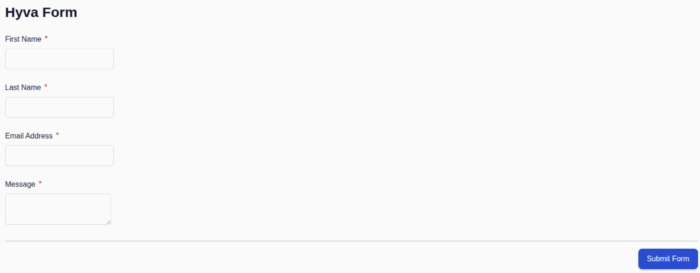
The above code will generate one simple Hyva form with basic required field validation as shown.
That’s it.
Go beyond the default Magento capabilities and tailor the frontend experience to your business needs by creating a custom form in the Hyvä theme.
Whether it’s a adding JavaScript form validation, contact form, request-a-quote form, or a feedback form, Hyvä makes it flexible to implement lightweight, user-friendly, and performance-optimized forms.
Custom forms give you full control to add fields, implement validations, and define data submission logic tailored to your business workflows.
Need help building custom forms in Hyvä? Contact us now.
