

Turn your customer interest into a purchase action with an add-to-cart button sticky.
In this blog post, I will cover the basics and show how to add a sticky add-to-cart to Magento 2 using a code that will help you display the sticky button to boost your conversion rate.
What is the Sticky Add to Cart button in Magento 2?
A sticky add to cart button stays on your product page when your customer scrolls down to explore product details and other recommendations.
Here is an example of it.
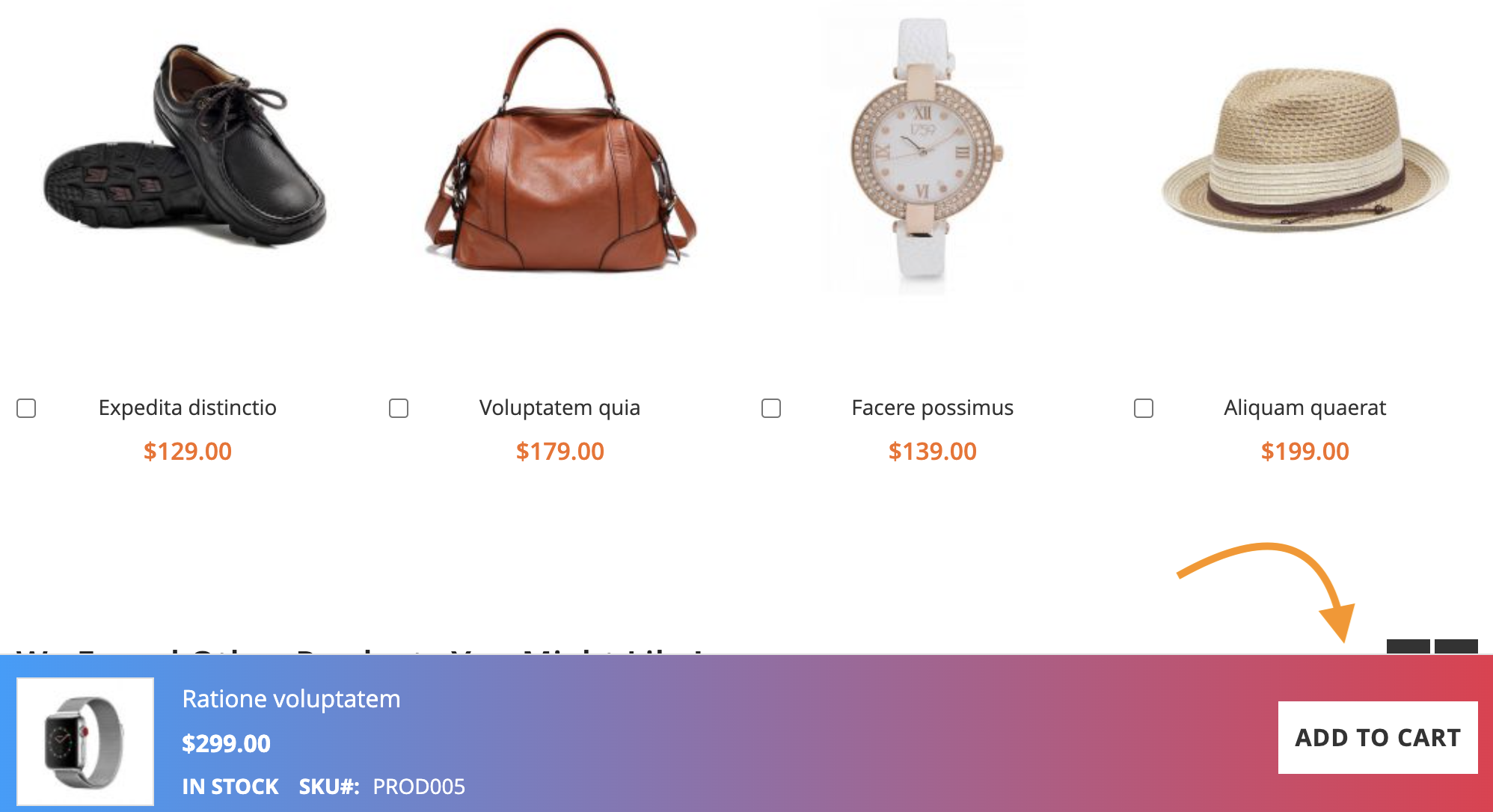
The main benefit of the Magento 2 sticky add-to-cart is that it reduces friction while a customer tries to buy the product, but here you all get other benefits like:
- Improves accessibility for mobile shoppers
- Acts as a consistent nudge for the customers
- Offers uninterrupted navigation without breaking the browsing flow
- Prompts customers to take quick action
- Always keep the purchase intent in mind
How to Add Sticky Add to Cart to Magento 2?
You have two options here:
- Using a code: You can add this feature using a simple code. This method gives you more control over the process without any charges. This is one of the preferred methods as it doesn’t require any complex coding skills.
- Using an extension: You can get a Magento 2 sticky add to cart button extension for this; you will have to incur the extension charges. Also, if the extension isn’t compatible with your store, it might cause performance issues.
Below, you will find a step-by-step way on how to add sticky add to cart in Magento 2 using code. You can use and access the code mentioned here — no need to create it by yourself.
Easily Add Sticky Add to Cart to Magento 2
Make sure you follow each step.
Firstly, you will have to update the product layout to add the sticky add to cart button.
Go to your theme’s directory:
app/design/frontend/Vendor/theme-name/Magento_Catalog/layout
And then, create or edit:
catalog_product_view.xml

<?xml version="1.0"?>
<page xmlns:xsi="http://www.w3.org/2001/XMLSchema-instance"
    xsi:noNamespaceSchemaLocation="urn:magento:framework:View/Layout/etc/page_configuration.xsd">
    <body>
        <referenceContainer name="content">
            <block class="Magento\Framework\View\Element\Template"
                   name="sticky.addtocart"
                   template="Magento_Catalog::product/sticky-addtocart.phtml" />
        </referenceContainer>
    </body>
</page>
Now, create an HTML template file for your sticky Add to Cart button.
For this, navigate to:
app/design/frontend/Vendor/theme-name/Magento_Catalog/templates/product/

Create a new file called sticky-addtocart.phtml

<div class="sticky-add-to-cart">
    <form action="<?php echo $block->escapeUrl($block->getAddToCartUrl($_product)); ?>"
          method="post" enctype="multipart/form-data">
        <input type="hidden" name="product" value="<?php echo $_product->getId(); ?>" />
        <button type="submit" class="action primary tocart">
            <?php echo __('Add to Cart'); ?>
        </button>
    </form>
</div>
Now, to make the sticky visible to your customers when they scroll, you will need to add a CSS.
Head to app/design/frontend/Vendor/theme-name/web/css/source/
Then, create or edit _extend.less and add the following styles:
.sticky-add-to-cart {
    position: fixed;
    bottom: 0;
    left: 0;
    right: 0;
    background-color: #fff;
    padding: 10px;
    box-shadow: 0 -2px 10px rgba(0, 0, 0, 0.1);
    z-index: 1000;
    text-align: center;
}

.sticky-add-to-cart button {
    background-color: #ff6600;
    color: #fff;
    padding: 10px 20px;
    border: none;
    cursor: pointer;
    font-size: 16px;
}
Lastly, run the following commands to deploy static content and clear the cache:
- php bin/magento setup:static-content:deploy
- php bin/magento cache:clean
- php bin/magento cache:flush
Now, test if the sticky button works correctly with different product types and if any customization needs to be done. It is always a good idea to align your sticky button with your branding.
Win More Sales With Your Sticky Add to Cart
Following the above steps, you can easily add sticky add to cart on Magento 2 and encourage customers to take action while they continue to browse on your site — an easy technique to not break their flow and still get sales.
Here are some resources for you to improve your sales in Magento 2:
