Everything is changing along with AI, even how we shop.
AI agents inside Google AI Mode and Gemini now find products, compare options, and complete purchases on a shopper’s behalf. For that to work, your store should be visible to AI agents as well as be able to buy from it too.
Google’s Universal Commerce Protocol (UCP) is the open standard that makes this possible. This guide explains what UCP and agentic checkout are and the two ways to set it up on Magento 2.
What Is Google UCP?
Google UCP (Universal Checkout Protocol) is an open standard that allows AI assistants like Google AI Mode and Gemini to securely connect with a merchant’s backend. This enables customers to discover products and complete purchases directly through the AI assistant.
While the AI handles the checkout, the merchant still owns the order, customer relationship, and business data.
Why Does Agentic Checkout Matters for Magento Merchants?
Adobe’s support for UCP for Adobe Commerce signals this future. Only agent-ready stores will capture these sales. Early adopters will gain a competitive advantage, while others risk becoming invisible during buying decisions. UCP-powered checkout is currently rolling out in the U.S., Canada, and Australia, so preparing now ensures readiness for global expansion.
How to Enable Agentic Checkout in Magento 2?
Magento doesn’t have a built-in, one-click UCP option. Unlike Shopify, it requires a module to add this functionality. There is no simple setting in the admin panel to enable it.
That leaves you with two paths:
- Build it manually. Write a custom module that serves the UCP profile, exposes your catalog and checkout, handles payments, and survives Magento’s caching and multi-store quirks.
- Use a third-party extension such as the Meetanshi Google UCP Agentic Checkout module, which adds the flow via configuration.
The rest of this guide walks through the steps to set up this extension.
The Meetanshi Google UCP extension is the only solution in the market that enables a headless, agentic checkout through UCP. Customers complete purchases through Google’s agentic interfaces using Google Pay, while every order and payment is processed securely inside your existing Magento store.
Prerequisites
Before you start, make sure you have an active account with a supported payment service provider such as Stripe or Braintree, plus access to Google Merchant Center and the Google Pay and Wallet Console.
Step 1: Install and Configure the Extension
Extract the zip and upload the extension to the root of your Magento 2 directory via FTP.
Then connect over SSH and run these commands in order:
php bin/magento setup:upgrade
php bin/magento setup:static-content:deploy –f
php bin/magento cache:flush
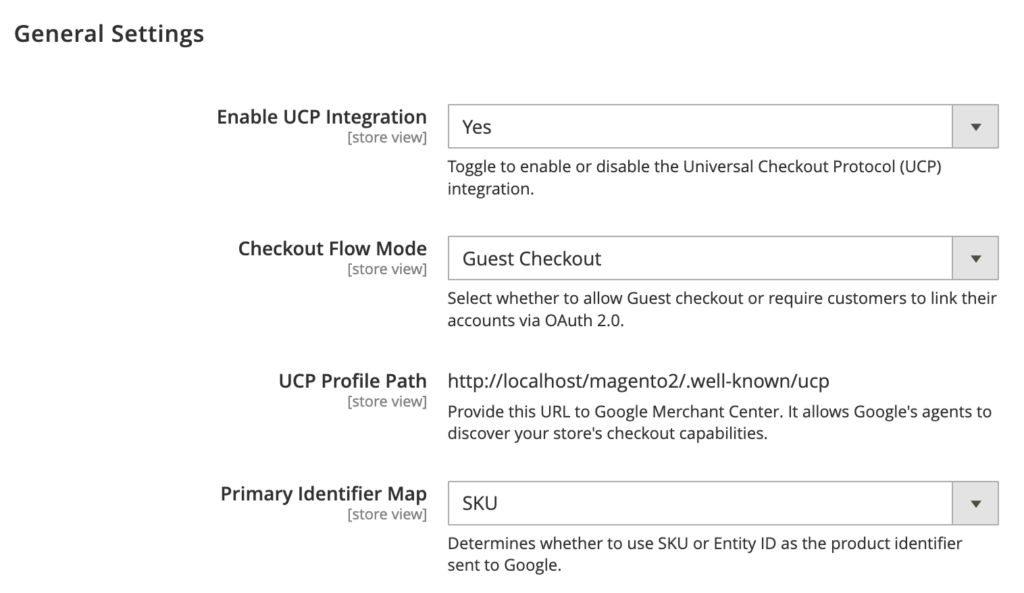
Moving on, go to Stores > Configuration > Sales > Google UCP Checkout and set the following:
- Enable UCP Integration: set to Yes to activate the service.
- Checkout Flow Mode: choose Guest Checkout to let anyone buy without an account, or Require Account Linking to prompt shoppers to link their Google account to their Magento customer account.
- Primary Identifier Map: choose whether to send the SKU or the Entity ID to Google as the unique product identifier.
- UCP Profile Path: this read-only URL is what you provide to Google during onboarding.
- Product Identifier Map: choose SKU or Entity ID for product identification.
Step 2: Configure Google Pay and Payment Routing
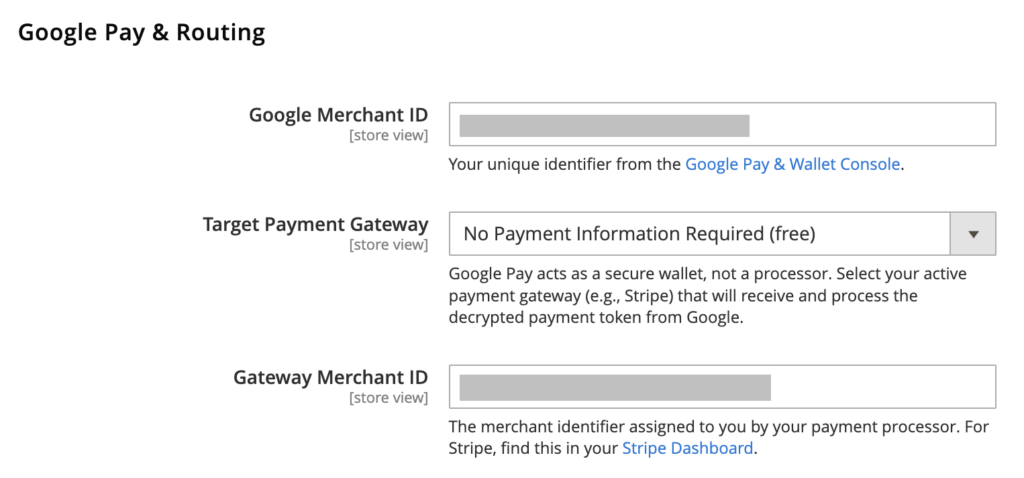
Next, tell the extension how to process the payment once the customer confirms:
- Google Merchant ID: your unique ID from Google.
- Target Payment Gateway: the active Magento payment gateway, such as Stripe, that will process the Google Pay token.
- Gateway Merchant ID: your account ID from your payment processor, such as your Stripe Account ID.
Step 3: Set Up Webhooks, API, and Manage Product Eligibility
To keep Google updated in real time, for example when an order ships, configure:
- Google Partner ID: your unique ID from Google Merchant Center.
- Production API Key: authenticates your store with Google’s API.
Once everything looks right, save the configuration.
The module automatically adds a Google UCP Eligible attribute to all products, set to Yes by default, so your whole catalog becomes eligible for agentic commerce.
To exclude a product, edit it under Catalog > Products and set the attribute to No in the General group.
Some products need legal disclosures, such as California Prop 65. Add these in the Google UCP Consumer Notice field on the product edit page to stay compliant with Google’s requirements and keep the product eligible.
Step 4: Verify and Test
Confirm that Google can see your store by visiting:
https://yourstore.com/.well-known/ucp
You should see a JSON response containing your service endpoints and public keys. Then run a test checkout against the REST API, replacing the placeholders with your own data:
curl -X POST https://yourstore.com/rest/V1/ucp/checkout/session \

  -H "Content-Type: application/json" \

  -d '{"line_items": [{"id": "line_1", "item": {"id": "YOUR_SKU"}, "quantity": 1}]}'
If something goes wrong, the usual causes are simple.
A 404 on /.well-known means the module is not enabled or the cache needs flushing. An invalid signature means the cryptography settings have been changed in the database.
A payment failure usually means the target payment gateway is inactive or the Gateway Merchant ID is wrong.
Frequently Asked Questions
Is there a Native Magento UCP module?
No. Magento has no built-in UCP support and no one-click toggle. You either build a custom module or use an extension like Meetanshi’s.
What Magento Version and Payment Provider Do I Need?
For a stable setup, you want Magento 2.4.7 or later. The Meetanshi extension needs an active account with a supported payment service provider such as Stripe or Braintree.
Which is the Best Google UCP Agentic Checkout Extension For Magento 2?
Meetanshi Magento 2 Google UCP Extension is one of the best options for enabling Google UCP and agentic checkout on Magento 2 stores.
Can I Exclude Specific Products from Agentic Checkout?
Yes. The Meetanshi extension makes all products eligible by default and lets you turn off the Google UCP Eligible attribute on any product you want to exclude.
Is Agentic Checkout Available in My Country?
UCP-powered checkout is rolling out in stages, starting with select merchants in the United States, Canada, and Australia, and expanding over time. Getting your store ready now means you are set the moment your market opens.
Get Agentic-Ready: Meetanshi’s Google UCP Extension
Agentic commerce is early, but it is moving fast, and the front door of shopping is shifting into AI conversations. Stores that get ready now will be seen by AI shoppers. Stores that wait may be overlooked.
For that, you don’t need months of development to get there. The Meetanshi Google UCP Agentic Checkout extension gives your Magento 2 store a complete, secure agentic checkout through configuration, with Google Pay, real-time order syncing, and per-product control built in. Skip the DIY headache and get agent-ready the simple way.