

Google Rich Snippets have been populating SERPs since 2009 with rich answers, which provide more informative results to the searchers. Search engines keep updating their algorithms to produce the best possible results for search queries. Google is far ahead of all others at providing the best-match information to its users.
In this article, I’ve discussed everything you need to know about Google rich results as an SEO person.
Let’s begin..!
What are Rich Snippets?

What Makes Google Rich Snippets So Important?

Google rich snippets are important for both users and websites. Unlike ordinary results, the rich snippets contain additional information that satisfies the search intent in a better way. Google displays different types of rich snippets, which depend on the searcher’s query. More on this later.
Such rich snippets usually occupy the upper fold of the search engine results page and thus receive more exposure & impressions. These rich results are generally displayed in carousel style, which is visually appealing and receives most of the clicks. Furthermore, the rich snippets help in qualifying the visitors to the site, which reduces the chances of bounce and reducing the bounce rate.
Benefits of Google rich snippets:
- More visibility on SERPs
- Improves user experience
- Increased click-through rate
- Drive quality traffic
Thus, winning the SERPs with rich results will mean more impressions, more clicks, and more traffic for the website. In a nutshell, Google rich snippets benefit the users and websites, i.e. by providing an excellent experience to the visitor and boosting traffic for the website.
Different Types of Google Rich Snippets (Including Examples)
People use Google for different purposes, and therefore, not all search queries are the same. Google is smart enough to understand the core motive behind a searcher’s query and produce the most helpful results. Different types of rich results are displayed to the users based on the core intent behind their query.
Some of the most common types of Google rich snippets are provided below with examples.
- Recipe Snippet
- Google Map Snippet
- Review Snippet
- Movie Snippet
- Event Snippet
- Product Snippet
Let’s drill down into the rich snippets examples to understand them in a better way.
Recipe Snippet
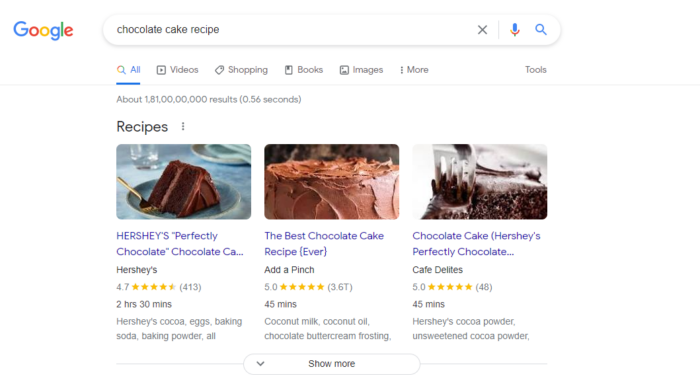
Google recipe snippets appear for informational queries related to food recipes. The recipe snippets generally appear at the top of the search engine results page and show recipes for the same dish from multiple resources.
For example — On searching “Chocolate Cake Recipe” on Google, the search engine identifies the searcher’s informative intent and shows the best available resources on the web for making chocolate cakes. It also fetches important information about the recipe from the sources, such as images, ratings, time to make, and ingredients to show on the SERP.
Google Map Snippet
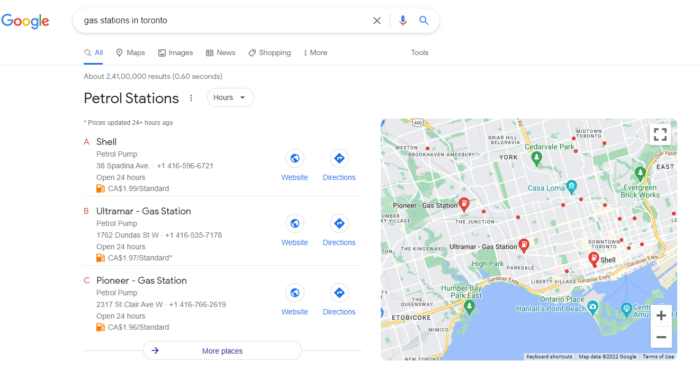
Ever searched for something like “Grocery stores near me” on Google? If so, then you might have definitely stumbled upon a result that displays different physical locations on Google Maps. These are called Google Map Snippets and are generally shown for local results.
For example — The query “Gas stations in Toronto” returns the list of the gas stations in Toronto along with their address, contact details, and location on Google map. Interesting, isn’t it? This type of result makes it easier for local searches to find local stores and businesses effectively and navigate to them. The business profile needs to be optimized for local SEO to harness the benefit of Google map snippet.
Review Snippet
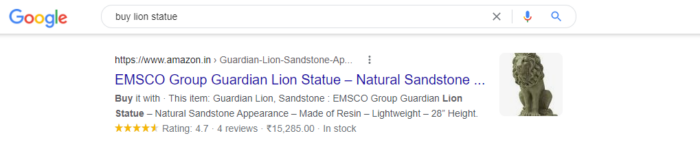
Google fetches the ratings and reviews data from the schema markup of the page and shows them on the SERP to help the customers choose the result with the most positive reviews. The review snippet shows the number of ratings (on a scale from 1 to 5) along with the number of votes. They may appear in the rich snippets or in the knowledge panel on the right-hand side.
According to Google, the review snippets apply to the following:
- Book
- Course
- Event
- How-to
- Local business
- Movie
- Product
- Recipe
- Software App
For example — On searching for “Buy lion statue”, Google returns the results with the ratings and reviews information.
Movie Snippet
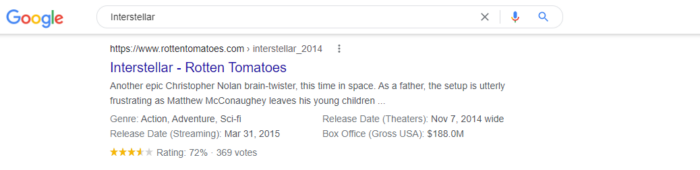
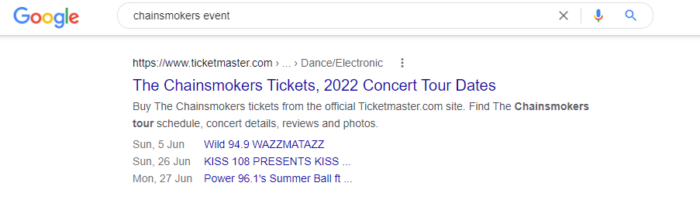
Google identifies movie-related structured data such as genre, release date, box office collection, ratings, votes, etc., and shows them on the search engine results page. Below is an example of a Google-rich snippet for movies.
Movie Snippet
Google identifies movie-related structured data such as genre, release date, box office collection, ratings, votes, etc., and shows them on the search engine results page. Below is an example of a Google-rich snippet for movies.
Product Snippet
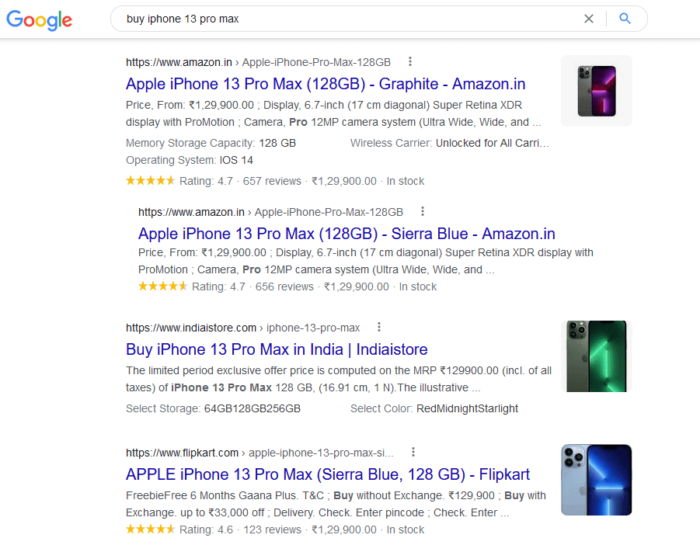
The product snippets on Google display the product attributes, price information, ratings, and availability status. An example of a product snippet in a rich result is provided below.
Apart from the types of rich snippets provided above, Google supports many other types of rich results. You can learn more about them at Google Search Gallery.
If this post has glued you this far, you may also love to read another expert post on Advanced Google Search Operators for SEO, where we have discussed some of the important Google search operators and the practical ways to use them for SEO.
Everything SEO People Need to Know About Google Rich Snippets
Rich snippets are dominant over ordinary search results as they drive more impressions, and clicks and provide better visibility on the Google search engine.
Do Rich Snippets Help SEO?
Yes, Rich snippets do help SEO.
Google rich snippets can help you boost SEO rankings, although not directly. The on-page metrics such as click-through rate, bounce rate, and time spent on the page can have a massive impact on the ranking of the web page. Getting your web page on the rich snippets can help you stand out from ordinary results on the SERP, which boosts the click-through rates. Furthermore, it sends pre-qualified visitors to the web page by providing rich information and therefore results in a lower bounce rate. All these things, together, affect the overall ranking of the web page and give the SEO a massive boost.
Featured Snippets vs Rich Snippets
The featured snippets are the search results that appear before the ordinary organic results at position zero on the search engine results page. Google fetches the best possible content from the web pages to display on the featured snippet that answers the searcher’s query. The featured snippets usually consist of a list, bullet, definition, or short paragraph that satisfies the user’s intent. You can learn more through this detailed article on Google’s featured snippets.
On the other hand, the rich snippets appear along with the ordinary search results and contain more information about the result. They are not necessarily always at the top of the page.
How to Get Rich Snippets on Google?
Structured data is the language of search engines that help them better understand the web page. Also known as schema markup, structure data in the form of meta information that web pages use to help search engine algorithms better understand and categorize the content. You can use Schema.org as a reference for an extensive library of vocabulary.
You can follow the below-mentioned steps to get Google rich results. Identify your content type and choose the required schema type. Google supports different types of structured data, which include:
- Article
- Book
- Breadcrumb
- Carousel
- Organization
- Course
- Critic Review
- Dataset
- Employer Aggregate Rating
- Event
- Fact Check
- Job Posting
- Lives stream
- Local Business
- Person
- Media Actions
- Video
- Product
- Q&A Page
- Recipe
- Restaurant
- Review Snippet
- Sitelinks SearchBox
- Social Profile
- Website
Depending on your website CMS, you can either use a plugin to add structured data or do it manually via coding. The method varies for each platform, e.g., you can learn how to add structured data to Magento 2 through this detailed guide.
Let’s go through the basic method of adding schema markup code.
Step 1: Add Schema Markup
In order to add schema markup to your web page, go to Google’s Structured Data Markup Helper, enter the type of markup, URL/HTML, and click on start tagging.
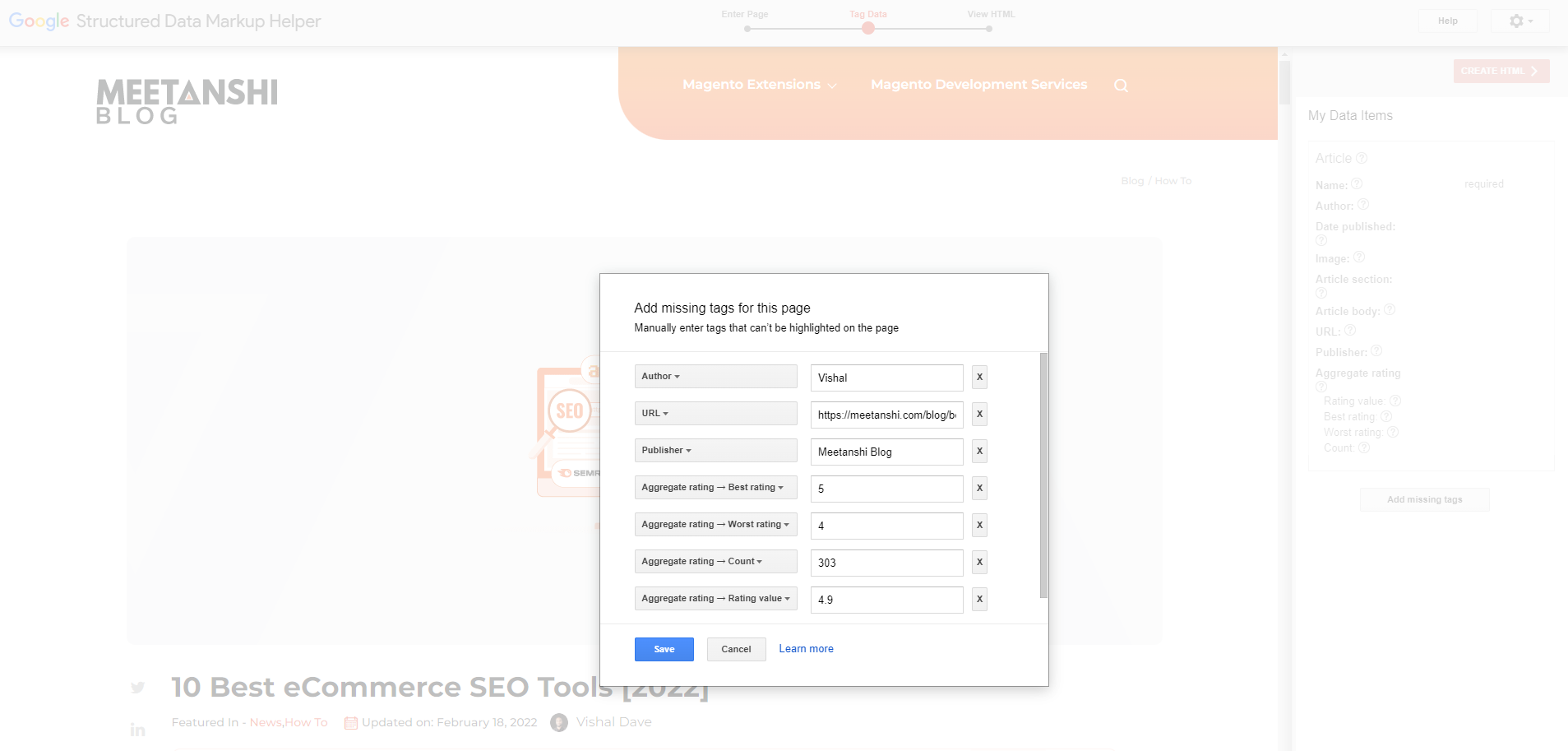
Now, it will load the live page if you have entered the URL or render the page from the HTML you have entered. Tag the missing data by selecting elements on page one by one and clicking on the ‘CREATE HTML’ button to generate the structured data code.
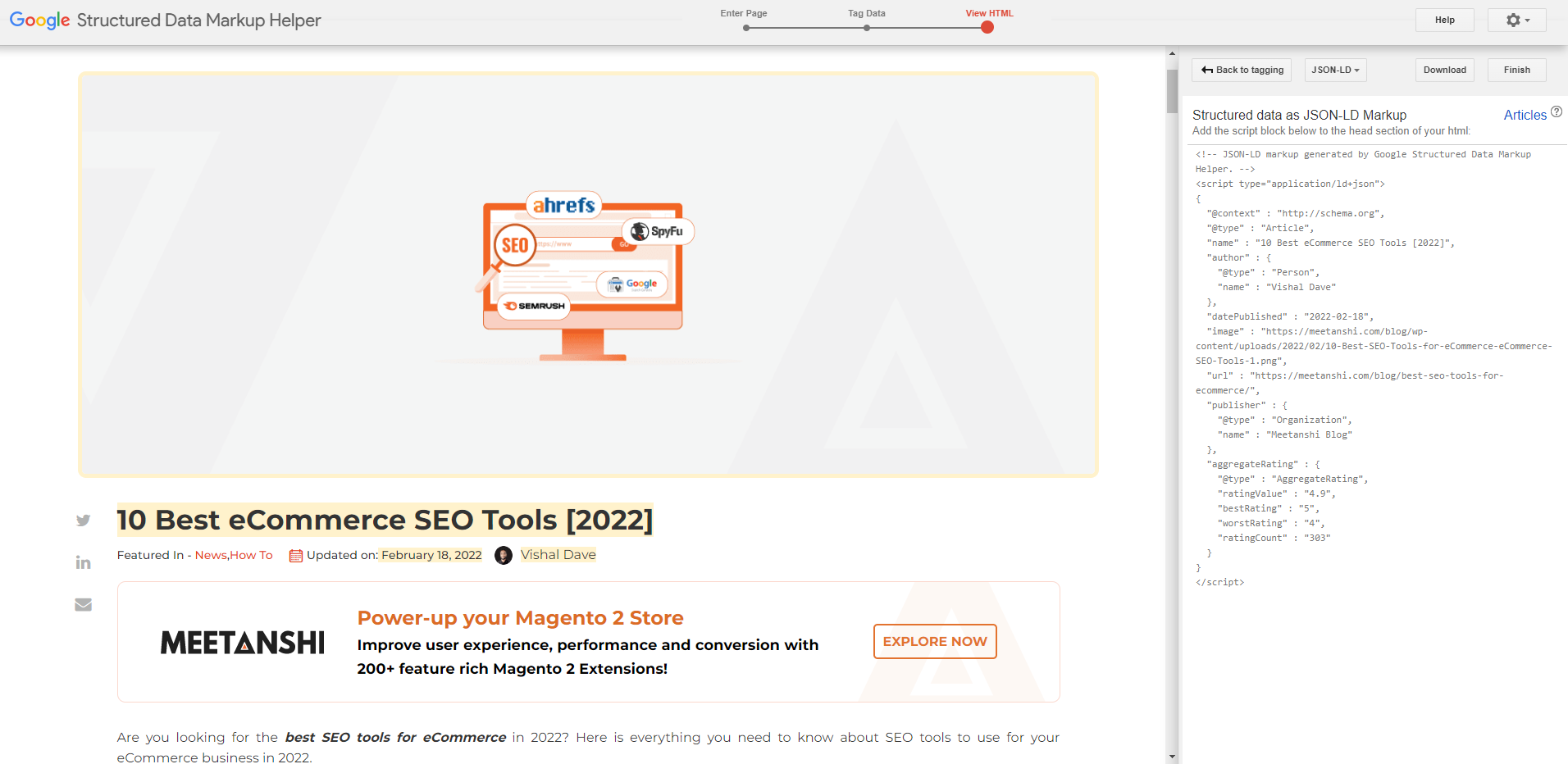
The markup helper will generate the schema markup code. Copy the code and add it to the head section of the web page to add structured data.
That’s it! The method to access the source file of the web page can be different for different CMS. Also, you can use our JSON-LD schema markup generator tools that make it easy to structure data for web pages.
For Shopify merchants, SearchPie: SEO, Speed &Schema serves as a dedicated companion to these SEO practices.

As a solution officially recognized as Built-for-Shopify, it helps you implement a professional Schema architecture without needing to handle the code yourself. SearchPie works in the background to provide accurate JSON-LD for Product, Review, and FAQ types, ensuring your store remains fully optimized for Rich Snippets.
By automating these technical steps, it allows you to maintain a strong SEO foundation while you focus on managing your daily business operations.
Step 2: Test Rich Results
Once you add the schema markup to your web page, it’s time to test it using a rich result testing tool!
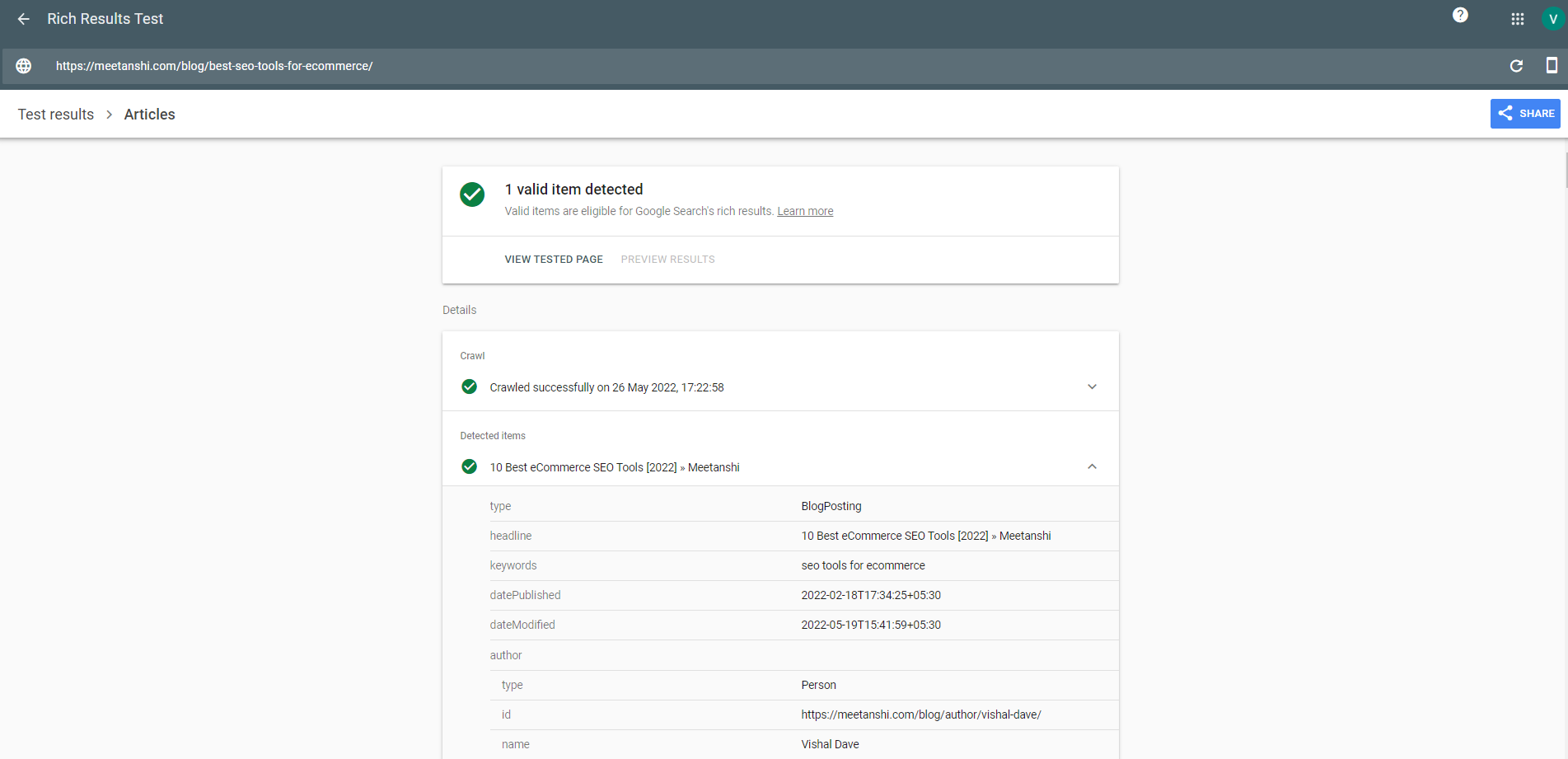
Go to Google Rich Results Test, which is a rich snippet testing tool, enter the ULR to test, and click on the ‘Test URL’ button to run the Google Rich result test.

The test result will display all the structured data associated with the web page.
How Long Does It Take For Rich Snippets to Appear?
Well, it depends on Google only. The sole decision to show or not to show your web page as rich results are taken by Google’s smart algorithms. Sources point out that it usually takes 2 to 12 weeks for a search result to appear in Google rich snippets.
The webmasters should optimize their web pages for rich snippets and wait for Google to fetch the data out and populate the SERPs through rich snippets. One thing to clearly avoid is altering the structured data frequently, which may reset the whole process and lead to disappointment.
Final Take on Google Rich Snippets
Google is getting smarter with each passing day and focusing on providing the most useful information to its users. Rich snippets are shown by Google to provide a richer and more satisfying experience to the searchers. They are some of the best ways to edge out the competition. Identify your content type, build your structured data, add it to the head of the web page, and wait for Google to rock it on the rich snippets.

