

Buy X get Y is a promotional strategy to delight shoppers to buy more.
Here is an example of the discount.
The idea here is simple: when a customer purchases a specific product (X), they can get another specific product (Y) for free or at a discounted price. Here, I will guide you through the steps of adding a Buy X Get Y discount on Shopify effectively.
How to Set Up a Buy X Get Y Shopify Discount?
The easiest method is to use Shopify’s in-built Discount tab.
Step 1: Pick the Discount Method
- From the Shopify admin, head to Discounts > Create discount.
- Select the Buy X get Y from the discount type.
- Select the method to apply the discount:
- Discount code: Add the discount code that a customer needs to manually add at the checkout.
- Automatic discount: Add a title for the code to apply automatically at the checkout.
Step 2: Add the Customization
The following customizations help to set how shoppers can use this discount, on which products, and more. We will see the steps in 3 phrases: Customer buys, Customer gets, and discounted value.
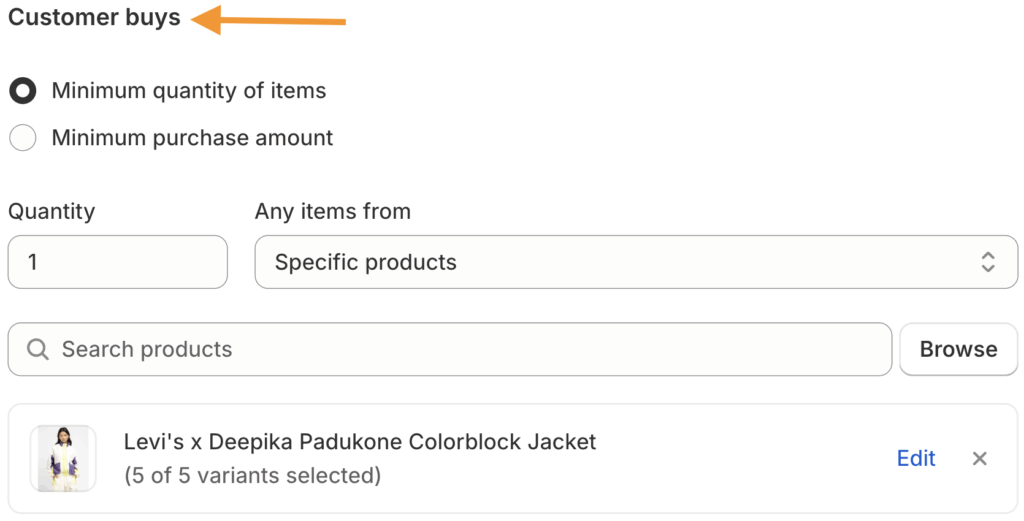
Customer Buys
- Apply this discount on the minimum quantity of items or purchase amount.
- Set the quality to avail the discount (if you have selected minimum quality).
- Add the minimum purchase amount (if you have selected the minimum purchase amount).
- Select a specific product or collection and add accordingly.
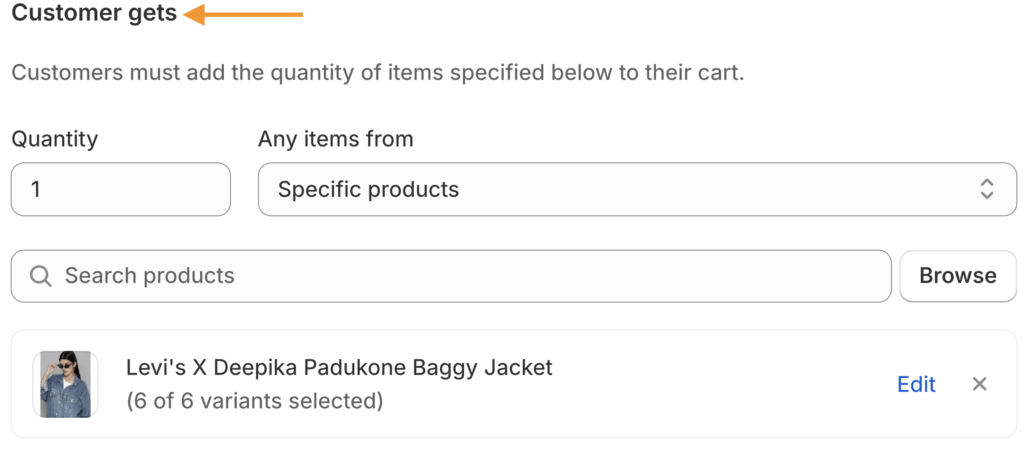
Customer Gets
- Add the quantity of items the customer receives a discount on.
- Specify which products or collections are discounted (they can be the same as ‘X’ or different).
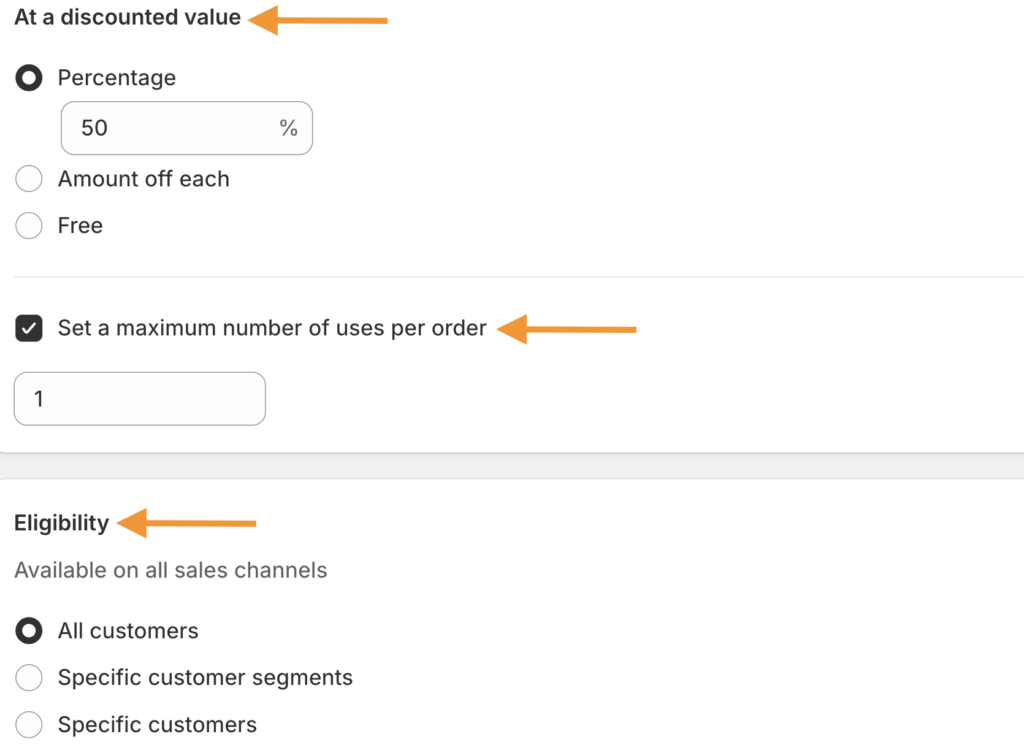
- Choose the discount value: percentage off, free (100% off), or amount off (fixed monetary value).
- Set a maximum number of uses per order for the discount.
Step 3: Set Eligibility, Limits, and Activate
- Select if the discount applies to All customers, Specific customer segments, or Specific customers.
- Add different product combinations based on your choice.
- Set a start date and end date to run this discount.
Then, save the created Shopify buy x get y discount, and you will see a success message.
Based on what we have set, the shopper will get the baggy jacket (Y) at 50% when they buy the colorblock jacket (X).
Here is how it looks at the checkout page:
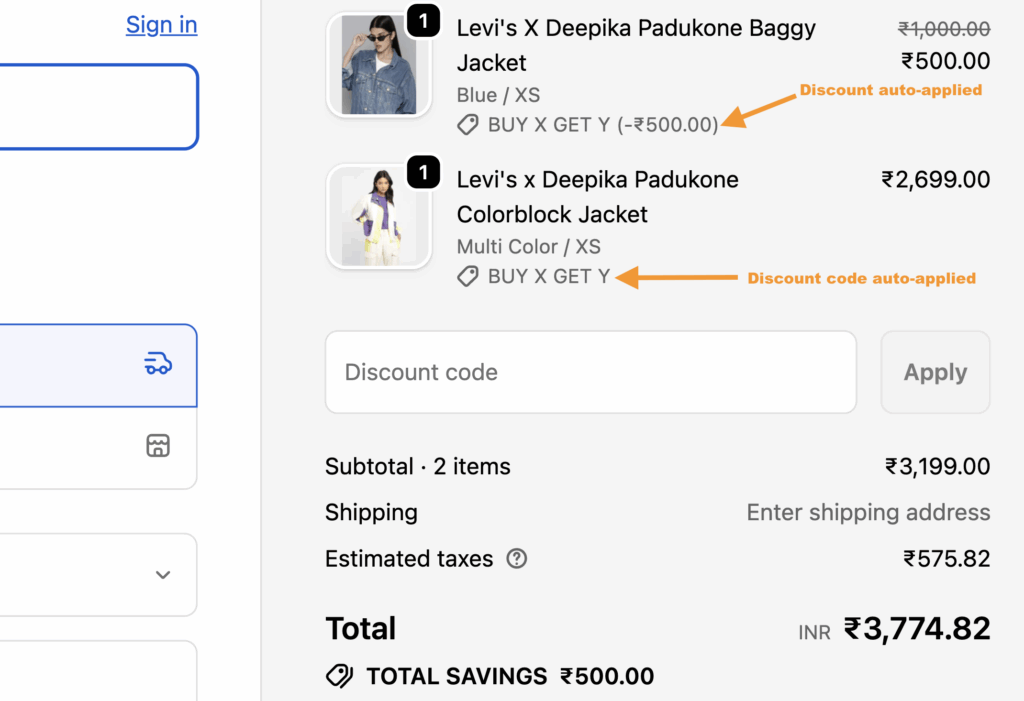
The discount code will be automatically applied when the conditions are met. If you opt for the code method, the shoppers will have to manually add the code. You can create the code yourself or use Shopify apps to generate codes.
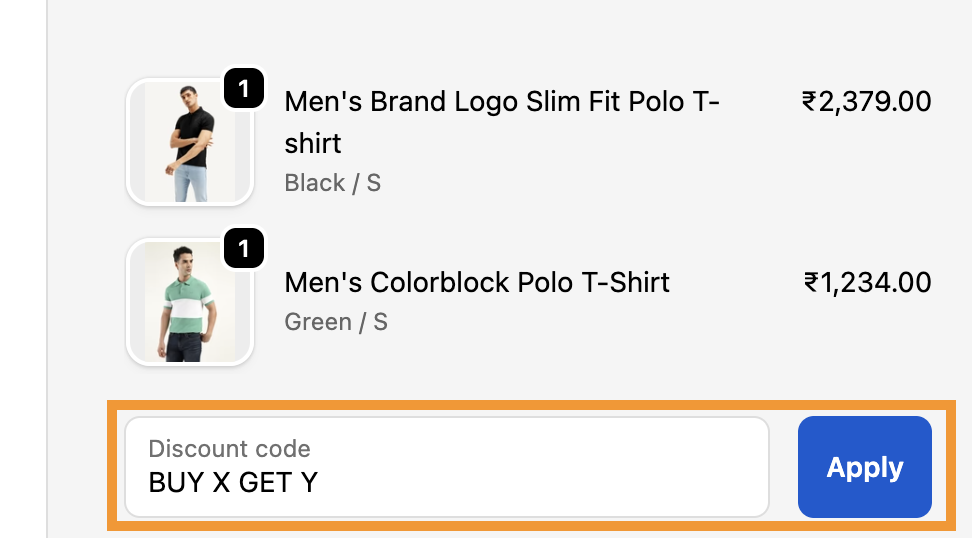
Using this method, you can try different combinations like buy 3 get 2 or buy 7 get 5. You just need to adjust the quantities and get a logical flow.
It is important to note that both the X and Y product should be available in the cart for the discount code to trigger.
Shopify Buy X Get Y Not Working: Solution
There are a few reasons why the Shopify buy x get y discount won’t work. But don’t worry, I have mentioned the solutions causing this issue and how you can fix it.
| Issue | Potential Reason(s) | Solution(s) |
| Minimum Requirements Not Met | The cart doesn’t meet the specified minimum quantity or amount. | Check the discount settings for the exact quantity/amount required. |
| Product/Collection/Customers Exclusions | The discount is restricted to specific products/collections/customers. | Verify the eligible products/collections/customers in the discount settings. |
| Usage Limits Reached | The total number of times the discount can be used is met. | Check the limit setting for the discount code. |
| Active Date Range Issue | The start date hasn’t arrived, or the end date has passed. | Confirm the discount’s Active dates are correct with the right date/time. |
| Combining Discounts | Customer is trying to use the “Buy X Get Y” discount with another automatic or code discount. | By default, only one discount can be applied per order. |
This wraps up the buy x get y discount on Shopify steps; you can create multiple versions of this discount and give shoppers the opportunity to shop more products. If you want to use a buy x get y Shopify app, then we recommend: BOGO + Free Gift & Buy X Get Y and BOGOS: Free Gift Bundle Upsell
Try whichever way feels comfortable and start selling more sales.
