

Adjusting pricing of each product is time-consuming. The Shopify bulk price editor saves your day, allowing you to edit product prices together without any difficulty.
Here are the simple steps to use the simple bulk price editor in Shopify.
Steps to Bulk Change Price in Shopify (Using the Native Bulk Editor)
Follow these three steps to make bulk price change in Shopify
- Select the Products to Edit
- Click on Bulk Edit Option
- Save Your Changes
Step 1: Select the Products to Edit
- Log in to your Shopify account and navigate to the Products.
- Select the products you want to edit the pricing. (You can only select 50 products per page)
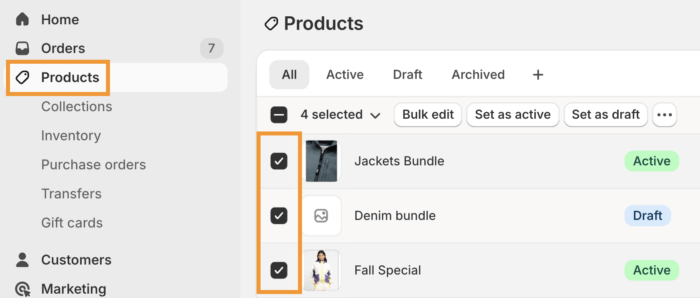
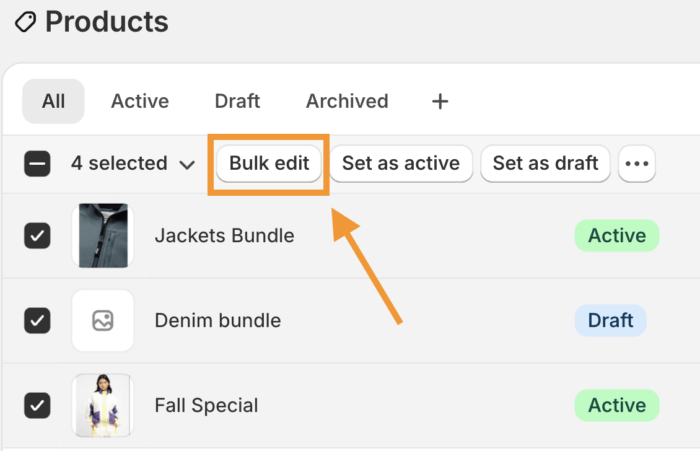
Step 2: Click on Bulk Edit Option
- Click on the Bulk Edit button from the top row.
- A spreadsheet-like editor will open to modify product details.
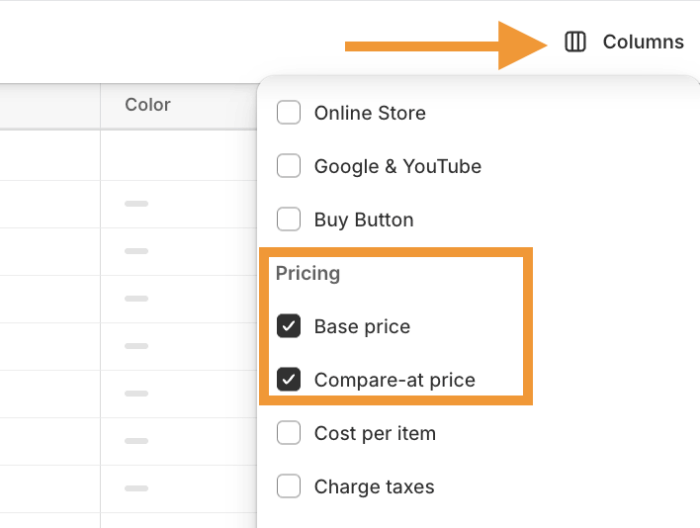
Step 3: Edit & Save Changes
- You will see the base price column
- Click on Columns > Pricing to bulk edit compare at price in Shopify and other related pricing field, like:
- Base price
- Compare at Price (original price shown during sales)
- Cost per item (optional, for tracking margin)
- Charge taxes
- Make changes as you need change in the columns
- Click on the Save button
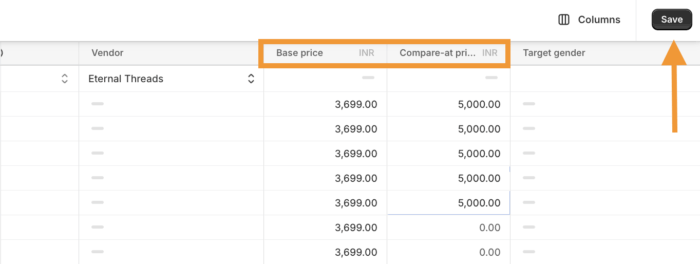
Shopify will update all selected product prices instantly and you can take a preview to see if all the changes are done accordingly.

Benefits of Shopify Bulk Editor Price Feature
The Shopify price editor helps you manage to price and adjust it across your entire catalogue without any hassles.
Besides that, it also helps you:
- Minimizes manual errors to change value across selected products
- Easily apply pricing changes in case of sale, holiday discounts, or more
- Managing pricing using CSV files if you are dealing with large inventories
- Edit prices for individual variants like sizes, colors, or bundles
- Get an option to preview the pricing changes
Other Ways to Bulk Edit Price in Shopify
There are two options to know while learning how to change prices on shopify in bulk
- Use Excel Sheet: If you are dealing with a large inventory, then you will have to export the product file, make your edits, and import it back to Shopify.
- Third-party bulk editor apps: If you want some advanced customization options, you can opt for bulk editor Shopify apps like Ablestar Bulk Product Editor, NA Bulk Price Editor, or Hextom: Bulk Product Edit.
Shopify’s built-in bulk editor is a simple option to make the needed pricing updates. It is a free option with basic settings. The Shopify apps, comes with advanced setting options with a monthly fee.
You can pick the option that best meets your requirement and edit your pricing.
Conclusion
Managing price is essential and needs time-to-time monitoring. Thanks to the in-built Shopify features and apps this task is much easier.
If you need a dedicated Shopify developer to manage this task for affection, our Shopify developer can help to manage this task effectively.
