

Magento 2 store owners are responsible for maintaining the professional standards and delightful customer experience to stay ahead of the competition.
As a part of it, updating customers about their order details, shipping status, invoice documents, credit memo, etc. is important.
An invoice is a legal document that reflects the transaction between buyer and seller. For E-commerce store owners, an invoice must be as detailed as possible that covers essential information a customer must know.
The default Magento 2 invoice includes details like subtotal, shipping and handling charges, tax, and grand total under “Invoice Totals” as shown here:

However, one may want to add quantity field in invoice total in Magento 2 admin panel which is an important detail to be included in the invoice PDF.
The below programmatic solution allows to do so!
Method to Add Quantity Field in Invoice Total in Magento 2 Admin Panel:
1. Create registration.php file at app\code\Vendor\Module directory
<?php

use \Magento\Framework\Component\ComponentRegistrar;

ComponentRegistrar::register(ComponentRegistrar::MODULE, 'Vendor_Module', __DIR__);
2. Create module.xml file at app\code\Vendor\Module\etc directory
<?xml version="1.0"?>
<config xmlns:xsi="http://www.w3.org/2001/XMLSchema-instance"
        xsi:noNamespaceSchemaLocation="urn:magento:framework:Module/etc/module.xsd">
    <module name="Vendor_Module" setup_version="1.0.0"/>
</config>
3. Create sales_order_invoice_new.xml file at app\code\Vendor\Module\view\adminhtml\layout
<?xml version="1.0"?>
<page xmlns:xsi="http://www.w3.org/2001/XMLSchema-instance"
      xsi:noNamespaceSchemaLocation="urn:magento:framework:View/Layout/etc/page_configuration.xsd">
    <body>
        <referenceBlock name="invoice_totals">
            <block class="Vendor\Module\Block\Sales\Order\Qty" name="qty"/>
        </referenceBlock>
    </body>
</page>
4. Create Qty.php file at app\code\Vendor\Module\Block\Sales\Order
<?php

namespace Vendor\Module\Block\Sales\Order;

use Magento\Framework\View\Element\Template\Context;

class Qty extends \Magento\Framework\View\Element\Template
{
    public function __construct(Context $context, array $data = [])
    {
        parent::__construct($context, $data);
    }

    public function initTotals()
    {
        if ((double)$this->getOrder()->getTotalQtyOrdered()) {
            $value = $this->getOrder()->getTotalQtyOrdered();

            $this->getParentBlock()->addTotal(
                new \Magento\Framework\DataObject(
                    [
                        'code' => 'qty',
                        'strong' => false,
                        'label' => 'QTY',
                        'value' => $value,
                    ]
                )
            );
        }
        return $this;
    }

    public function getOrder()
    {
        return $this->getParentBlock()->getOrder();
    }
}
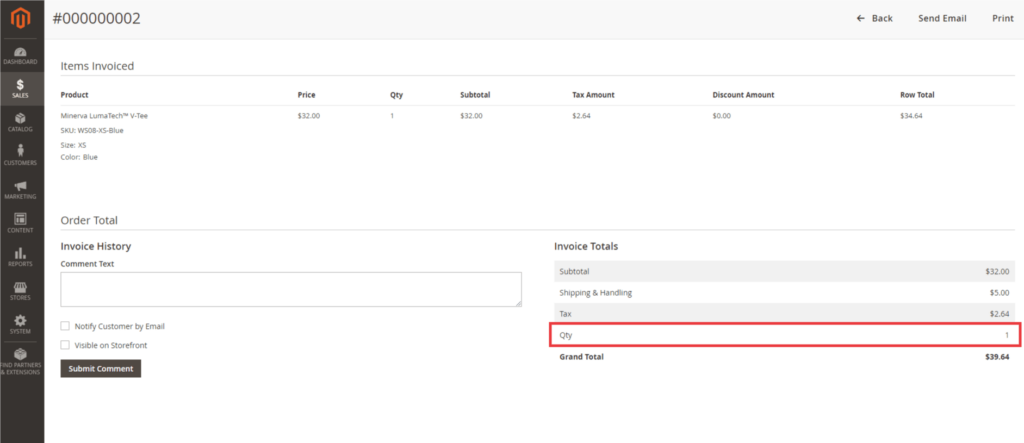
Once done, the quantity is listed under “Invoice Totals” as shown here:
Improve the invoice PDF with the above solution in Magento 2 store.
In order to display the manually added charges, one has to add custom field in invoice totals in Magento 2 invoice email
Also, do share the solution with Magento Community via social media.
Thank you.
