Some items online require checking a customer’s age before they can view them.
An age verification popup acts as a gatekeeper for your website. When a new visitor lands on your page, a window pops up and asks them to verify how old they are.
When a customer clicks to confirm they are old enough, the window disappears so they can browse and continue to shop.
If they click that they are under the age limit, the site automatically sends them away to a safe page, keeping your business protected and compliant.
Let’s understand how to add an age verification popup to your store step by step.
Methods to Add an Age Verification Popup
There are two main ways to add an age verification popup to your store.
- Manual Coding – This option requires hiring a developer to write code directly into your site. It offers total control, but it takes longer and can cause layout bugs or site slowdowns if not done carefully.
- Using an Extension (Recommended) – This is the quickest and easiest path for most store owners. An extension gives you a simple settings page in your admin dashboard to change text, colors, and age rules without touching any code.
How to Set Up Magento 2 Age Verification Extension
Adding an age gate protects your business from legal risks while creating a seamless experience for legal shoppers. Follow this step-by-step guide to configure your popup settings and get your store compliant fast.
Using Meetanshi’s Magento 2 Age Verification Extension, you can easily restrict underage access, customize your popup with a live admin preview, and protect your store’s SEO.
Step 1: Install and Configure Extension
Start by downloading the Meetanshi Magento 2 Age Verification Extension.
- Upload Files: Move the extension files into your Magento setup and refresh your store cache.
- Enable Extension: Go to Stores > Configuration > Meetanshi > Age Verification and set it to Enable.
- Set Age Limit: Choose your store’s minimum age requirement.
- Set Rejection Link: Enter the web link where underage users should be sent if they click “No.”
Step 2: Configure Core Settings
Log into your Magento admin panel and open the age verification settings page. This is where you set the main rules for how your age gate works in your store.
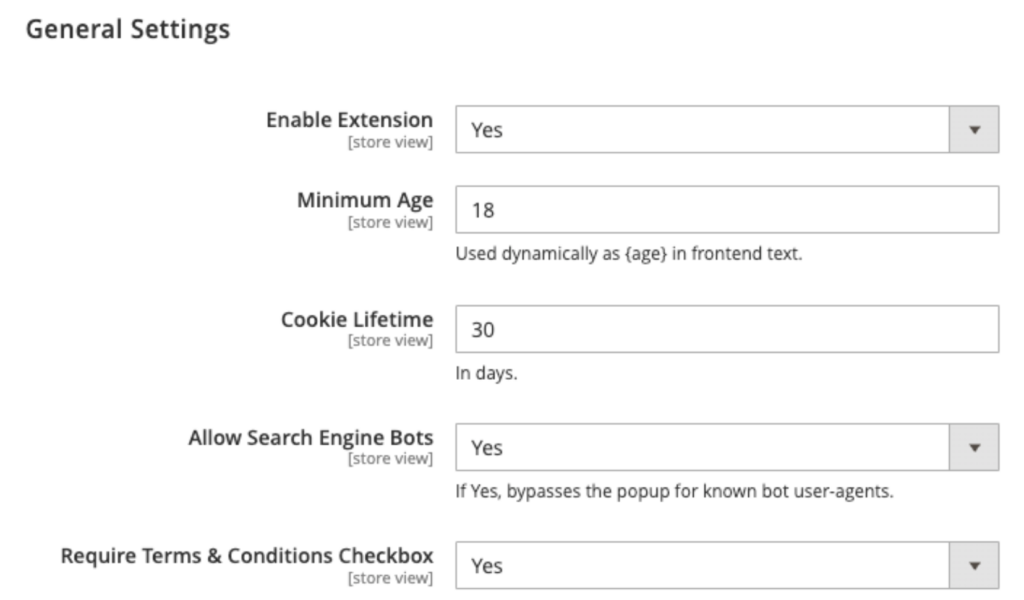
Here are the key settings to adjust:
- Enable Status & Minimum Age: Turn the popup on and enter your required age limit (like 18 or 21).
- SEO Bot Access: Allow search engines like Google to bypass the popup so your search rankings stay safe.
- Cookie Memory: Set how many days the site remembers verified shoppers so returning customers are not asked repeatedly.
- Exit Link & Terms: Enter a web link to redirect underage visitors, and optionally require a Terms & Conditions agreement checkbox.
Step 3: Customize Your Popup Content
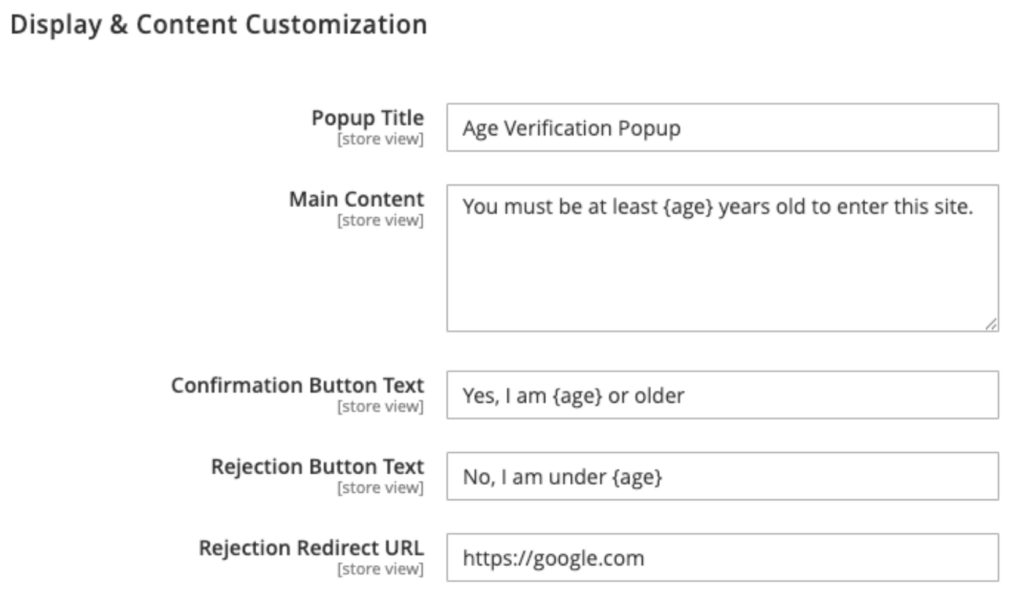
Head to the content settings section to write the exact message your visitors will see when they land on your store.
Here are the key settings to adjust:
- Popup Heading & Message: Write a clear title and text asking visitors to confirm their age, using the {age} tag so your minimum age updates automatically.
- Action Buttons: Customize the text on your “Yes” and “No” buttons; for example, “I am 21 or older” vs. “I am under 21”.
- Exit Web Address: Enter the destination URL where visitors will be redirected immediately if they click the rejection button.
Step 4: Style Your Popup Window
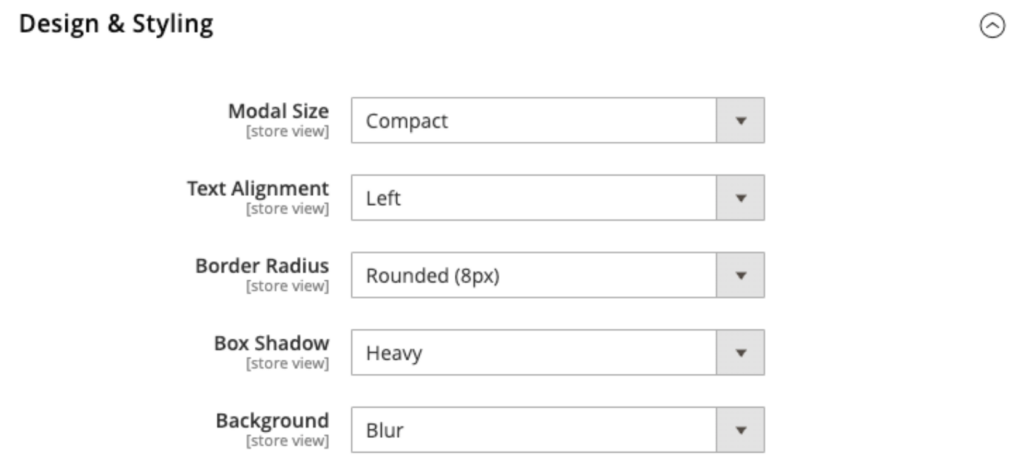
Use the built-in design controls to match your website branding without touching any CSS code.
Here are the key settings to adjust:
- Live Preview Widget: Drag and check a floating preview box in your admin panel that shows design changes in real time.
- Layout and Backdrop: Choose between a compact pop-up and a full-screen window, along with backdrop effects.
- Shape and Alignment: Set text alignment and choose corner styles ranging from sharp square edges to rounded pill shapes.
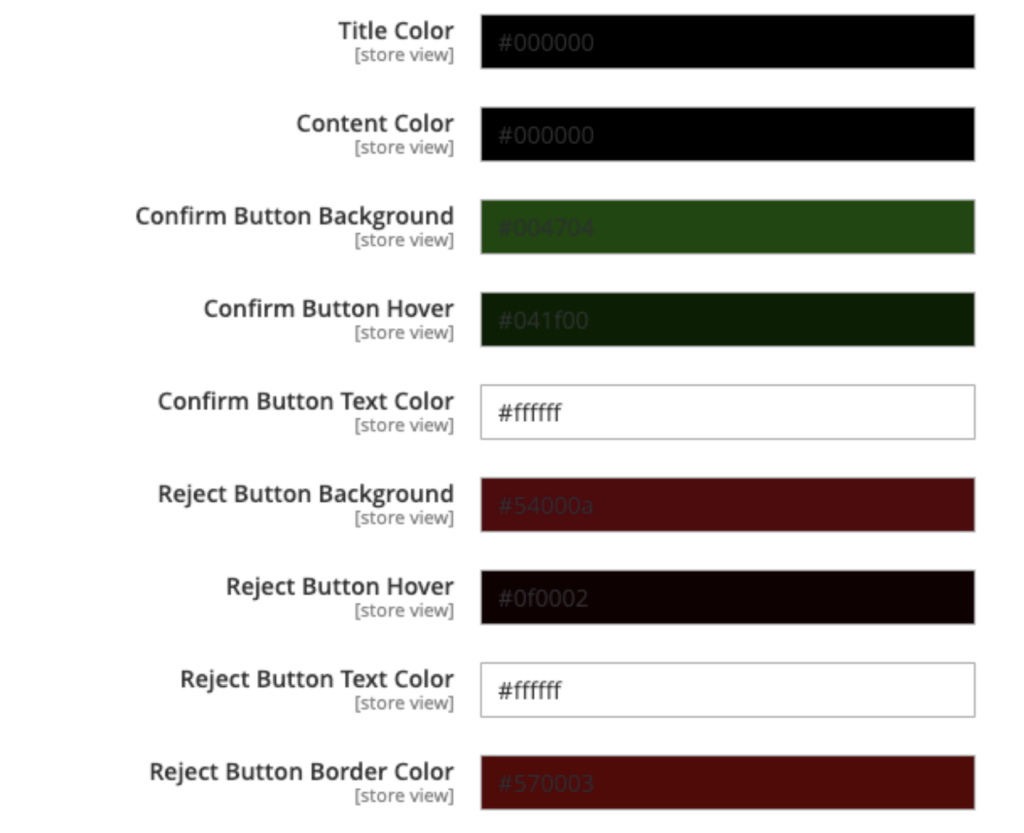
- Custom Brand Colors: Pick custom colors for your background, headlines, text, and button hover effects using built-in color pickers.
Step 5: Check Your Live Storefront
After saving your settings, check your live storefront to preview your new desktop layout. The popup is also completely mobile-friendly, so it automatically adapts to smaller smartphone and tablet screens behind the scenes.
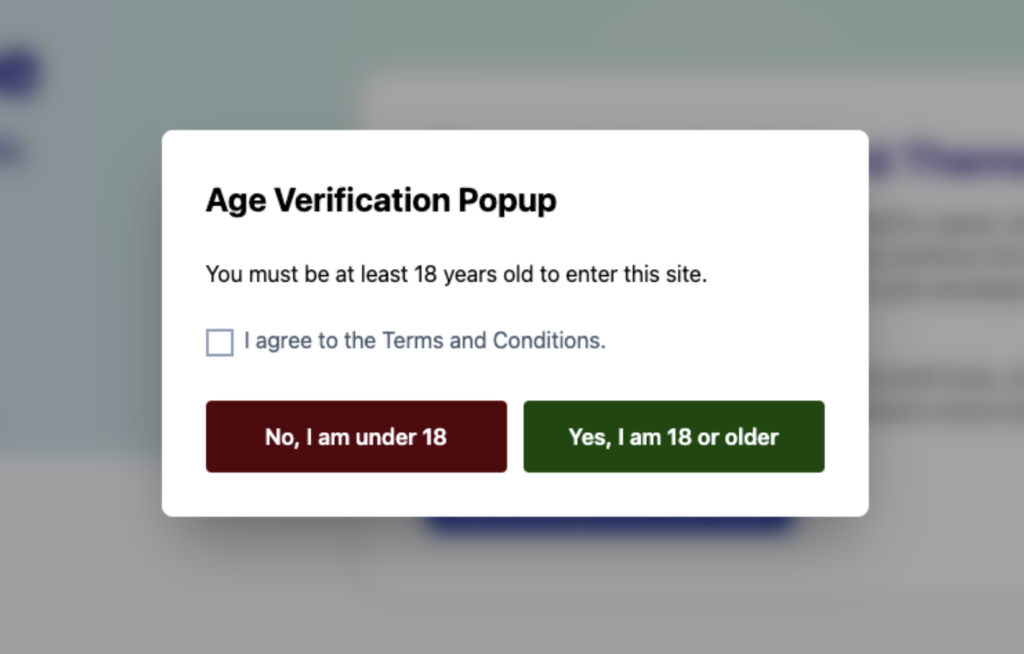
Once you save your settings, the extension starts working on your live website right away. It keeps new visitors from browsing your products until they confirm they meet your required age.
Here is what you need to know about how it appears to your customers:
- Works on All Devices: You do not need to create different designs for different screens. The popup automatically adjusts its layout so it is easy to read on desktop screens, tablets, and mobile phones.
- Instant Protection: First-time visitors will see your age gate as soon as they open your site. Regular customers who already confirmed their age will skip the popup completely and go straight to shopping.
- Refresh Your Site: If your new text or colors do not show up immediately on your website, clear your store cache in the admin dashboard so all your changes go live for everyone.
What an Age Verification Popup Extension Offers
Adding an age gate shouldn’t mean hiring a web developer every time you want to change a sentence or a button color. The extension lets you manage the entire age verification process right from your Magento dashboard.
It provides all the tools you need to stay legally compliant while maintaining a great shopping experience for your customers.
Here is what Meetanshi’s extension provides:
- Live Admin Preview: Easily change your text, button labels, and colors, and see how your popup looks instantly before publishing.
- Custom Cookie Duration: Choose how many days the site remembers verified shoppers so returning customers aren’t asked every time they visit.
- SEO Bot Bypassing: Automatically lets search engine crawlers like Google scan your pages so your search rankings stay completely safe.
- Layout and Agreement Options: Choose between a centered popup box or a full-screen display, with an optional Terms and Conditions checkbox.
- Lightweight Speed and Theme Support: Built to load fast and work smoothly on standard Magento layouts and modern Hyvä themes without slowing down your site.
Final Thoughts on Store Safety
Online stores selling items like wine, tobacco, vaporizers, or adult products must check visitor ages before granting entry. Using a clear age popup keeps your site legally compliant and stops underage visitors from viewing restricted products.
Meetanshi’s Age Verification extension gives you total control over your popup layout, text, and Google search settings. It provides an easy, code-free way to keep your online shop safe, stylish, and fully compliant.